
How to Turn an SOP into an AI-Assisted Workflow
October 06, 2026
Connect documented procedures to assigned, trackable work and manage them through Claude or ChatGPT.
Your employee onboarding SOP explains what HR, IT, and the hiring manager should do. The instructions are clear, the document is easy to find, and yet a new hire can still arrive without the right equipment or system access on day one.
Someone has to start the process, assign the work, coordinate the handoffs, and check what remains incomplete. Writing those responsibilities down helps people understand the process, but running it requires a system around those instructions.
To turn an SOP into an AI-assisted workflow, translate the procedure into actionable steps with clear ownership, timing, inputs, review, and completion records. Build that workflow in Manifestly, then connect an AI assistant such as Claude or ChatGPT to help start runs, inspect progress, and make supported updates.
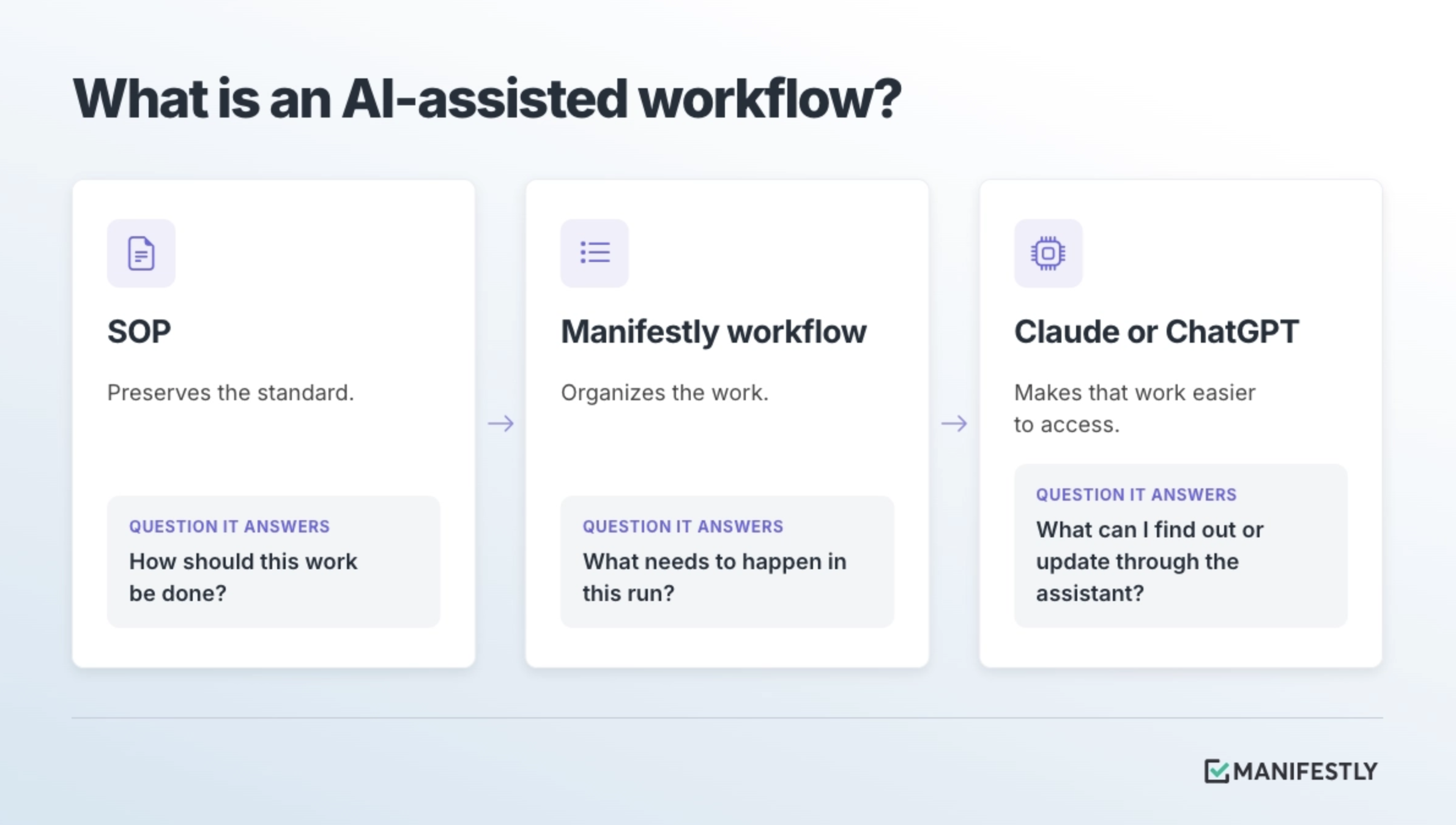
The SOP preserves the standard. The workflow organizes the work. The AI assistant makes that work easier to access.
What is an AI-assisted workflow?
An AI-assisted workflow is a structured process that people can start, inspect, or update with help from a connected AI assistant. Its steps, assignments, deadlines, and records live in the workflow system, while the assistant provides a conversational way to interact with them.
For example, a manager might ask an assistant to start an onboarding run, list its incomplete steps, or add a comment about a delayed laptop delivery. Those requests concern a specific instance of work, with actual owners and a visible status.
Each part of the system contributes something different:
This builds on recurring workflow automation: organizing repeatable work so it can be assigned, started on a schedule or business event, tracked, and recorded each time it happens.
AI assistance becomes useful because there is a defined process underneath it. Asking a chatbot to explain your onboarding SOP is different from asking a connected assistant which steps remain incomplete for a hire starting next Monday.
Start with one SOP your team already uses
Choose a familiar process that repeats, crosses people or teams, and has a clear outcome. Employee onboarding, customer onboarding, monthly close, property inspections, and IT access reviews are all useful candidates.
Start where your team already spends time coordinating the work. If someone regularly sends reminders, gathers status updates, or reconstructs what happened, there is a practical reason to give that process a workflow.
Before building, check that the SOP reflects how the work should happen today. Look for outdated instructions, missing inputs, ambiguous handoffs, and decisions that depend on knowledge only one person holds.
If the procedure still needs documentation, use this guide to writing a standard operating procedure. If the instructions are already sound, focus on how they will become assigned work. Many SOPs fail after they are written because the surrounding execution system is missing.
How to turn SOP instructions into workflow steps
Converting an SOP means deciding how its instructions apply to each real instance of work. Importing the text can provide a starting point. The operational decisions still need attention.
Manifestly’s checklist software for recurring tasks supports workflow instructions, role-based assignments, due dates, reminders, data collection, and progress tracking. Use those capabilities to give the process a clear path from start to completion.
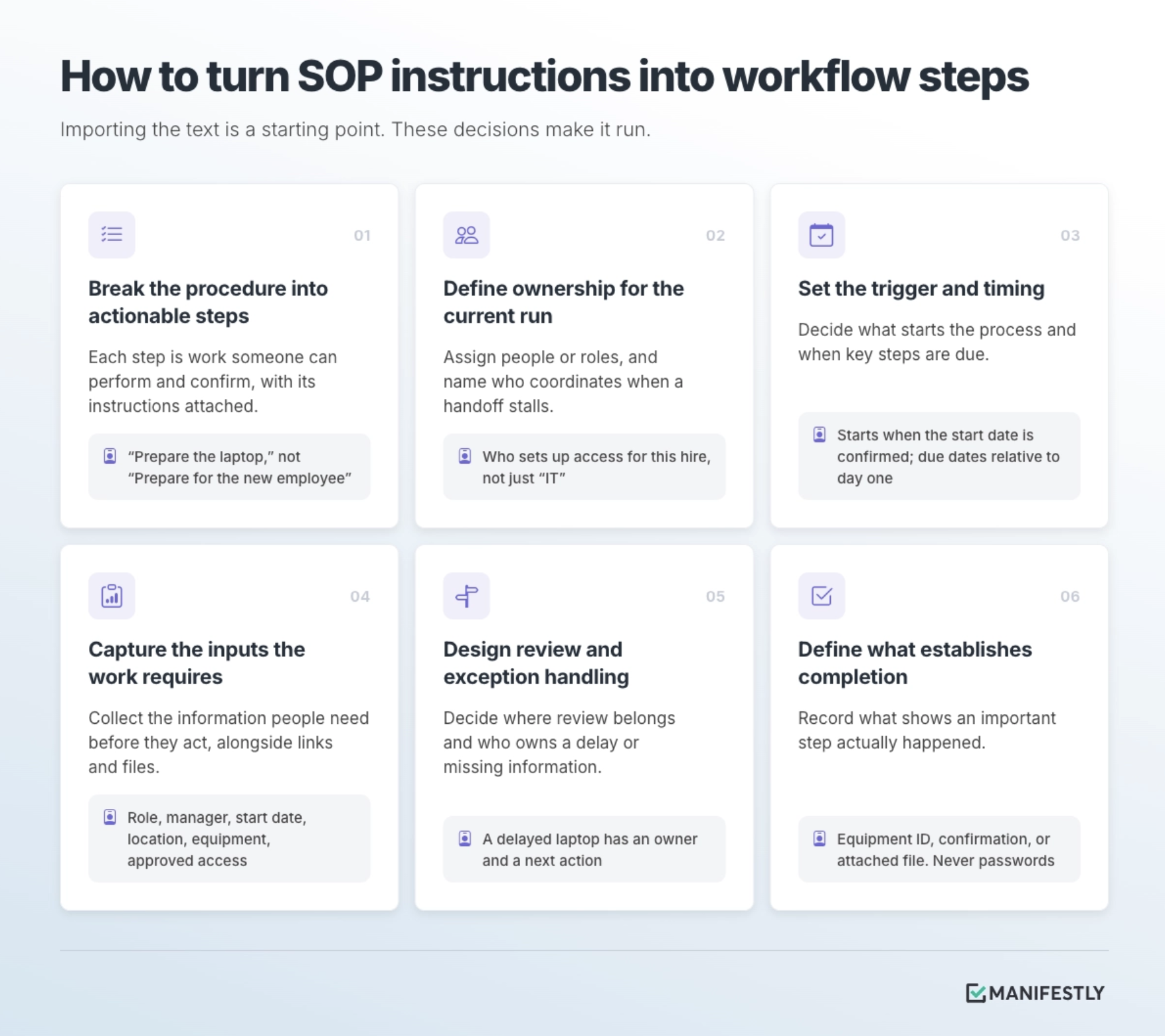
1. Break the procedure into actionable steps
Each step should describe work someone can perform and confirm. “Prepare for the new employee” is broad. “Confirm shipping details,” “Prepare the laptop,” and “Verify required system access” make the work easier to assign and inspect.
Keep supporting explanations with the relevant step. A person setting up access should be able to find the approved system list and instructions while doing the work.
2. Define ownership for the current run
The SOP may say that IT prepares access. The workflow needs to make clear who is responsible when this particular employee joins.
Assign steps to people or roles as appropriate, and decide who coordinates the overall outcome. Several teams may contribute, but someone should know what to do when a handoff stalls.
3. Set the trigger and timing
Identify what begins the process: a confirmed start date, signed contract, scheduled inspection, or recurring calendar date.
Then define timing for important steps. Onboarding deadlines might be set relative to the employee’s first day. A recurring review might follow a weekly or monthly schedule. Configure dates to reflect the process rather than leaving people to infer urgency from the instructions.
4. Capture the inputs the work requires
Identify what people need before they can act. For onboarding, that might include the employee’s role, manager, start date, location, equipment requirements, and approved access.
Use data collection fields where structured information is useful. Keep relevant instructions, links, and files alongside the steps. Handle personal or sensitive information according to your organization’s policies and access requirements.
5. Design review and exception handling
Some steps require a second person’s judgment. Others need a clear response when the expected path breaks.
Decide where review belongs, who handles missing information, and how a delay should be recorded and followed up. A delayed laptop should have an owner and a next action. A disputed access request should reach someone authorized to decide it.
6. Define what establishes completion
Decide what information demonstrates that an important step happened. That might be an equipment identifier, a confirmation, an attached file, or a recorded review.
A completed step should reflect completed work. For system access, record what was verified and when, without placing passwords or credentials in the workflow.
Here is how those decisions could translate an onboarding SOP:
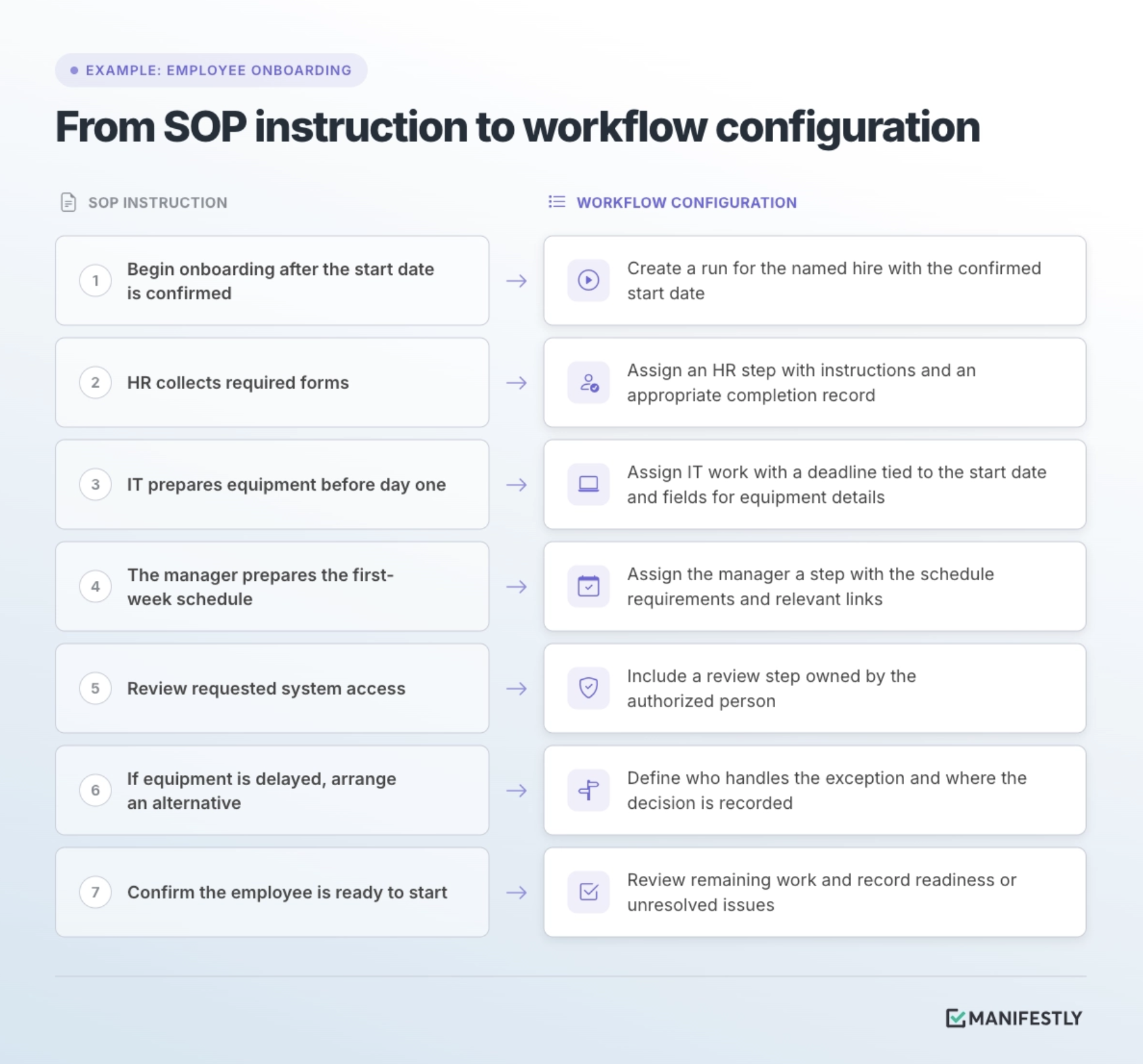
Templates can help you identify common steps. You can browse employee onboarding workflow templates, then adapt the process to your team’s responsibilities and requirements.
Connect Claude or ChatGPT to the workflow
Once the workflow is ready, connect your AI assistant to Manifestly through its MCP integration. MCP, or Model Context Protocol, is a standard that lets compatible AI applications connect to external tools and information.
Manifestly’s MCP integration supports actions such as finding workflows, starting runs from existing templates, checking status, assigning steps, updating data collection fields, and adding comments.
Claude and ChatGPT can provide conversational access through compatible MCP configurations. Connection steps and available tools depend on the client and account setup. For Claude-specific instructions, follow the guide to connecting Claude to Manifestly using MCP.
Access follows the authenticated Manifestly user’s permissions. Connecting an assistant does not give it permission to see or change everything in the account.
Start by asking which workflows it can access. Then test a supported action against a workflow you recognize and confirm the result in Manifestly.
Example: From onboarding SOP to AI-assisted workflow
Consider a new employee, Jamie Rivera, starting on November 2. The SOP describes the onboarding standard. Your Manifestly workflow turns it into work for HR, IT, and the hiring manager.
The following prompts illustrate how someone could interact with that configured workflow through Claude or ChatGPT. Use your actual template and step names, and provide any information the assistant requests.
Start a run from the workflow template
Start a run from the Employee Onboarding workflow for Jamie Rivera, whose start date is November 2. Confirm the template and information you need before creating it.
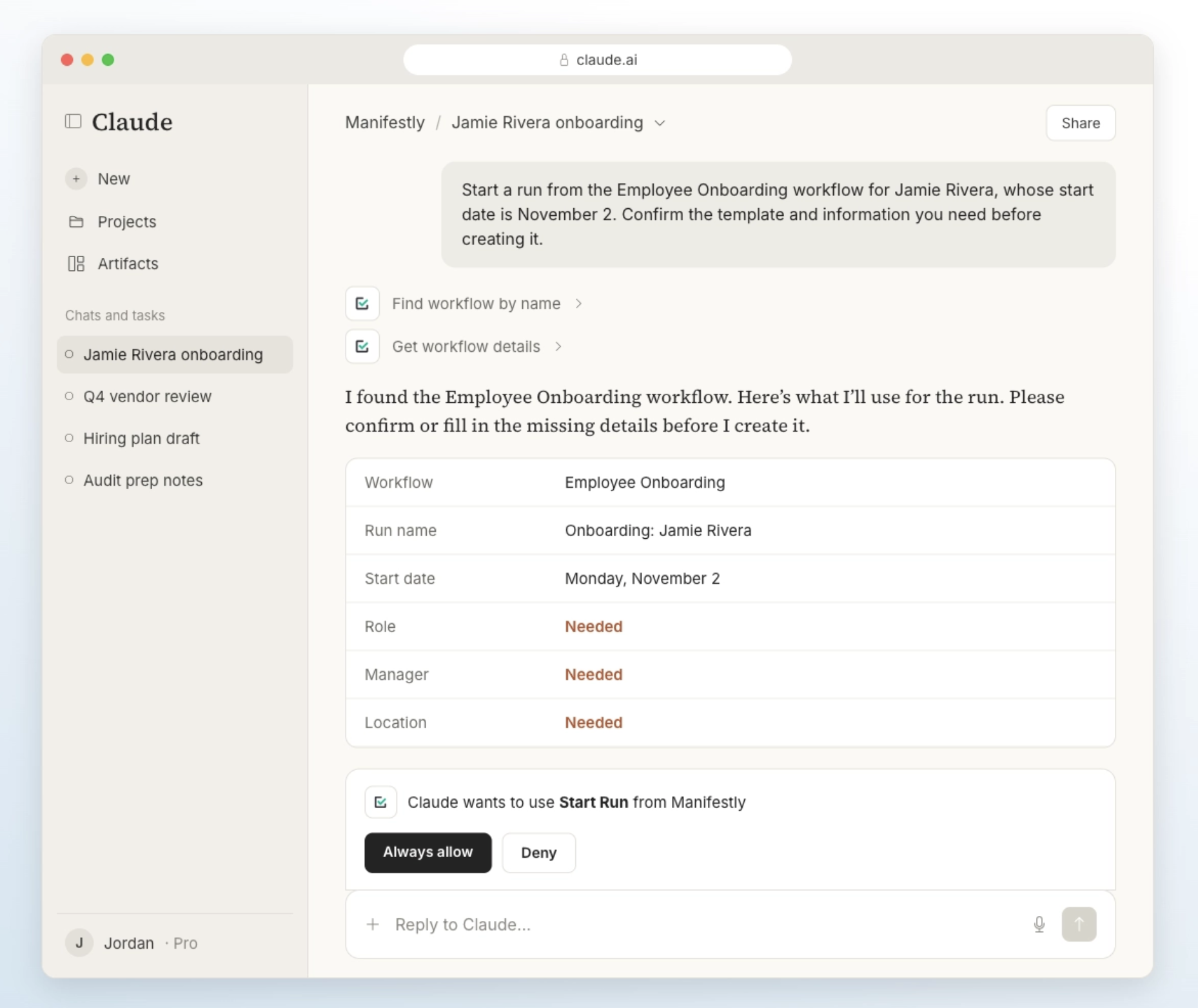
The assistant can use the connected tools to find the template and create a run. The assignments and timing come from the workflow configuration and the information supplied for that run. Naming a hire and date does not establish every onboarding requirement by itself.
Open Manifestly to check that the correct template was used, the relevant information was captured, and the assignments and dates are appropriate.
Check what remains incomplete
In Jamie Rivera’s onboarding run, list the incomplete steps, their owners, and their due dates. Flag anything overdue.
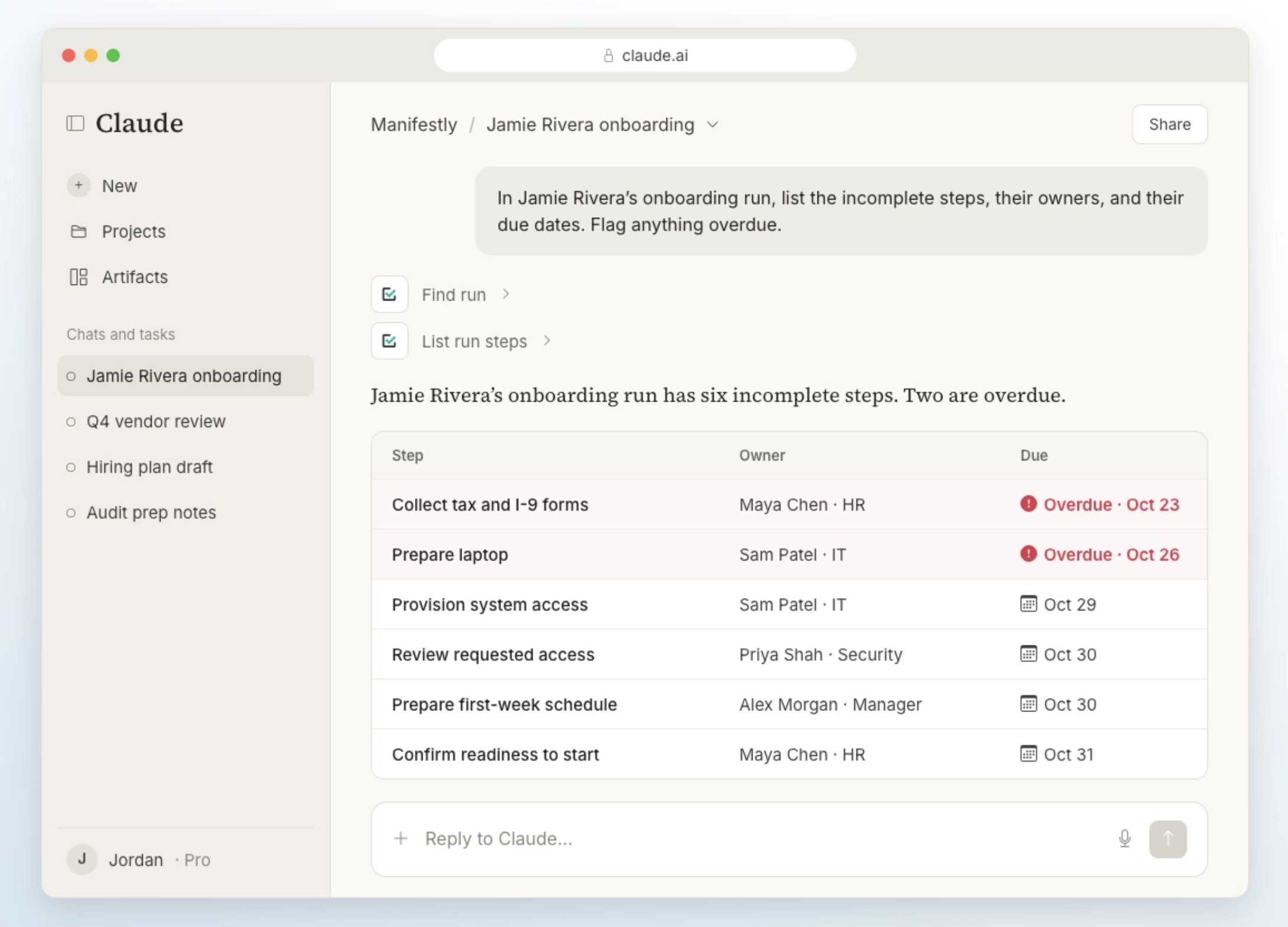
The assistant can retrieve workflow information and help organize it into an update. HR might still be waiting on forms. IT might have prepared the laptop but not confirmed access. The manager might need to finish the first-week schedule.
That gives the coordinator a starting point for follow-up. The answer is only as useful as the information recorded in the workflow. An incomplete step does not, by itself, explain why the work has stopped.
Record an update where the work lives
In Jamie Rivera’s onboarding run, add this comment to the Prepare Laptop step: “Delivery is delayed until October 30. IT will confirm arrival and arrange a loaner if needed.”
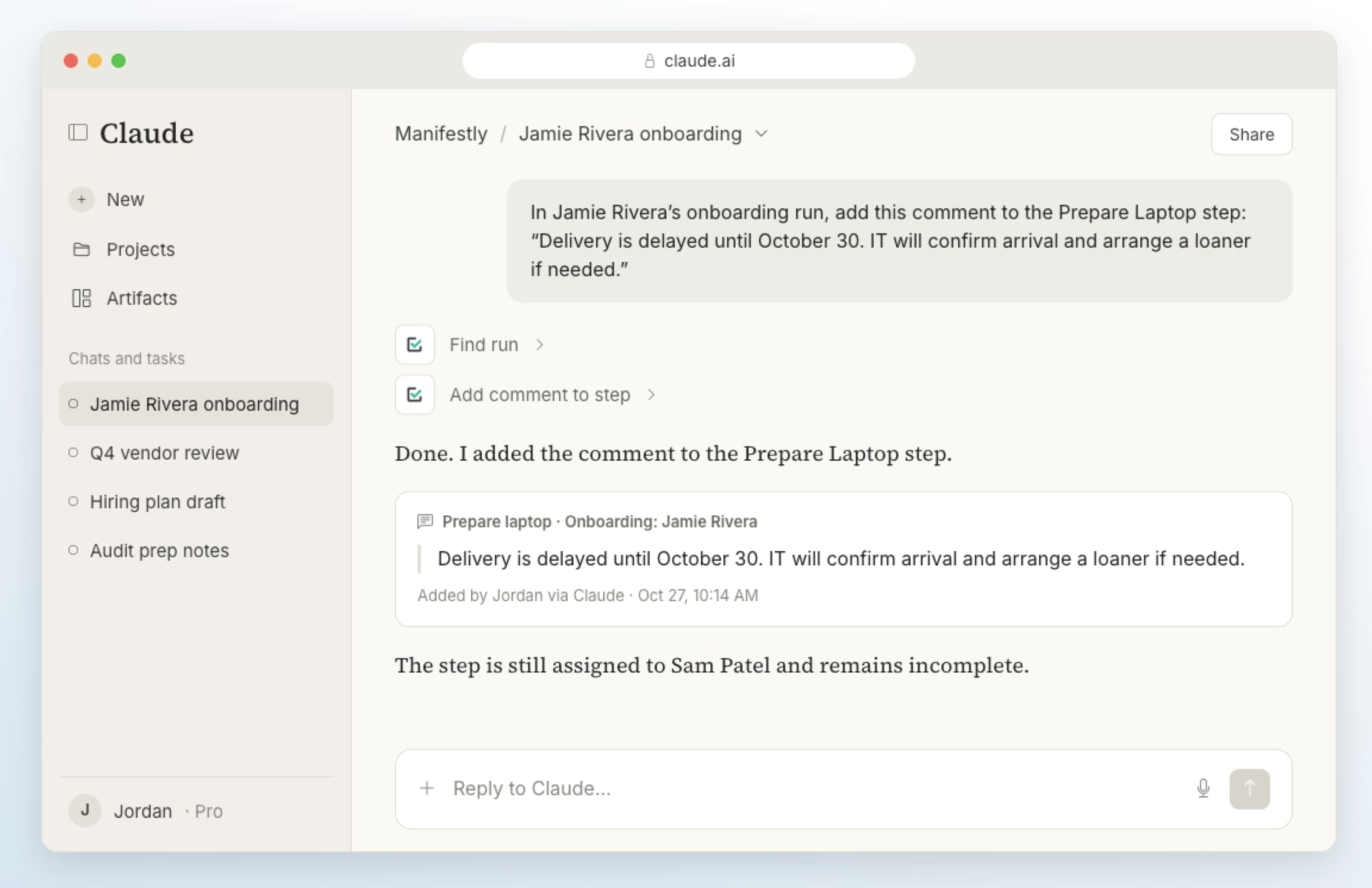
Check that the comment reached the intended step. The update is then attached to the work, where the next person can find it.
A summary displayed in an AI conversation is useful to the person reading it. Information others need should also be recorded in the workflow through a supported action.
Review readiness before day one
Show the remaining incomplete steps in Jamie Rivera’s onboarding run. Include overdue work and any recorded issues that could affect the first day.
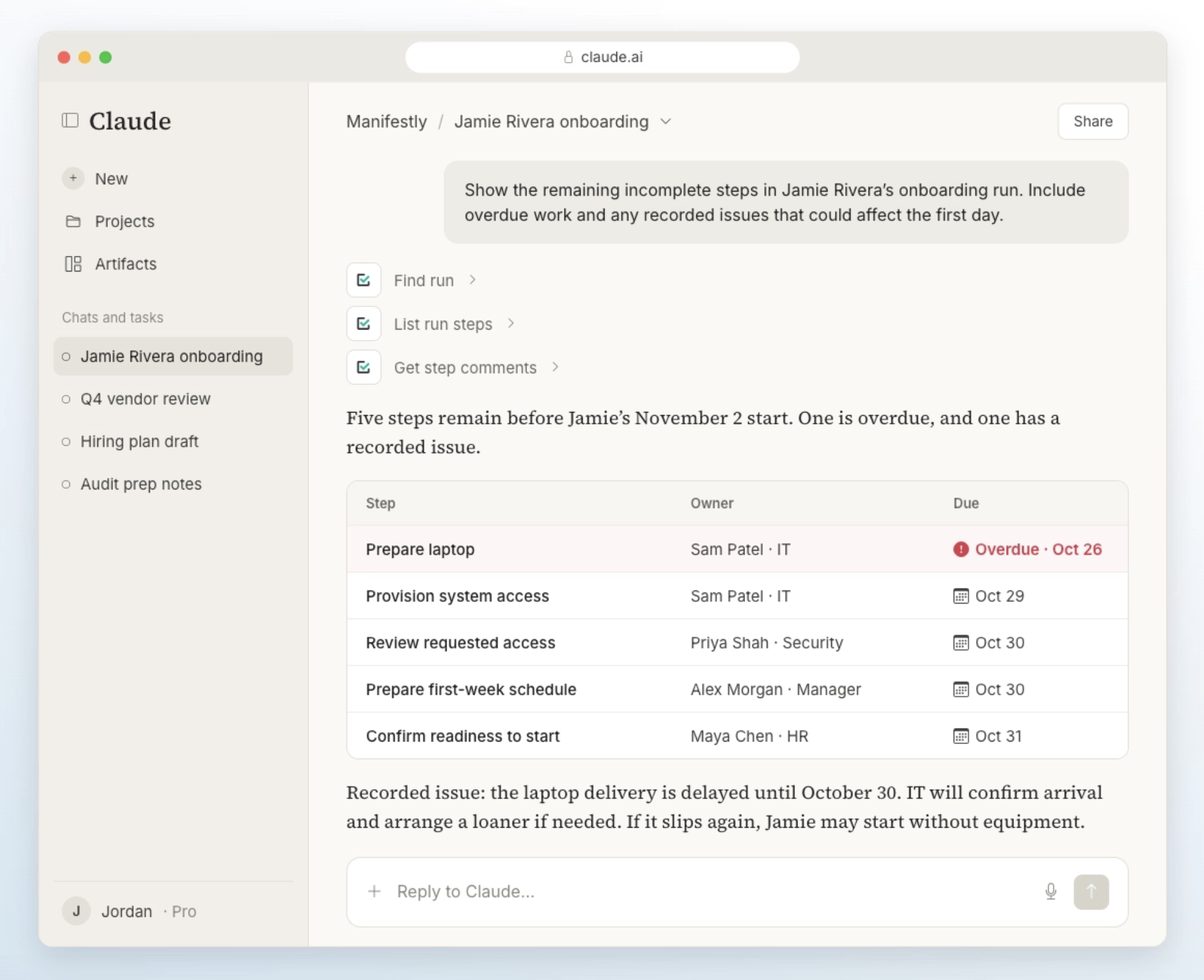
The person coordinating onboarding reviews the returned information, confirms important details, and follows up with the relevant owners. HR still collects the forms. IT still verifies access. The manager still makes decisions about the first week.
The assistant reduces the effort of finding and updating the work. The workflow gives the team a shared place to run it.
The same approach applies to other recurring processes. An IT team could inspect an access review or check incomplete maintenance steps. Browse IT workflow templates for processes you can adapt.
Keep ownership and review explicit
Starting a workflow, summarizing its status, and completing its steps are different actions. An assistant’s ability to update a step does not establish that the underlying work happened correctly.
Before marking important work complete, verify the required outcome. A status summary cannot prove that access works. A drafted schedule does not establish that the manager reviewed it. A comment about a delay does not resolve the delay.
Decide which actions people should verify, which decisions require approval, and who owns follow-up when information is missing or wrong. Prompting an assistant to confirm a change is useful, but required controls should also be reflected in permissions and the workflow’s review structure.
This is the principle behind accountability in AI-assisted operations: work should remain inspectable as AI makes it easier to initiate and update.
It also connects to Manifestly’s AI maturity model for human-centric work, which evaluates whether AI-supported work has ownership, review, visible status, and a durable record. Connecting an assistant can support that structure. Maturity depends on how the process actually runs.
Using Claude or ChatGPT through MCP is also distinct from assigning an AI agent a workflow step. In the example above, a person directs the assistant’s interactions. Giving an agent a defined task within the workflow is a separate design decision, with its own instructions, boundaries, and review needs.
Frequently asked questions
What is the difference between an SOP and a workflow?
An SOP documents how a process should be performed, including instructions and standards. A workflow organizes how that process is carried out in a specific run, with steps, assignments, timing, status, and completion records. The two work together: documentation preserves the standard, and the workflow applies it to actual work.
Can AI help turn an SOP into a workflow?
Yes. AI can help identify actionable steps, suggest a sequence, and flag missing information or unclear responsibilities. A person familiar with the process should review the proposed structure and configure assignments, timing, inputs, and review requirements. Importing or generating steps is a starting point for building a reliable workflow.
Can I use Claude or ChatGPT with Manifestly?
Manifestly’s MCP integration supports compatible AI clients, including Claude and ChatGPT. The connection method and available actions depend on your client and account configuration. Once connected, the assistant interacts with Manifestly within the authenticated user’s permissions.
Does connecting an AI assistant automate the whole process?
The connection provides access to supported workflow information and actions. The workflow still needs to be configured, and people still carry out work and make decisions where required. Scheduled runs, integrations, and agent-assigned steps are additional capabilities you can consider for the process.
How do I confirm an AI-requested action happened correctly?
Open the relevant run in Manifestly and check the result. Confirm that the correct template, run, or step was used and that assignments, dates, fields, comments, or completion status match the intended action. Verify the underlying work before treating important steps as complete.
Give your next SOP somewhere to run
Choose one procedure your team already understands. Build the assignments, timing, inputs, and records that let it run consistently. Then connect Claude or ChatGPT and use the assistant to start a run or find what needs attention.
The next time a handoff stalls, your team has somewhere to look, an owner to contact, and a record to update. AI assistance becomes part of managing the process because the process already has a place to run.
Start a free trial of Manifestly and turn one SOP into an assigned, trackable workflow.