
What Is Recurring Workflow Automation? Definition, Examples, and Benefits
July 14, 2026
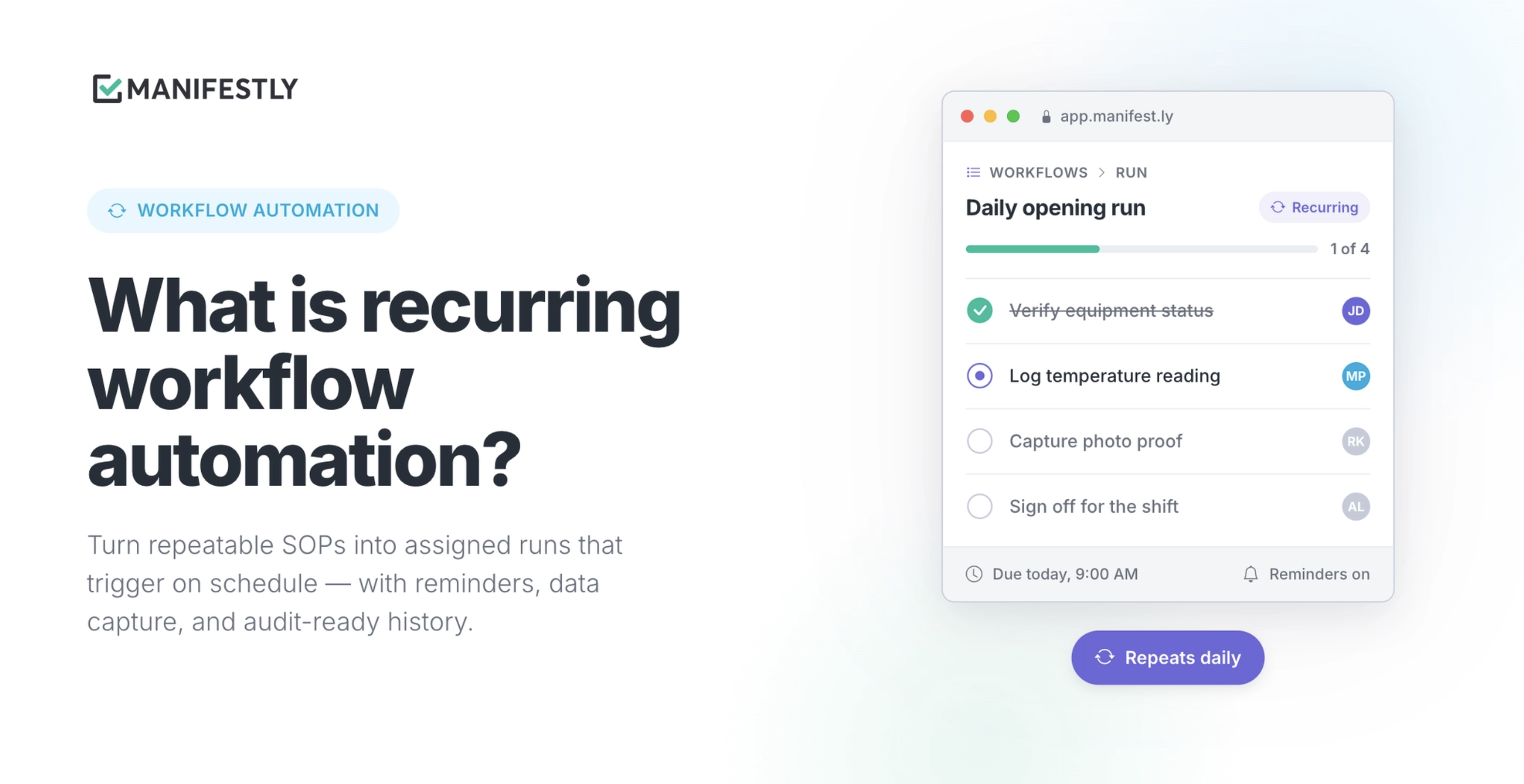
Recurring workflow automation is software that turns a repeatable business process — like onboarding, a compliance review, or a vendor approval — into an assigned, scheduled workflow with owners, due dates, reminders, and a completion record.
Instead of leaving the process in a document and relying on someone to remember each step, recurring workflow automation helps the process run. It assigns work to the right person, tracks what is done and what is late, and keeps a history of each completed workflow run.
That is the short answer. The rest of this article explains how recurring workflow automation works, how it differs from documentation and project management tools, what recurring work needs to be reliable, and where teams use it day to day.
Quick Answer: What Is Recurring Workflow Automation?
Recurring workflow automation is a way to run repeatable business processes automatically on a schedule or trigger.
A team starts with a process that happens more than once: onboarding a new employee, reviewing vendor access, preparing for an audit, completing a safety inspection, or handing off a new client. The process is turned into a workflow with clear steps, assigned owners, due dates, reminders, and a record of completion.
A written process and a running process are not the same thing. An SOP explains what should happen. A recurring workflow helps make sure it actually happens the right way, at the right time, with the right people involved.
How Recurring Workflow Automation Works
Recurring workflow automation usually follows a simple pattern.
First, the team turns a repeatable process into a checklist or workflow. Each step includes the instructions, fields, files, approvals, or evidence needed to complete the work.
Next, the workflow is assigned to a person or role. Some steps may go to HR, others to IT, finance, operations, a manager, or an outside vendor. The point is that ownership is built into the process instead of being left to interpretation.
Then the workflow runs on a schedule or trigger. It might start every Monday, on the first day of each month, before a quarterly review, or whenever a new employee, client, location, or vendor is added.
As the workflow runs, the system sends reminders, tracks late steps, shows managers where work is stuck, and keeps a record of what happened. Once the workflow is complete, the team has more than a checked box. It has a history of who did the work, when it was done, and what information was captured along the way.
How Recurring Workflow Automation Differs From Documentation, Checklist Software, and Project Management
Most teams already have a place where processes are written down and a place where work gets tracked. The problem is that neither one is usually built for recurring operational work.
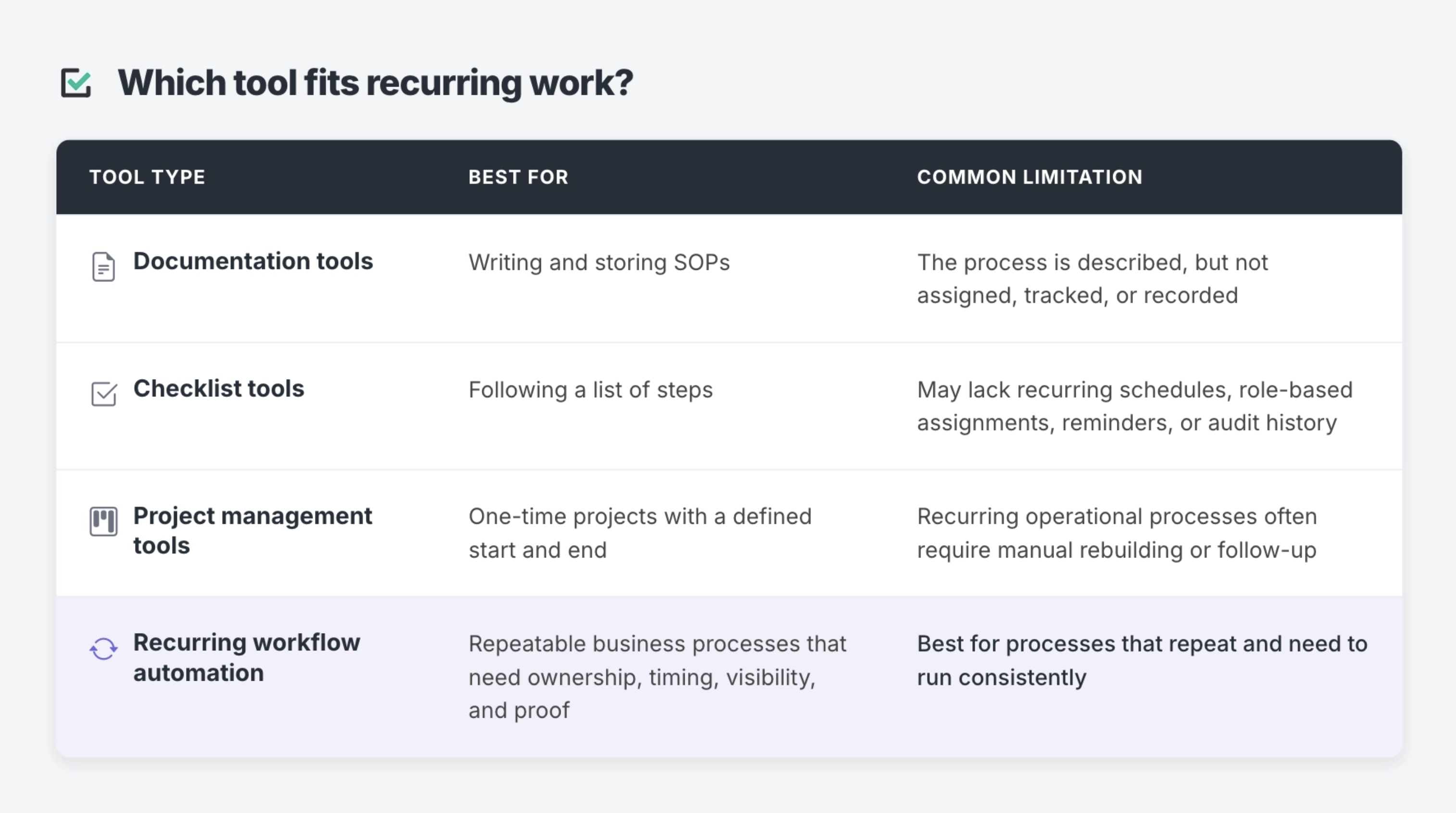
Documentation tools, such as Google Docs, Notion, or a shared SOP folder, are good at describing a process. They are not built to assign it, remind anyone about it, or show a manager what is stuck. An SOP in a folder tells the team what should happen. It does not make sure the process happens this week, on schedule, with the right person completing the right step.
Project management tools, such as Asana, Trello, or monday.com, are usually built for work that has a beginning and an end: a launch, a campaign, a migration, or a one-time initiative. They can support repeatable work to a point, but recurring operational processes often become awkward over time. Someone still has to recreate the project, assign the right people, check the same steps again, and track each cycle manually.
Checklist tools help teams follow a sequence of steps. That can be useful, especially for simple tasks. But recurring workflow automation goes further by adding scheduling, ownership, reminders, visibility, and completion records to the checklist.
Recurring workflow automation sits between static documentation and broad project management. It keeps the structure of a documented SOP, but adds the workflow layer needed to run the same process reliably over time.
What Recurring Work Actually Needs
A written process and a running process are not the same thing. For a recurring process to hold up over time, it needs a few specific things that documentation alone does not provide.
Ownership
Every step needs a named person or role responsible for it. “The team” is not an owner. In practice, shared responsibility often means no one acts until someone asks.
Recurring workflow automation makes ownership explicit. HR can own one step, IT can own another, finance can handle an approval, and a manager can confirm completion before the process closes.
Timing
Recurring work needs a schedule and due dates. It is not enough to say a process should happen “regularly” or “before the next review.”
A reliable workflow defines when the process starts, when each step is due, and what happens when something is late.
Reminders
People forget. They get busy. They assume someone else handled it. This is normal, especially when recurring work competes with urgent one-off requests.
A system that reminds the right person at the right time removes the need for a manager to remember on everyone’s behalf.
Visibility
Managers need to see what is done, what is late, and where a process is stuck without asking for a status update or sitting through another meeting just to surface the same information.
Recurring workflow automation gives teams a way to see process status while the work is happening.
Records
When a process is complete, there should be a record of who did the work, when it was completed, and what information was captured.
That record matters for employee onboarding, audits, inspections, approvals, client handoffs, and any process where someone may later ask what happened.
Miss any one of these pieces and the process may still exist on paper, but it starts to depend on memory again. That is usually when recurring work falls through.
Benefits of Recurring Workflow Automation
The main benefit of recurring workflow automation is that it reduces the manual coordination required to make repeatable work happen.
Instead of relying on someone to start the process, assign the steps, send reminders, check progress, chase late work, and collect proof, the workflow handles those parts in a consistent way.
The practical benefits include:
- Clear ownership for every step
- Fewer missed handoffs
- Less manual follow-up
- Better visibility into late or stuck work
- More consistent process execution
- A record of completion for audits, reviews, and handoffs
- Easier onboarding for new team members
- Less dependence on one person remembering how the process works
These benefits matter most when the work is important, repeated, and easy to overlook. A one-time project can often be managed through a project board or task list. A recurring process needs a system that can run the same way every time.
When Should a Team Use Recurring Workflow Automation?
A team should use recurring workflow automation when a process repeats, involves multiple people, has deadlines, requires reminders, or needs a record of completion.
It is especially useful when the process has started to depend on one person manually coordinating the work. That person may be the operations manager, HR lead, office manager, compliance owner, customer success lead, or department head who knows the process well enough to keep it moving.
A process is a good fit for recurring workflow automation if:
- It happens every week, month, quarter, year, or every time a specific event occurs
- More than one person or department is involved
- The same steps need to happen in roughly the same order
- Someone has to remind people to complete their part
- A manager needs visibility into what is complete or late
- The team needs proof that the process was followed
- Mistakes, missed steps, or delays create operational risk
If the work only happens once, a project management tool may be enough. If the work repeats and someone has to remember, chase, verify, or document it each time, it is a stronger fit for recurring workflow automation.
Who Uses Recurring Workflow Automation, and For What?
Recurring workflow automation shows up anywhere a team runs the same process more than once and needs it to happen consistently.
The common thread is not the industry. It is the shape of the work: the process repeats, more than one person touches it, and someone eventually needs to know whether it happened correctly.
Employee Onboarding
Employee onboarding often touches HR, IT, finance, facilities, security, and the hiring manager. Each team owns a different part of the process.
A recurring onboarding workflow keeps every step assigned and visible. HR can start the process, IT can provision accounts, finance can handle payroll setup, the manager can prepare first-week materials, and each step can be tracked without one person chasing every department manually.
Employee Offboarding
Offboarding has similar coordination needs, but the stakes can be higher. Teams may need to revoke access, collect equipment, update payroll, document knowledge transfer, remove permissions, and confirm final approvals.
Recurring workflow automation helps make sure sensitive steps do not depend on memory or informal follow-up.
Compliance Reviews and Audit Prep
Access reviews, policy attestations, vendor due diligence, safety checks, and compliance reviews are recurring by nature. They also need evidence.
A workflow gives the team a structured way to complete the review, collect the required information, and keep a record of what happened before an audit or internal review.
Customer and Client Operations
Client onboarding, account handoffs, renewals, implementation checklists, and recurring business reviews often follow the same shape every time.
When these processes live across email, Slack, documents, and project boards, it becomes hard to see where a client stands. A recurring workflow gives the team a repeatable path from one stage to the next.
Inspections and Quality Reviews
Property inspections, safety checks, store opening procedures, location audits, and quality reviews need consistency across people, shifts, or locations.
A recurring workflow helps teams follow the same process, capture the right information, and keep a record that the check was completed.
Vendor and Approval Processes
Vendor onboarding, budget approvals, access requests, and recurring sign-offs often involve multiple people. The process may be simple at first, but it becomes harder to manage as the company grows.
Recurring workflow automation gives the team a clear chain of ownership, approval, and completion history.
Recurring Workflow Automation Examples
Here are a few examples of recurring workflow automation in practice.
Monthly Access Review
A company runs a monthly access review to confirm that employees and contractors still have the right permissions.
The workflow starts on the first business day of each month. IT reviews account access, managers confirm whether access is still needed, security checks exceptions, and the process owner signs off once the review is complete.
The workflow creates a record of who reviewed access, what changes were requested, and when the review was completed.
New Hire Onboarding
When a new employee is added, HR starts an onboarding workflow.
The workflow assigns IT to create accounts, finance to complete payroll setup, the hiring manager to prepare the first-week plan, and HR to confirm required documents. Each step has an owner and due date, and the manager can see what is still open before the employee’s first day.
Quarterly Vendor Review
A team reviews key vendors each quarter.
The workflow prompts the vendor owner to confirm contract status, finance to review spend, legal to check renewal terms, and operations to confirm whether the vendor is still needed. The completed workflow leaves a record for future planning and compliance review.
Weekly Location Inspection
A regional manager needs every location to complete a weekly inspection.
The workflow runs every Friday, assigns the inspection checklist to the local manager, requires photos or notes for certain steps, and shows leadership which locations completed the process on time.
Is Recurring Workflow Automation the Same as Business Process Automation?
Recurring workflow automation is related to business process automation, but it is more specific.
Business process automation is a broad category. It can include automated approvals, data movement between systems, robotic process automation, rule-based routing, integrations, and many other ways to reduce manual work.
Recurring workflow automation focuses on repeatable human processes. It is most useful when people still need to make decisions, complete checks, capture information, review evidence, or approve work, but the coordination around that work should not be manual every time.
In other words, recurring workflow automation does not remove people from the process. It gives people a clearer process to run.
How Manifestly Fits the Category
Teams usually do not need to automate every process at once. They need one reliable place to run the recurring work that still depends on manual follow-up.
Manifestly helps teams turn SOPs and checklists into assigned, scheduled workflows with reminders, visibility, and a completion record. Teams use Manifestly for onboarding, compliance reviews, client handoffs, inspections, approvals, and other recurring processes where ownership and proof matter.
Each workflow can include assigned steps, due dates, role-based responsibilities, data capture, comments, conditional logic, and reminders across email, Slack, and Microsoft Teams. Completed runs leave behind a searchable history, which gives teams a clearer record of what happened.
Manifestly is built for teams that need practical workflow structure without the cost or complexity of a heavyweight enterprise platform. The starting point is usually small: choose one recurring process that causes the most manual follow-up, turn it into a workflow, and expand once the first process is running reliably.
Start With One Recurring Process Your Team Still Manages Manually
The best place to start is the recurring process your team still has to chase.
It might be onboarding, offboarding, an access review, an inspection, an approval, a client handoff, or a monthly operations check. If the process already exists but still depends on someone remembering to assign work, send reminders, check progress, and collect proof, it is a strong candidate for recurring workflow automation.
Start with one process. Turn it into an assigned, scheduled workflow. Give every step an owner, deadline, reminder, and record of completion.
That is how recurring work moves from documentation to reliable execution.
FAQ: Recurring Workflow Automation
Is recurring workflow automation the same as workflow management software?
They overlap. Workflow management software is the broader category and can include both one-time and recurring processes. Recurring workflow automation is more specific. It focuses on processes that repeat on a schedule or trigger and need to run the same way every time.
How is recurring workflow automation different from checklist software?
A checklist tells someone what to do. Recurring workflow automation adds ownership, scheduling, reminders, visibility, and a completion record on top of the checklist. That helps the process run instead of depending on someone remembering to start it and follow up.
Do I need recurring workflow automation if my team already has SOPs?
Many teams already have SOPs. The gap is that an SOP does not assign itself, remind anyone, show what is late, or keep a record of completion. Recurring workflow automation turns the SOP into a live process the team can run, track, and improve.
What kinds of processes are worth automating this way?
Good starting points include onboarding, offboarding, audits, inspections, approvals, client handoffs, access reviews, vendor reviews, and recurring operations. The best candidates are processes that repeat, involve multiple people, and require proof that the work was completed.
Does recurring workflow automation replace project management tools?
No. Project management tools are still useful for work with a defined start and end, such as a launch, migration, or one-time initiative. Recurring workflow automation is built for processes that repeat on a schedule or trigger, especially when the same steps need to happen consistently over time.
Is recurring workflow automation only useful for large or regulated companies?
No. Any team with more than one person touching a repeating process can benefit from recurring workflow automation. Regulated teams may need it for evidence and audit trails, but smaller teams often need it because recurring work depends too heavily on memory, Slack messages, spreadsheets, or one person following up manually.
What is the difference between recurring task management and recurring workflow automation?
Recurring task management helps teams remember individual tasks that happen again. Recurring workflow automation manages the full process around those tasks, including step order, ownership, deadlines, reminders, data capture, approvals, visibility, and completion history.
What should recurring workflow automation software include?
Recurring workflow automation software should include workflow templates, recurring schedules, assigned steps, due dates, reminders, role-based ownership, status visibility, data capture, integrations, and a record of completed workflow runs. For compliance-heavy or operationally important work, audit-ready history is especially important.