
Why SOPs Fail After They Are Written and How to Fix Them
July 21, 2026

Most teams already know how their important processes should work.
The employee onboarding steps have been documented. The monthly close procedure has been reviewed. The client handoff checklist exists. Someone spent time capturing the right sequence, explaining the standard, and storing it where the team could find it.
Then the process still breaks down.
A task gets missed. A handoff runs late. Nobody realizes the work has stalled until someone asks for an update. When proof is needed later, the team has to reconstruct what happened from messages, documents, and memory.
It is easy to conclude that the SOP failed.
Often, the documentation was not the real problem. The process failed because the system around the SOP did not turn those written instructions into assigned, trackable work.
Why do SOPs fail after they are written?
SOPs often fail after they are written because documentation alone does not assign the work, schedule it, remind the owner, show its status, or record its completion.
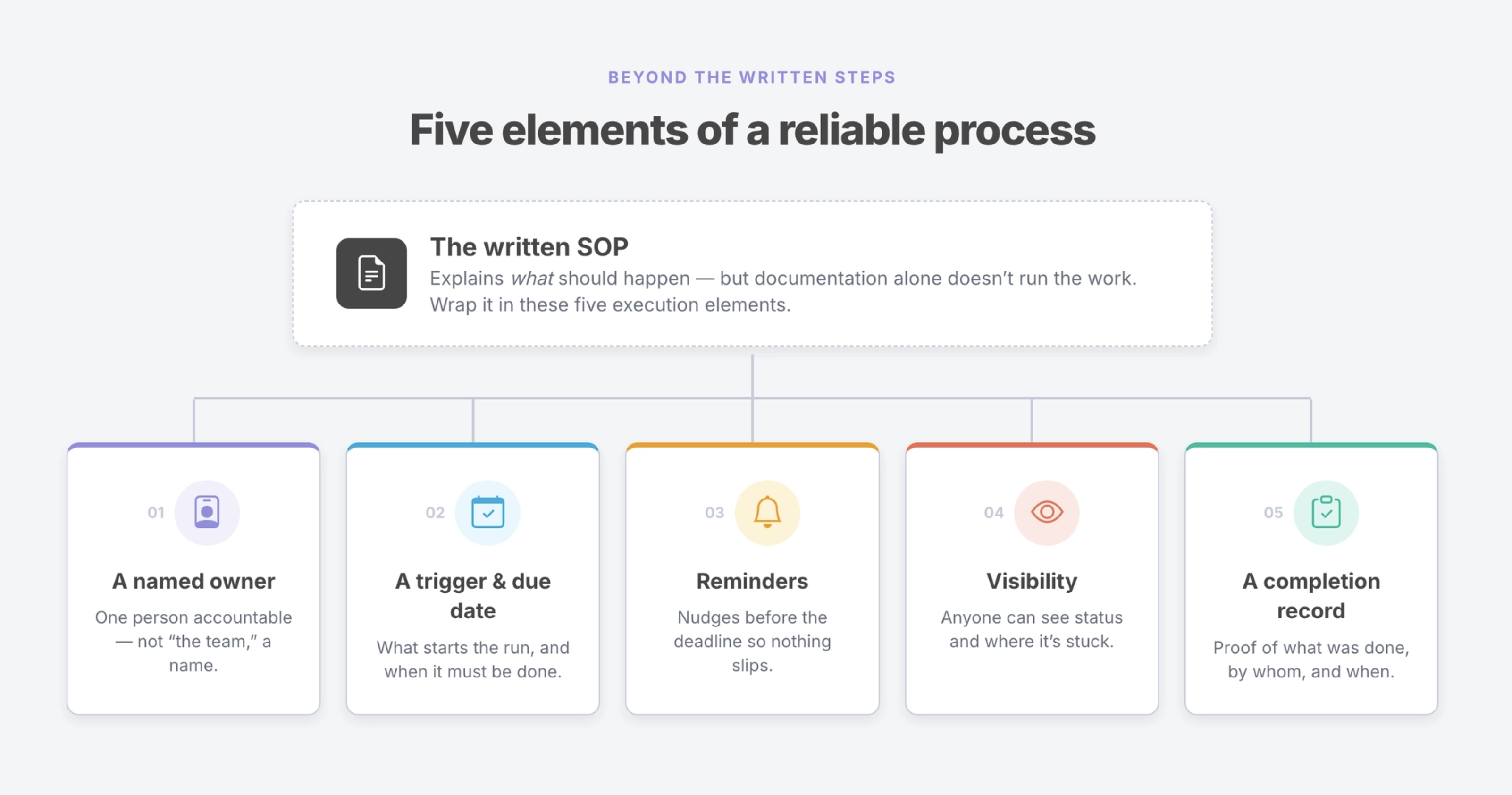
A reliable process needs five elements around the instructions:
- A named owner
- A trigger and due date
- Reminders
- Visibility
- A completion record
When recurring work breaks down, at least one of these execution elements is usually missing.
The SOP may correctly explain what should happen. The team still needs a system that makes sure it happens on time and leaves behind a clear record.
The five reasons SOPs fail
The same execution gaps appear across employee onboarding, compliance reviews, customer handoffs, inspections, financial close, IT access management, and other recurring processes.
The details change. The underlying failures are usually predictable.
1. No one owns the process
The SOP exists, but no one is clearly accountable for running it this time.
It may have been shared with a department, added to an internal knowledge base, or mentioned in a meeting. Everyone can access it, but nobody has been assigned responsibility for the current process.
Sharing instructions is not the same as assigning the work.
A document without an owner is a reference. It is not a responsibility.
This becomes especially risky when the process crosses teams. HR may assume IT is handling account setup. IT may be waiting for a manager’s approval. The manager may believe the process started automatically.
Each person knows part of the procedure, but no one owns the outcome.
A reliable process needs a named person who can answer a simple question:
Who is responsible for making sure this run reaches completion?
2. There is no trigger or due date
Some processes have clear instructions but no defined moment when the work should begin.
They run when someone remembers, when a manager notices, or when another task creates enough urgency to force action.
That may work while the team is small and the process is familiar. It becomes less reliable as the company grows, responsibilities shift, and the same people carry more open loops.
A recurring process needs a trigger.
That trigger might be:
- A new employee’s start date
- The first business day of the month
- A signed customer contract
- A scheduled inspection
- A support escalation
- A quarterly access review
- A contract renewal date
Once the process starts, the work also needs deadlines. Without a due date, even assigned tasks can remain open indefinitely because nothing distinguishes today’s priority from next week’s responsibility.
A process that runs “when someone gets to it” is still dependent on memory and individual judgment.
3. The process depends on memory
Even when a process has an owner and a deadline, people still forget.
They are managing customer issues, internal requests, meetings, approvals, and other deadlines. A task may be clear when it is assigned and easy to overlook three days later.
This is not a personnel failure. It is a predictable limitation of running recurring work through memory.
When the system does not send reminders, managers become the reminder system.
They check spreadsheets, send Slack messages, ask for updates, and follow up again when a step remains incomplete. The process may still get done, but only because someone carries the coordination burden manually.
Reliable recurring work should not depend on one person remembering to remind everyone else.
The system should surface upcoming and overdue work before a small delay becomes a missed handoff.
4. No one can see the current status
A documented process tells people which steps should happen. It does not necessarily show what is happening now.
The instructions may live in Notion or Google Drive. Assignments may appear in email or Slack. Updates may be shared in meetings. Evidence may be saved in separate folders.
When status is scattered across tools, managers cannot easily answer basic operational questions:
- Has the process started?
- Which steps are complete?
- What is due next?
- Where is it stuck?
- Who needs to act?
- Is anything overdue?
Without shared visibility, problems remain hidden until they create a downstream consequence.
A new employee starts without access to a required system. A client waits for a deliverable that was never assigned. A compliance review reaches its deadline with missing evidence.
The issue is discovered at the point of failure rather than at the point where someone could have corrected it.
5. The process leaves no completion record
Sometimes the process runs correctly, but the team cannot prove it later.
A person may have completed the work. A manager may remember reviewing it. A file may exist somewhere. But there is no consistent record showing what happened, who completed each step, and when it was done.
That limits more than audit readiness.
Without a completion record, teams cannot reliably:
- Confirm that the process ran
- Review exceptions or delays
- Compare one run with another
- Identify recurring bottlenecks
- Improve the process over time
- Demonstrate compliance
- Defend the work during a client or internal review
A checked box is useful. A complete history is better.
Important recurring work should leave behind evidence as it happens, including dates, assignments, comments, files, approvals, and other required information.
What is the difference between process documentation and workflow execution?
Process documentation and workflow execution solve related but different problems.
Documentation preserves the standard. Execution applies that standard to a specific instance of work.
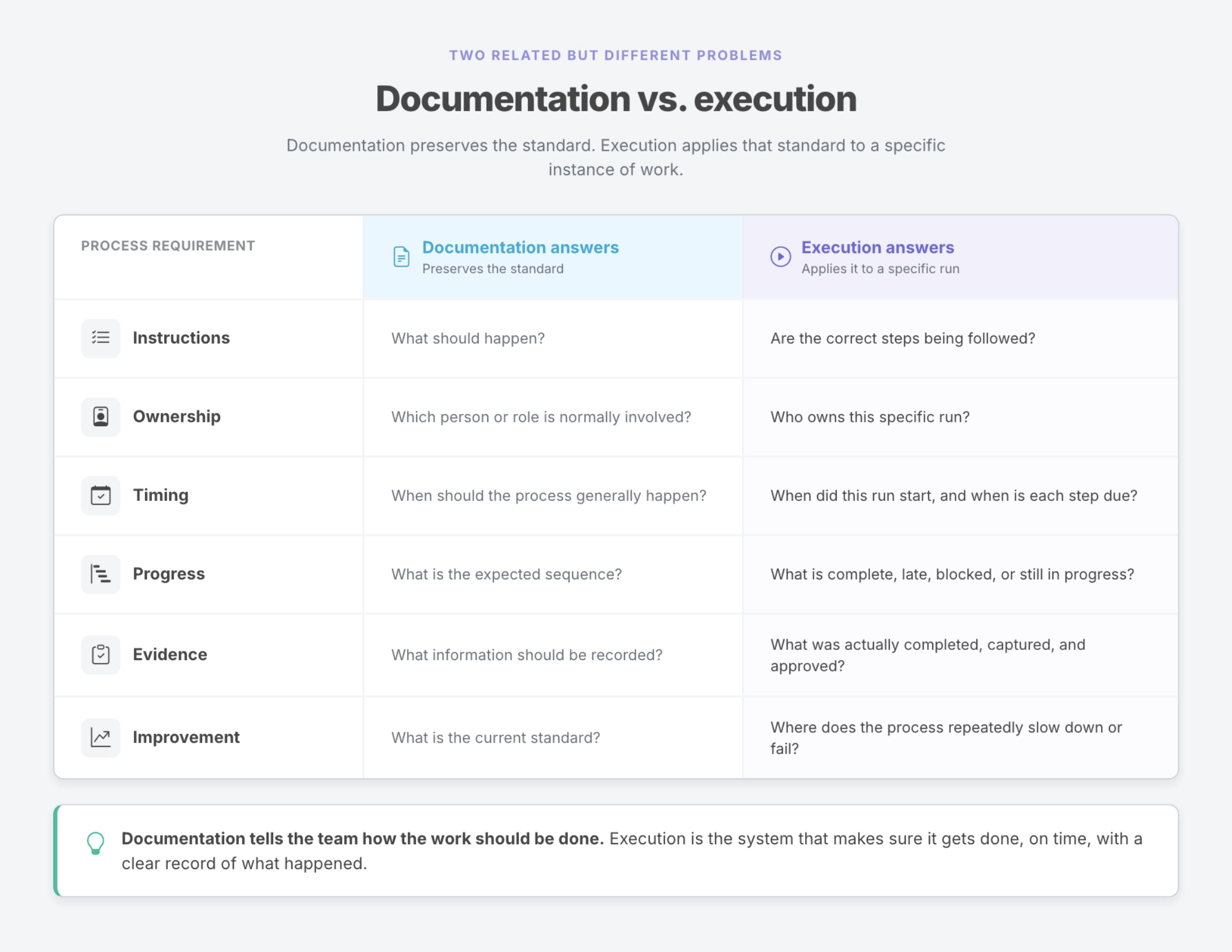
Good documentation gives the team the correct sequence, operating standard, institutional knowledge, and a shared reference for how the work should be done.
Reliable execution requires more.
The process must be assigned to real people. It needs dates tied to a specific run. Someone needs visibility when it slips. Required information must be captured as the work happens. Completion must leave behind a record.
Documentation tells the team how the work should be done. Execution is the system that makes sure it gets done, on time, with a clear record of what happened.
This distinction matters because teams often respond to a process failure by rewriting the SOP.
Sometimes that is necessary. Instructions can become outdated, incomplete, or unclear.
But rewriting the document will not solve a missing owner, an undefined schedule, weak follow-up, limited visibility, or absent records.
Those are execution problems. They need an execution system.
The five elements a reliable recurring workflow needs
The five reasons SOPs fail are also the five requirements of a reliable recurring workflow.
The difference is whether each element is missing or built directly into the process.
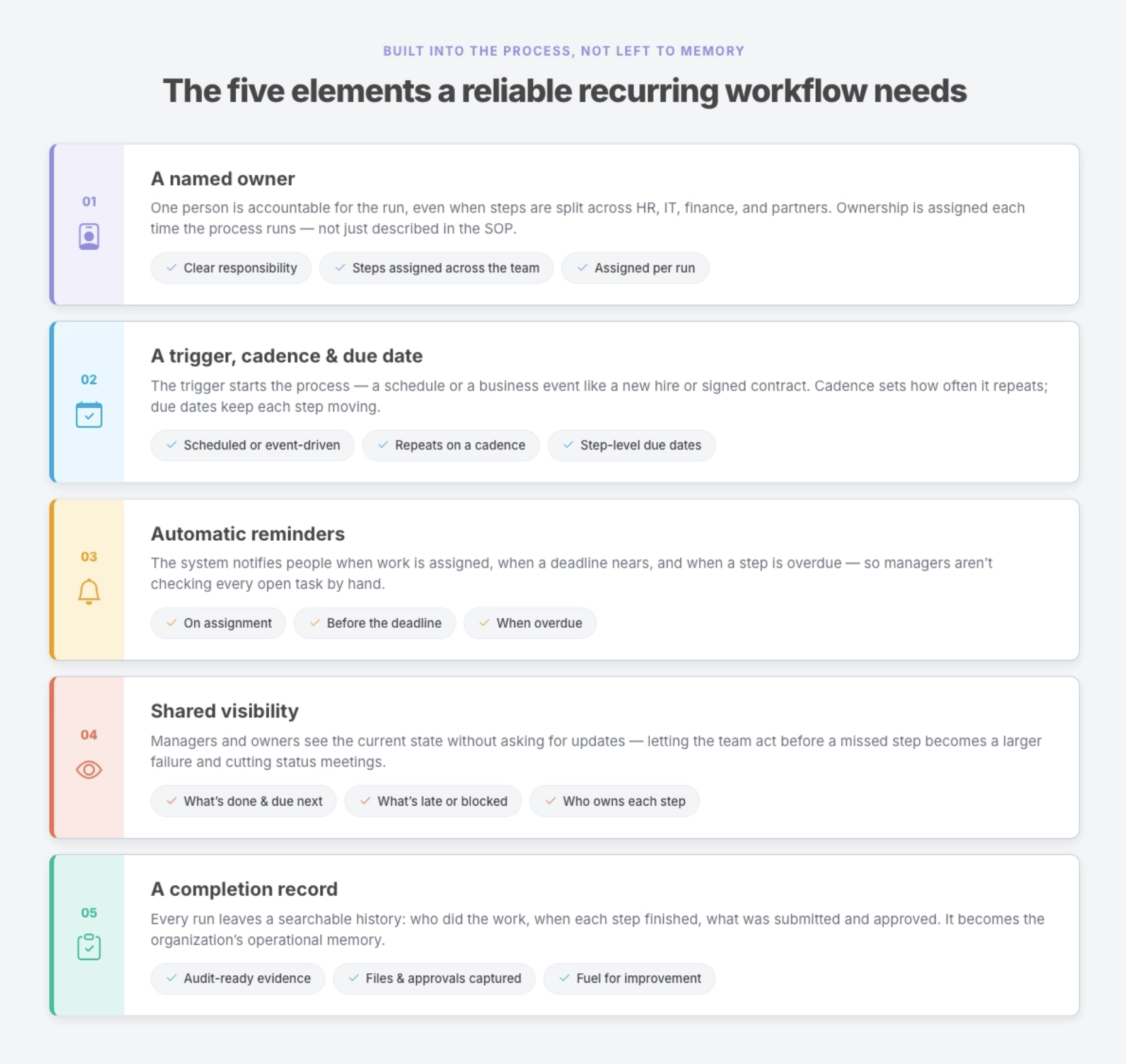
1. A named owner
Every workflow run should have clear responsibility attached to it.
That does not mean one person must complete every step. A process may include work from HR, IT, finance, security, operations, managers, and external partners.
Individual steps can be assigned across the team while one person remains accountable for the overall result.
Clear ownership reduces ambiguity. People know what they are responsible for, managers know where to look when the process stalls, and the team no longer has to rely on informal assumptions.
For recurring work, ownership should be assigned each time the process runs, not merely described in a general SOP.
2. A trigger, cadence, and due date
Reliable workflows begin at a defined moment.
Some run on a recurring schedule, such as a weekly operational review or monthly reconciliation. Others begin when a business event occurs, such as a new hire, signed contract, incident, approval request, or customer launch.
The trigger starts the process. The cadence determines how often it repeats. Due dates keep the individual steps moving.
Together, they replace “someone should remember to do this” with a clear operational timeline.
3. Automatic reminders
Reminders should be part of the workflow rather than an extra task for the manager.
The system should notify people when work is assigned, when a deadline is approaching, and when a step becomes overdue.
This does not remove human responsibility. It supports it.
Owners still need to complete the work, make decisions, and handle exceptions. The workflow reduces the coordination work around those responsibilities so managers do not have to spend their time checking every open task manually.
4. Shared visibility
Managers and process owners should be able to see the current state of the work without asking each person for an update.
That includes:
- What has started
- What is complete
- What is due next
- What is late
- Where the process is blocked
- Who currently owns each step
Visibility allows teams to act before a missed step becomes a larger failure.
It also reduces unnecessary status meetings. When the current state is already visible, conversations can focus on exceptions, decisions, and improvement rather than basic reporting.
5. A completion record
Each workflow run should leave behind a searchable history.
That record should show who completed the work, when each step was finished, what information was submitted, which files were attached, what approvals were given, and where exceptions occurred.
The record becomes part of the organization’s operational memory.
It gives managers confidence that the process ran, gives auditors or clients evidence when proof matters, and gives the team useful information for improving the workflow over time.
Where does AI fit into a reliable workflow?
AI can help teams create instructions, summarize information, update fields, complete defined tasks, and move parts of a process forward.
It can reduce the amount of manual work inside a workflow. It does not remove the need for accountability.
Automating a step is not the same as owning the outcome. A named person should still be responsible for the result, especially where the process involves judgment, approval, compliance, customer impact, or meaningful business risk.
The strongest operational use of AI is not an autonomous process with no oversight. It is AI assistance inside a structured workflow with clear permissions, defined checkpoints, human review, and a complete record of what happened.
The work can move faster without becoming invisible.
How to audit whether your SOP is executable
You do not need to rebuild your entire operating system to find the gaps.
Start with one recurring process and ask five questions.
Owner: If this process runs next Tuesday, whose name is on it?
Look for a person, not only a department or role.
“Operations handles it” is less useful than naming the person accountable for the current run.
Also distinguish between completing a step and owning the outcome. Several people may contribute while one person makes sure the process reaches completion.
Timing: What starts the process, and when is the work due?
Identify the specific trigger.
Does the process begin on a schedule, when an event happens, or only when someone notices it needs to be done?
Then look at the deadlines inside the process. Each important handoff should have clear timing rather than an open-ended expectation.
Reminders: Does anything notify the owner before work becomes late?
If the answer is “the manager usually follows up,” the reminder system is still manual.
Check whether assignees receive notifications when work is assigned, when due dates approach, and when a task becomes overdue.
Visibility: Can you see the current status without asking someone?
Try to determine whether the process is in progress, blocked, late, or complete.
If finding the answer requires checking several tools or asking each participant, status is not truly visible.
Record: Could you prove the process ran last month?
Imagine that an auditor, client, executive, or department lead asks for evidence.
Could you quickly produce a record showing what happened, who completed the work, when it was done, and which information or approvals were captured?
If the answer depends on reconstructing the process from email and Slack, the workflow does not yet have a reliable record.
Every “no” identifies an execution gap.
Every “usually” identifies a process that still depends on habit, memory, or one person’s vigilance.
That person may be highly capable. They are also carrying coordination work that the system should handle.
Which SOP should you turn into a workflow first?
Do not begin with the longest SOP or the most complicated process.
Start with the process where better execution will create an immediate operational benefit.
A strong first candidate usually has three characteristics.
It runs repeatedly
The more often a process repeats, the more value the team gets from assigning, scheduling, tracking, and recording it consistently.
Examples include:
- Employee onboarding
- Customer onboarding
- Monthly financial close
- Access reviews
- Safety inspections
- Client reporting
- Compliance checks
- Location opening or closing procedures
It crosses people or departments
Handoffs are common failure points.
A process involving several people benefits from clear assignments, dates, notifications, and shared status because no single person holds all the context.
A missed step creates real consequences
Prioritize processes where a delay, omission, or missing record affects customers, employees, compliance, revenue, security, or service quality.
The goal is not to automate everything at once.
It is to take one important process that currently depends on manual coordination and give it a reliable path from start to completion.
Turn one SOP into an assigned, trackable workflow
Start with one SOP your team already uses.
Give the next run:
- A named owner
- A defined trigger
- Clear due dates
- Automatic reminders
- Shared visibility
- A completion record
That is the system the documentation needs around it.
Manifestly turns SOPs and checklists into assigned, trackable workflows your team can run repeatedly. Each process can include owners, schedules, due dates, reminders, instructions, data capture, files, comments, approvals, and a searchable history of completion.
You do not need to overhaul every process at once.
Choose one recurring workflow. Make the work visible, assigned, and accountable. Then improve it each time it runs.
Build your first workflow in Manifestly
Frequently asked questions
Why do employees not follow SOPs?
Employees may not follow an SOP because the instructions are difficult to find, unclear, outdated, or disconnected from the place where the work happens. In many cases, the larger issue is that the SOP has not been converted into assigned work with clear ownership, timing, reminders, and follow-up.
Making the instructions available is important. Building them into the workflow is what makes them easier to follow consistently.
What makes an SOP effective?
An effective SOP clearly explains the purpose, sequence, standard, responsibilities, and required outputs of a process. It should be accurate, accessible, easy to understand, and updated as the process changes.
For recurring work, the SOP should also be connected to an execution system that assigns the work, applies deadlines, tracks progress, captures evidence, and records completion.
What is the difference between an SOP and a workflow?
An SOP documents how a process should be performed. A workflow organizes how that process is carried out in a specific instance.
The SOP provides the instructions and standard. The workflow adds owners, dates, assignments, status, reminders, data capture, and completion history.
How do you make sure an SOP is followed?
Turn the SOP into a repeatable workflow.
Assign each step to a person or role, define what starts the process, apply due dates, send reminders, make progress visible, and capture a record as the work is completed.
Managers should also review exceptions and update the underlying SOP when the process reveals unclear or outdated instructions.
Can workflow software replace SOP documentation?
Workflow software does not eliminate the need for clear documentation.
Teams still need instructions, standards, policies, examples, and guidance. Workflow software places that information inside an assigned process so people can access it while doing the work.
The strongest system combines good documentation with reliable execution.