
Manifestly MCP Integration: Run Recurring Workflows from Claude
June 23, 2026

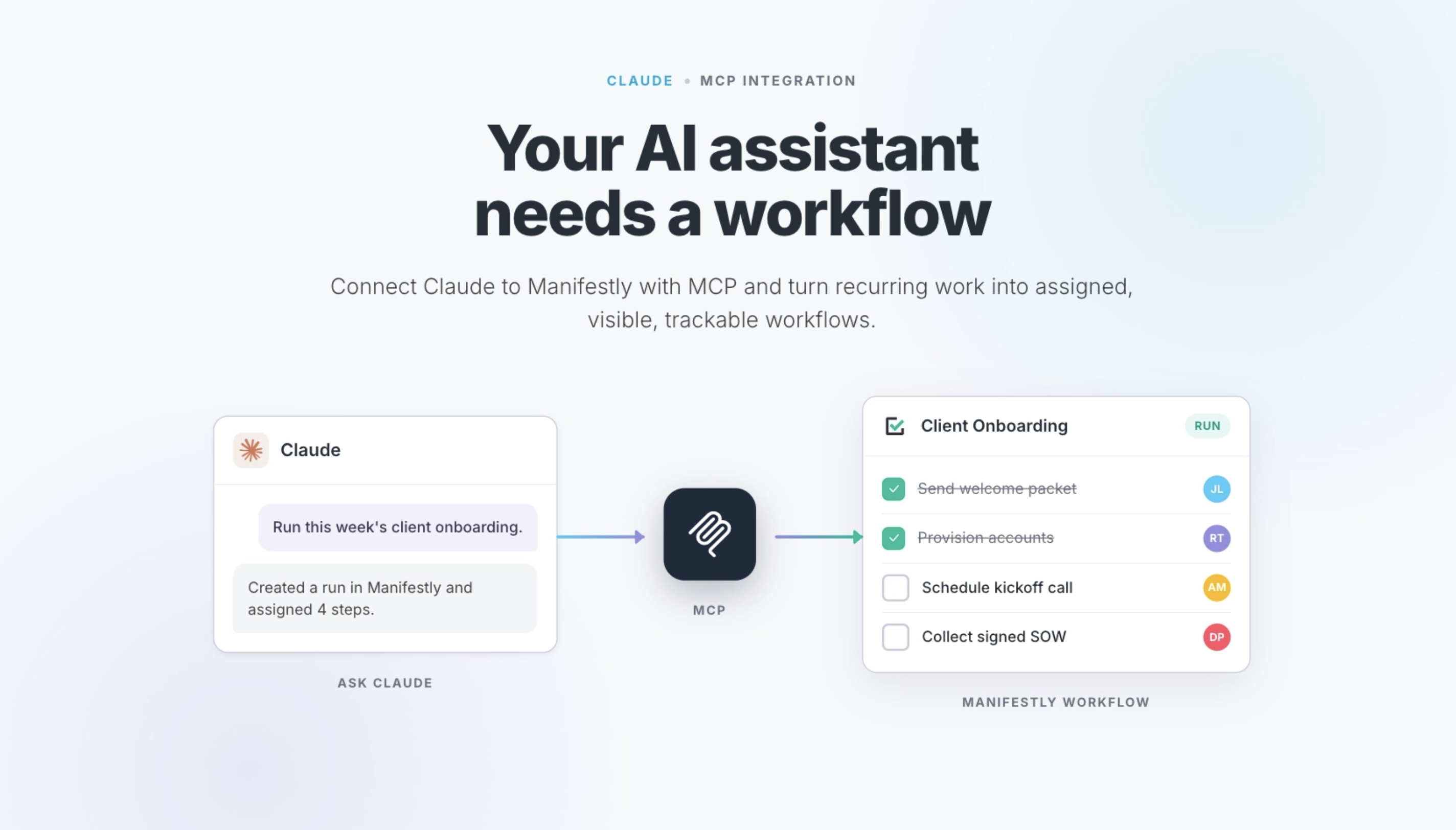
Your AI assistant needs a workflow, not another prompt.
Manifestly's MCP integration lets Claude and other MCP-compatible AI assistants connect directly to your Manifestly workflows. Once connected, teams can manage recurring work through natural-language conversations instead of switching tabs, searching dashboards, or chasing status updates manually.
With Manifestly's MCP server, you can ask your AI assistant to:
- Show overdue workflow runs and assignments
- Start a new workflow run from an existing template
- Check the status of a process in progress
- Assign steps to team members
- Complete or skip steps
- Fill in data collection fields
- Add comments to workflow steps
- Browse workflows, runs, departments, and users
This is not a chatbot sitting beside your checklists. It is a direct connection between your AI assistant and the workflow system where recurring work is assigned, tracked, completed, and recorded.
What Is the Manifestly MCP Integration?
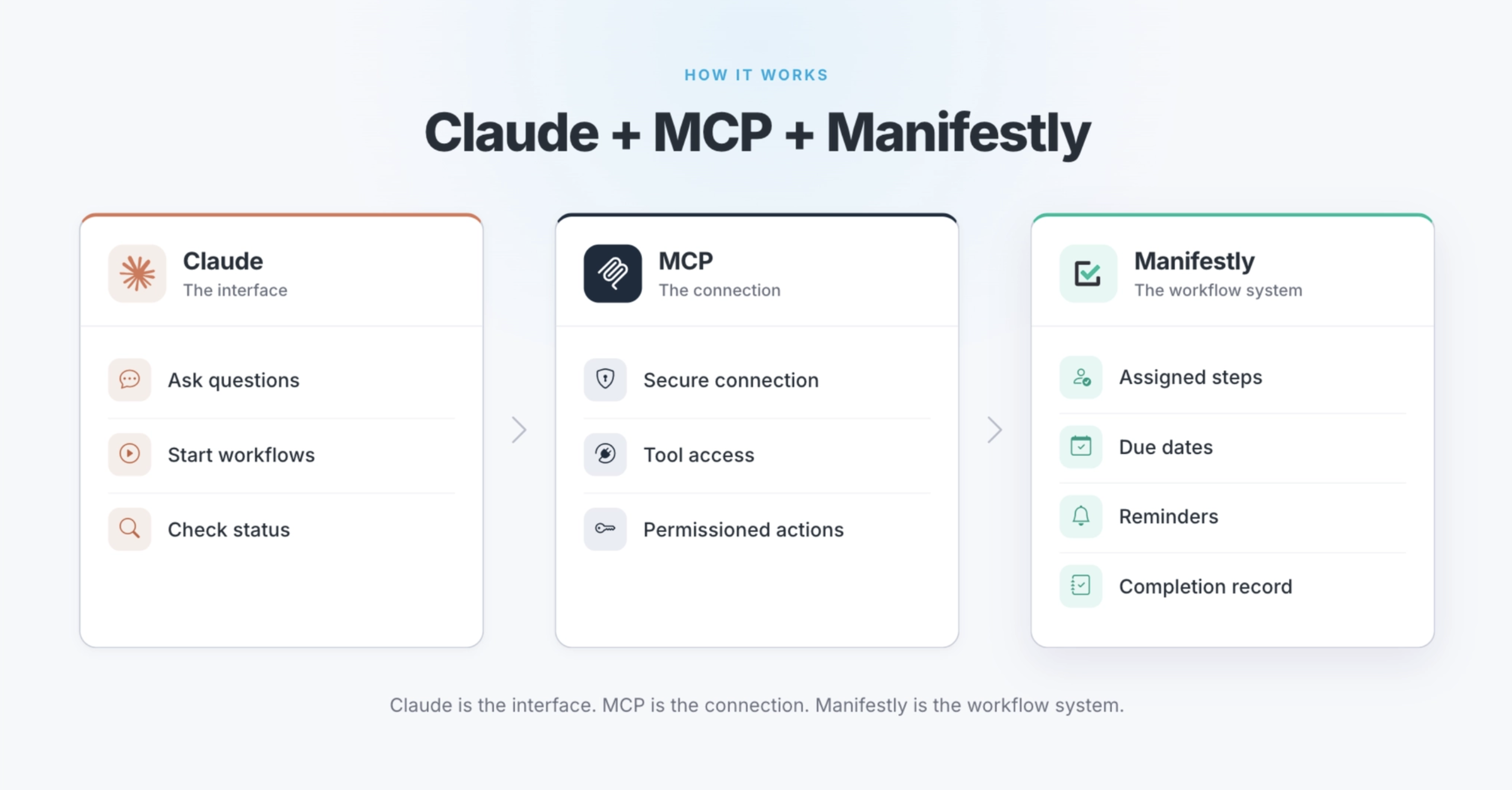
The Manifestly MCP integration connects AI assistants like Claude, ChatGPT, Claude Code, and other MCP-compatible clients to your Manifestly account.
MCP stands for Model Context Protocol. It is an open standard that allows AI applications to connect with external tools, systems, and data sources. In this case, Manifestly acts as the workflow system your AI assistant can interact with.
That means Claude is not just helping you write a checklist or summarize a process. It can interact with live workflow data in Manifestly.
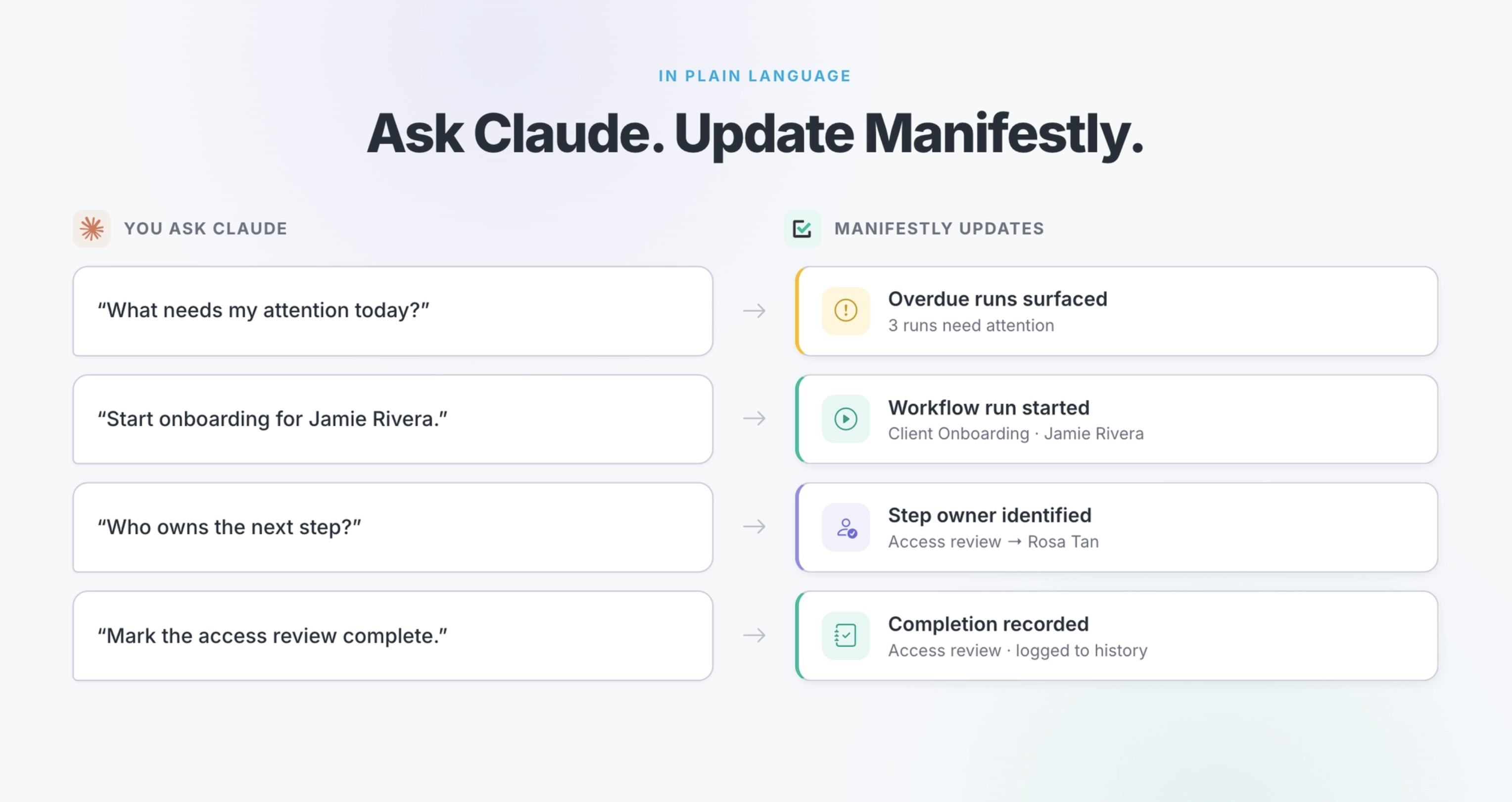
For example, instead of opening Manifestly and manually checking what is late, you could ask: “What needs my attention today?”
Claude can then surface overdue assignments, late workflow runs, and in-progress work from Manifestly.
Instead of manually starting a recurring checklist, you could ask: “Start the new hire onboarding workflow for Jamie Rivera.”
Claude can find the workflow template in Manifestly and create a new run.
The important point is not just that AI can answer questions. It is that AI can now interact with structured operational systems where real work happens.
AI Is Moving From Answers to Action
For the past few years, most teams have used AI to draft, summarize, brainstorm, and analyze.
That has been useful. AI can write faster, synthesize information, and help teams think through problems more clearly.
But the role of AI at work is changing.
AI assistants are becoming interfaces for the systems teams already depend on. They are no longer just places to ask questions or generate text. They are becoming a way to interact with workflows, projects, documents, data, and operational tools.
That shift creates an important question:
When your AI assistant helps initiate work, where does that work actually live?
A chat thread is not enough. A prompt is not enough. A document is not enough.
Recurring work needs assigned owners, due dates, reminders, visibility into what is late, and a record of what was completed. That is not what a prompt provides. That is what a workflow system provides.
Prompts Describe Work. Workflows Run Work.
AI can help a team describe a process. It can generate a checklist, draft an SOP, summarize a handoff, or suggest what should happen next. But there is a meaningful difference between describing work and running it.
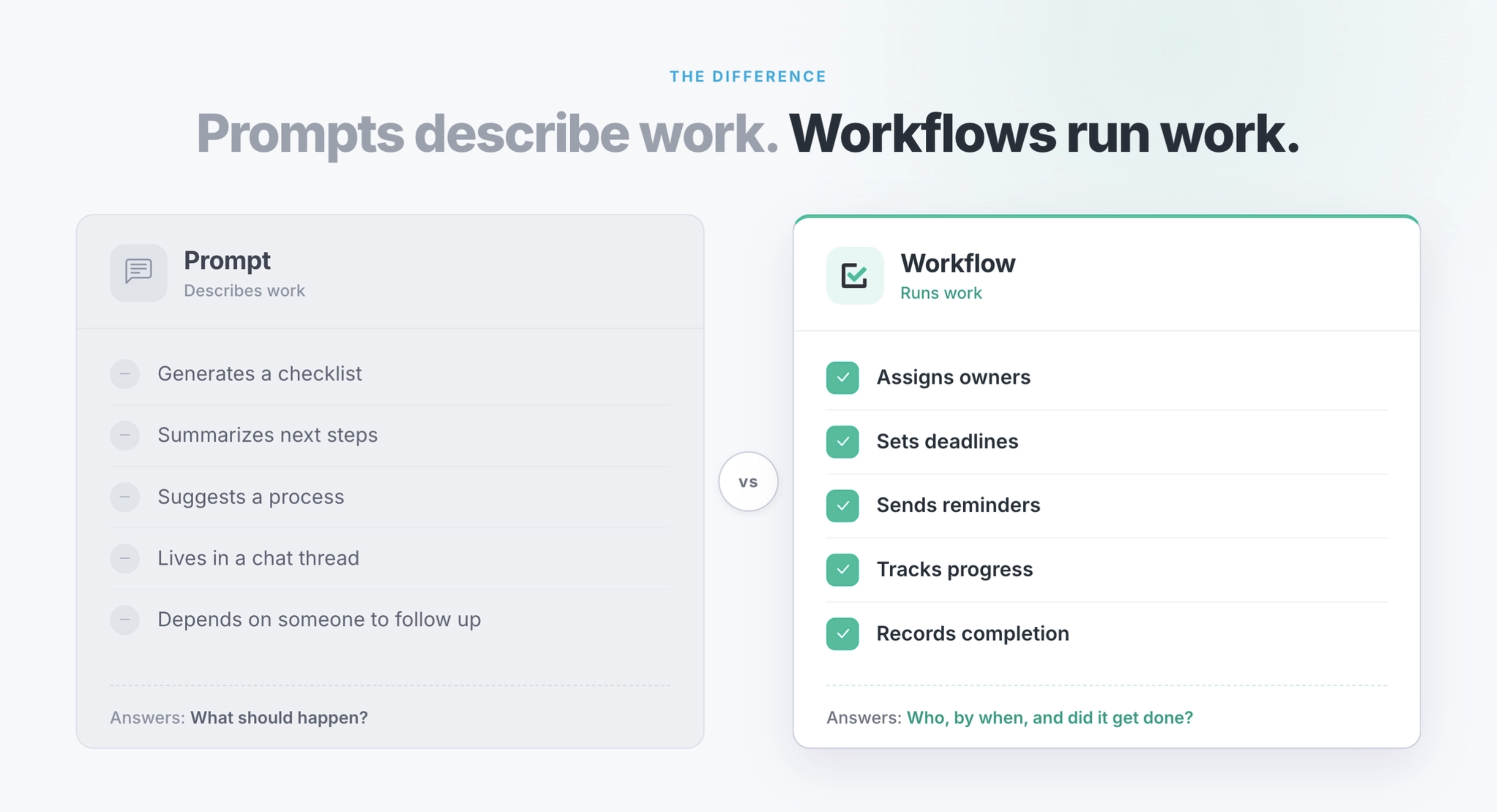
Describing work answers the question: “What should happen?”
Running work answers a different set of questions:
- Who owns each step?
- When is it due?
- Has it been completed?
- What is late?
- Where is the handoff stuck?
- What evidence was collected?
- What happened last time this process ran?
That distinction matters because most important operational work is not a one-time task.
New employees need to be onboarded. Customers need to be implemented. Reviews need to be completed. Approvals need to be collected. Evidence needs to be captured. Managers need to know what is done, what is late, and where work is stuck.
AI can help with all of that, but it needs a structured system underneath it.
That is where Manifestly fits.
Claude can help teams interact with the work. Manifestly keeps the work assigned, visible, repeatable, and accountable.
Why Recurring Work Needs More Than a Prompt
Recurring work breaks down in predictable ways.
Ownership is unclear. Deadlines are informal. Follow-up depends on whoever remembers. Proof is scattered across email, documents, spreadsheets, and chat threads. Status meetings become the place where everyone tries to reconstruct what should already be visible.
An AI assistant can help surface these problems, but it cannot solve them structurally if the work itself has no system.
A prompt can tell someone what to do.
A workflow can assign the step, set the deadline, send the reminder, show the status, and keep the record.
That is why connecting Claude to Manifestly through MCP matters. It gives teams a way to use AI without losing the structure recurring work requires.
The assistant becomes easier to use.
The workflow becomes easier to manage.
And the process does not disappear into a chat thread.
What Can Claude Do with Manifestly?
Once Manifestly is connected through MCP, your AI assistant can help manage workflows and runs using natural language.
Here are a few examples.
Check overdue work
You can ask: “What needs my attention?” or “What workflow runs are overdue?”
Claude can check Manifestly and summarize overdue assignments, late runs, and in-progress work.
This is especially useful for managers, operators, and team leads who need quick visibility without manually digging through dashboards.
Start a workflow run
You can ask: “Start the daily store opening checklist.” or “Kick off onboarding for Jamie Rivera.”
Claude can find the right workflow template in Manifestly and create a new workflow run. You can also include details like a due date, participant, or custom title.
This helps teams move from conversation to execution faster.
Track progress on a process
You can ask: “How is the security audit going?” or “Show me the status of Jamie's onboarding.”
Claude can retrieve the workflow run, show step completion status, and surface comments left by team members.
Instead of asking around for updates, teams can get a clearer view of the process in progress.
Complete or skip steps
You can ask: “Mark the first step as done.” or “Skip the visual inspection step.”
Claude can update the step in Manifestly and show what comes next.
This makes it easier for team members to manage work in the flow of conversation without losing the underlying workflow record.
Assign steps to team members
You can ask: “Assign Jordan Lee to the next incomplete step.”
Claude can help resolve the user and assign the step in Manifestly.
That matters because recurring work often breaks down at handoffs. When ownership is vague, work stalls. When ownership is assigned in the workflow, the next step is clear.
Fill in data collection fields
You can ask: “Fill in Dana Park's onboarding details. She is an engineer starting next Monday.”
Claude can identify the relevant fields in Manifestly and fill in the information you provide.
For onboarding, audits, inspections, approvals, and recurring reviews, this helps keep process data connected to the workflow instead of scattered across notes and messages.
Add comments to workflow steps
You can ask: “Add a comment to the access review step: Found two stale accounts.”
Claude can add the comment directly to the relevant step in Manifestly.
This is important for teams that need context, documentation, or audit history attached to the work itself.
Five Recurring Processes Where This Matters
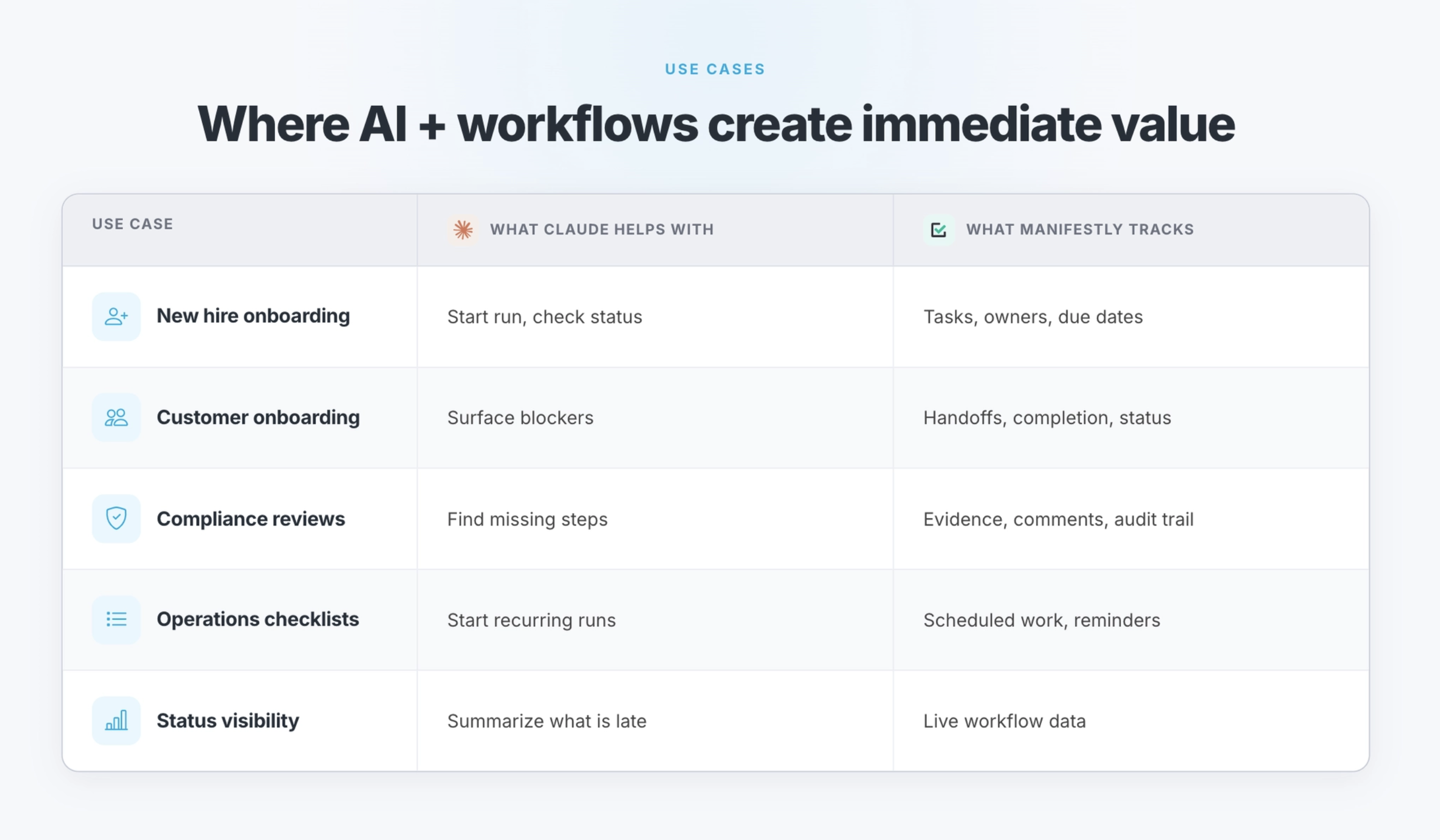
1. New hire onboarding
New hire onboarding involves too many owners and handoffs to manage from memory or a chat thread.
Equipment needs to be ordered. Accounts need to be created. Documents need to be signed. Training needs to be completed. Managers need to prepare for the employee's first week. HR, IT, finance, and department leads may all own different parts of the process.
Claude can help start the onboarding workflow and surface status.
Manifestly keeps every step assigned, visible, and accountable.
That means the process does not depend on one person remembering to follow up with everyone manually.
2. Customer onboarding
Customer onboarding is a recurring process with a direct impact on retention.
When steps are missed, handoffs stall, or ownership is unclear, customers feel it. The sales-to-success handoff gets messy. Implementation tasks drift. Internal teams lose track of what has been completed and what still needs attention.
With Claude connected to Manifestly, a customer success manager can ask for the status of an onboarding workflow, identify what is incomplete, and see where the process is stuck.
Manifestly keeps the customer onboarding workflow repeatable, assigned, and trackable.
3. Compliance reviews
Compliance work depends on proof.
It is not enough to say a review happened. Teams often need a clear record of who completed each step, when it was completed, what evidence was collected, and what exceptions were found.
Claude can help teams navigate the process and find what needs attention.
Manifestly captures the workflow record, comments, field data, and completion history attached to the process.
That gives teams a clearer way to manage recurring compliance checklists, access reviews, safety inspections, audits, and other proof-driven work.
4. Recurring operations checklists
Weekly operations reviews, monthly maintenance tasks, safety walkthroughs, opening and closing checklists, and recurring inspections are exactly the kind of work that breaks down when it lives in someone's memory or a shared document.
The process may be known, but it is not always followed consistently.
Claude can make the workflow easier to access and update.
Manifestly turns the process into a scheduled workflow run with assigned steps, due dates, status visibility, and a completion record.
That is the difference between having a checklist and actually running the checklist.
5. Weekly status visibility
A lot of status meetings exist because teams do not have a structured way to see what is happening.
The meeting becomes the dashboard.
People spend time asking what is done, what is late, who owns the next step, and where the process is stuck.
With Claude connected to Manifestly, teams can ask those questions before the meeting.
What is overdue?
Which workflow runs are late?
Where is onboarding stuck?
What still needs review?
What was completed this week?
The result is not just fewer manual updates. It is better operational visibility.
How to Connect Claude to Manifestly Through MCP
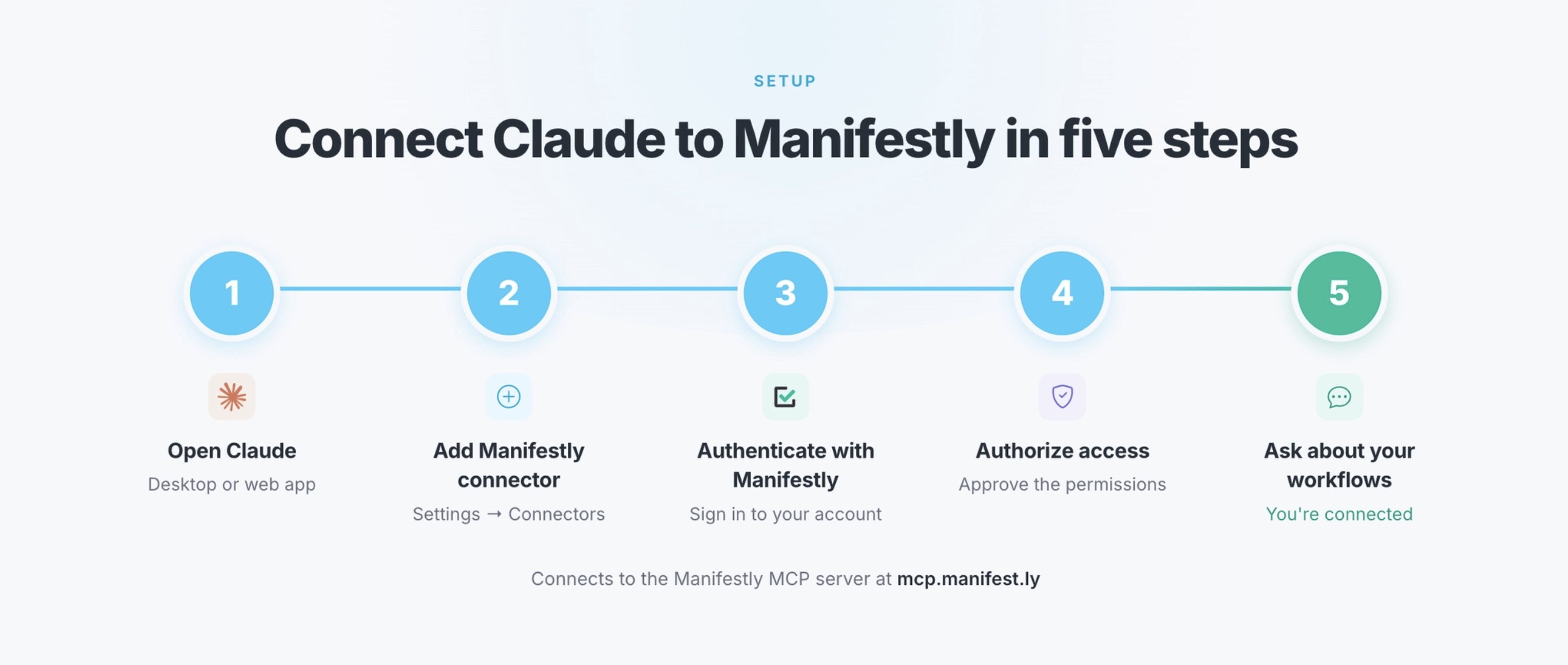
Manifestly's MCP server is designed to work with Claude, Claude Code, ChatGPT, and other MCP-compatible clients.
For Claude, the setup generally works like this:
- Open Claude.
- Go to the Integrations or Connectors section.
- Search for Manifestly and add the connector.
- Log in to Manifestly and authorize the connection.
- Return to Claude and start asking questions about your workflows.
Once connected, your AI assistant can interact with Manifestly based on your existing account access and permissions.
For Claude Code or other MCP clients, Manifestly also supports connecting through its MCP server URL.
The goal is simple: give your AI assistant a secure way to work with the operational processes your team already runs in Manifestly.
Is This Only for Claude?
No.
Claude is one of the clearest use cases because many teams are already using Claude as a daily AI assistant. But Manifestly's MCP server is built for MCP-compatible clients, including Claude, Claude Code, ChatGPT, and other tools that support the Model Context Protocol.
That matters because MCP is not just another one-off integration. It is part of a broader shift toward AI assistants that can connect to the systems teams already use.
For Manifestly customers, that means recurring workflows can become accessible from more places without losing the structure of the workflow itself.
Why Use Manifestly Instead of Managing Work in Claude?
Claude can help you think through work, ask questions about work, and interact with work.
But Claude is not where recurring operational processes should live.
A chat thread does not provide the same structure as a workflow system. It does not reliably manage recurring runs, step ownership, due dates, reminders, permissions, completion records, or audit history.
Manifestly provides the operational layer underneath the assistant.
That means your team can use Claude as a more natural interface while Manifestly remains the system of record for the workflow.
Claude helps with access and interaction.
Manifestly makes sure the work gets done.
The Bigger Shift: AI as an Interface for Work
AI assistants are becoming more capable, more connected, and more useful inside daily work.
That is a real shift. It creates an opportunity for teams to simplify how they interact with operational systems.
But capability without structure creates its own problems.
If AI can help initiate work, teams still need to know where that work lives. They need to know who owns it, when it is due, whether it was completed, and what the record shows.
That is not a limitation of AI. It is an argument for the systems that sit underneath it.
The future of AI at work is not just better prompts. It is better connections between AI assistants and the systems that run the business.
For recurring work, that system is the workflow.
Claude can help with the work. Manifestly makes sure the work gets done.
Frequently Asked Questions
What is the Manifestly MCP integration?
The Manifestly MCP integration lets Claude, ChatGPT, Claude Code, and other MCP-compatible AI assistants connect directly to your Manifestly account. Once connected, your AI assistant can help manage workflows and runs through natural-language conversations.
What does MCP stand for?
MCP stands for Model Context Protocol. It is an open standard that allows AI applications to connect with external tools, systems, and data sources.
Can Claude run Manifestly workflows?
Yes. With Manifestly's MCP server connected, Claude can interact with Manifestly workflows and runs. It can help start workflow runs, check status, surface overdue work, assign steps, complete or skip steps, fill in fields, and add comments.
Is Manifestly's MCP integration only for Claude?
No. Claude is one supported client, but Manifestly's MCP server also works with Claude Code, ChatGPT, and other MCP-compatible clients.
Why use Manifestly instead of managing workflows in Claude?
Claude is useful for interacting with work, but Manifestly keeps the workflow structure. Manifestly manages assigned steps, due dates, reminders, workflow runs, status visibility, permissions, comments, data collection, and completion records.
What kinds of workflows can I manage with Claude and Manifestly?
Common examples include new hire onboarding, customer onboarding, compliance reviews, safety inspections, recurring operations checklists, weekly reviews, approval processes, and other recurring workflows that need clear ownership and visibility.
Does the MCP connection respect Manifestly permissions?
Yes. The Manifestly MCP server acts on behalf of the authenticated user and respects existing roles and permissions in Manifestly.
Try the Manifestly MCP Integration
Connect Claude to Manifestly and try it with one recurring workflow.
Start with a process your team already runs every week, every month, or every time a new employee or customer needs to be onboarded.
Ask Claude what is overdue.
Start a workflow from a template.
Check where the process is stuck.
Then let Manifestly keep the work assigned, visible, and accountable.
Learn more at manifest.ly/ai-integrations/claude