
How to Turn an SOP into a Recurring Workflow
November 03, 2026
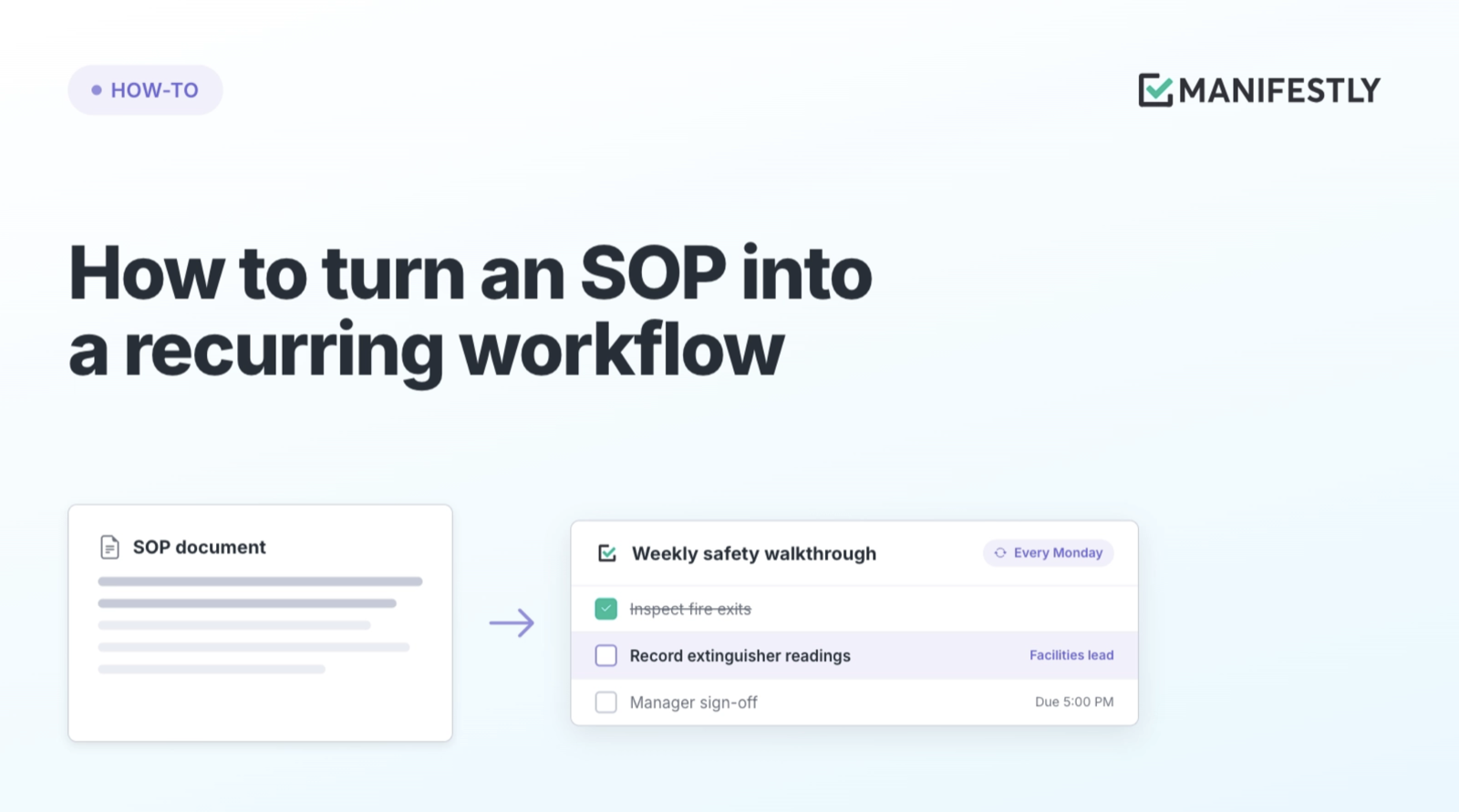
Your month-end close SOP is solid. It lists every reconciliation, every review, and who signs off. Every month, someone still has to remember to start it, copy last month’s checklist, update the dates, and chase the people who have not finished.
The procedure is documented. The repetition is not.
To turn an SOP into a recurring workflow, build its steps into a workflow template once, then attach a trigger: a calendar schedule, a business event, or a manual start. Each occurrence then starts as its own run, with owners assigned by role, due dates calculated from the run, reminders, and a completion record.
The SOP defines the standard. The recurring workflow makes sure the standard happens on time, every time, without anyone having to remember to start it.
What is a recurring workflow?
A recurring workflow is a repeatable process that starts automatically on a schedule or event, assigns each step to an owner, and records what happened each time it runs.
Two terms do most of the work in this article:
- Workflow template: the standard. Your SOP’s steps, instructions, assignments, and due date rules, built once.
- Run: one occurrence of that template. November’s close is a run. December’s close is another run.
You maintain the template. Your team works the runs.
That separation is what makes recurrence reliable. Nobody copies last month’s checklist and edits the dates. The template stays clean, and every run starts from the current version of the process.
Which SOPs should become recurring workflows?
Not every SOP needs a schedule. A strong candidate passes three tests:
- It repeats on a rhythm or a predictable event. Daily opening, weekly review, monthly close, quarterly access review, or every new client.
- Missing it has consequences. A late close delays reporting. A skipped inspection creates risk. A missed access review becomes an audit finding.
- Someone currently starts it by memory. If a manager sends the same reminder every month, the process is already recurring. It just is not running on its own yet.
If an SOP fails all three, it may be reference material, not a workflow. If you are not sure why documented processes break down in the first place, start with why SOPs fail after they are written.
How to turn an SOP into a recurring workflow
These eight steps take one SOP from a document to a process that starts, assigns, and records itself every cycle.
1. Build the workflow template once
Translate the SOP into actionable steps with clear instructions, inputs, and completion criteria. We cover that conversion in detail in how to turn an SOP into an AI-assisted workflow.
The rule for recurring work: build it once, then edit the template. Copying last cycle’s checklist and adjusting it by hand is how steps get dropped and old dates survive.
2. Choose what starts each run
Every recurring workflow needs a trigger. Pick the one that matches how the work actually begins.
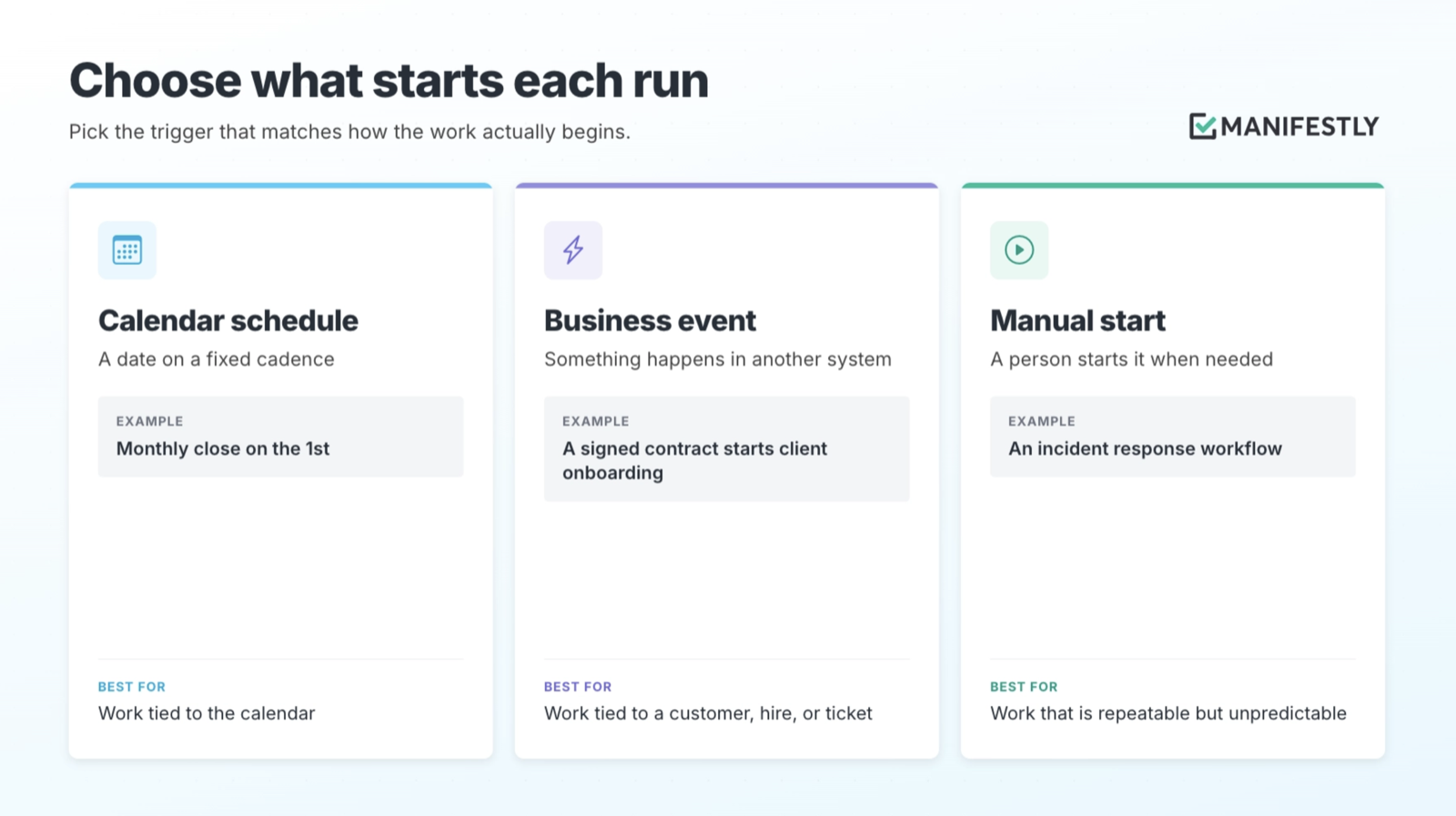
Calendar schedules are built into Manifestly. Business events usually come from another system through the API or Zapier, so a new record in your CRM or HR system can start the right run automatically.
Some SOPs need more than one trigger. A security review might run quarterly and also start whenever a major vendor changes.
3. Set the cadence
For calendar-driven work, choose how often the run repeats: daily, every business day, weekly, monthly, or quarterly.
Match the cadence to the obligation, not to habit. If a control has to be evidenced monthly, a quarterly run leaves two months unrecorded.
Give runs a name people can find later. If you leave the run name blank, Manifestly fills it with the current date, so “Monthly Close” for November is easy to tell apart from October.
4. Teach the schedule your calendar
A schedule that ignores holidays creates work nobody is there to do.
With Business Calendars, you attach a list of your team’s days off to a workflow. From then on:
- Due dates can count in business days, skipping weekends and holidays.
- A due date that lands on a day off snaps to the next or previous business day.
- A scheduled run that falls on a holiday or weekend can move forward, move back, or skip that occurrence entirely.
This matters most for work with external deadlines. Payroll, filings, and month-end reporting do not move because the 1st landed on a Saturday.
5. Anchor due dates to the run, not the calendar
Fixed dates break the first time a run starts late. Relative due dates move with the run.
In Manifestly, a step’s due date can be based on:
- The run start date. “Bank reconciliation due 3 business days after the run starts.”
- The previous step. “Manager review due 1 day after the reconciliation is complete.”
- A date captured in the run. “Equipment ready 2 days before the employee’s start date.”
The SOP usually describes timing in words. Relative dates turn those words into deadlines that recalculate on every run.
6. Assign roles, not names
An SOP that names Dana in accounting stops working when Dana is on vacation or changes jobs.
Use role-based assignments so each step goes to whoever currently holds the role. Then name one person who owns the overall run. Several people can complete steps. One person makes sure the run finishes.
7. Decide what happens when a run does not finish
Recurring work will eventually stall. Decide in advance how the workflow responds.
- Reminders notify owners before and after a due date, so the manager is not the reminder system.
- Stop tasks block later steps until an earlier one is done. Nobody closes the books before the reconciliations are complete.
- Approvals put a required sign-off at the checkpoint where judgment matters.
- Auto-close ends runs that are no longer relevant after a set period, so last quarter’s abandoned run does not clutter this quarter’s dashboard.
8. Update the template without breaking live runs
Your SOP will change. A new control gets added, a system gets replaced, a step turns out to be unnecessary.
Edit the template, then choose which open runs receive the change. You can update the runs that just started and leave a nearly finished run alone.
Let the people doing the work tell you what needs to change. Turning on workflow feedback lets them flag an unclear or outdated step from inside the run, which keeps the template and the SOP from drifting apart.
Example: Monthly close as a recurring workflow
Here is how the eight steps come together for a month-end close SOP.
Trigger and cadence. The workflow is scheduled monthly on the 1st. The run name is left blank, so each run is labeled with its date.
Calendar rules. A Business Calendar with the company’s holidays is attached. The weekend and holiday rule is set to move forward. January 1, 2027 is a holiday that falls on a Friday, so January’s run starts Monday, January 4.
Relative due dates, counted in business days:
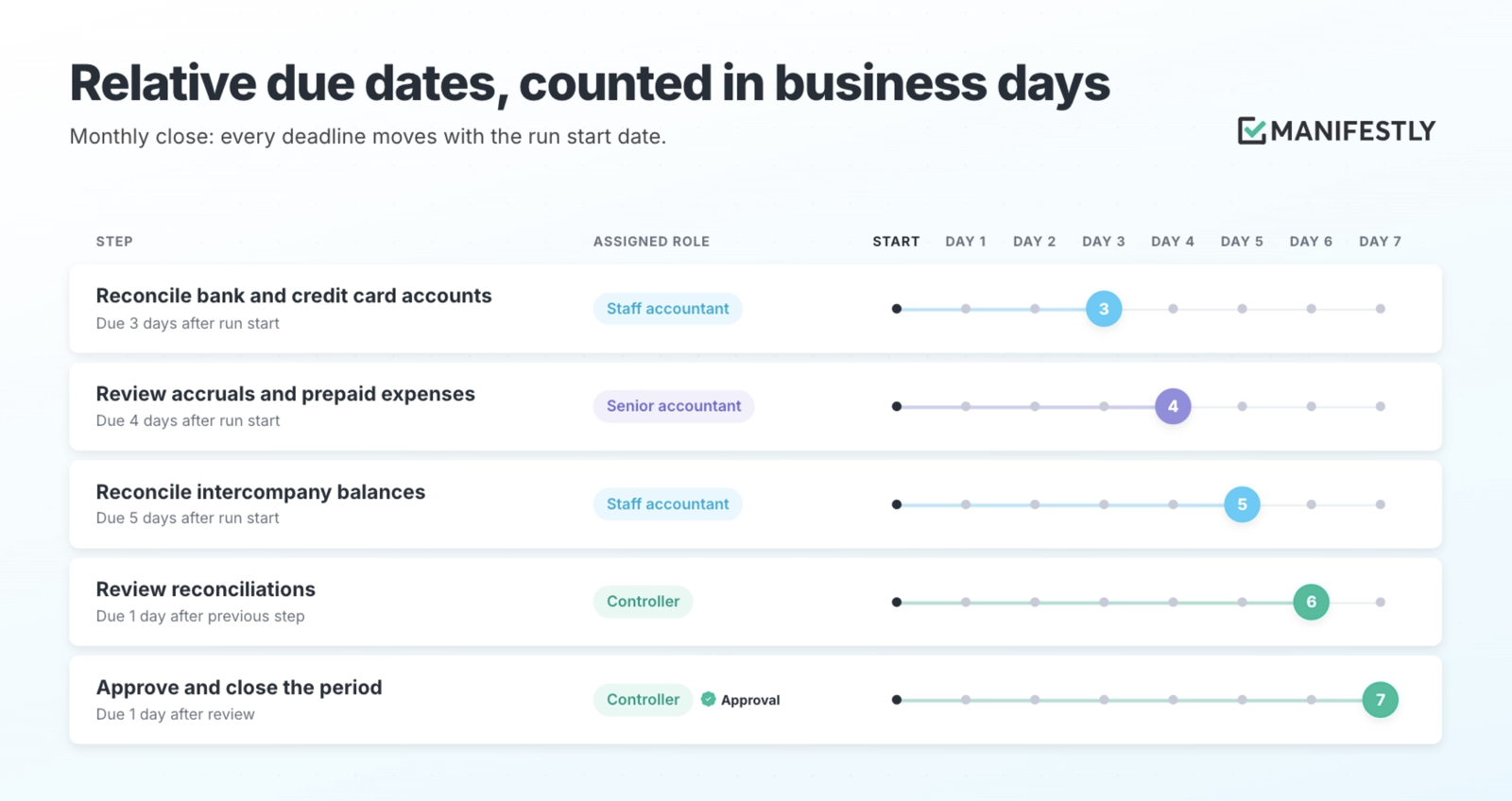
Checkpoints. A stop task blocks the close step until every reconciliation is complete. The controller’s approval is required before the period closes.
Ownership. Steps go to roles. The controller owns the overall run.
When the run starts on January 4, every due date calculates from that day. Nobody edits a date, copies a checklist, or sends the kickoff email. When the run finishes, the record shows who completed each reconciliation, when, and who approved the close.
You can start from a monthly close template and adapt it to your own chart of accounts and review structure.
How do you know your recurring workflow is working?
A recurring workflow produces something a document never could: a history of every run. Use it.
After a few cycles, look for patterns:
- Which steps run late repeatedly? A step that is late every month usually has the wrong due date, the wrong owner, or a missing input.
- Which runs never finish? Runs that sit open or get auto-closed point to a trigger that fires too often or a process nobody owns.
- What do people flag in feedback? Repeated comments on the same step mean the instructions need work.
Manifestly’s workflow reports surface late steps and let you export the data collected across runs, so you can compare cycles without rebuilding the history from email.
This closes the loop. The SOP shapes the workflow, the runs show where the SOP is unclear or outdated, and the template gets better every cycle.
Where AI fits in a recurring workflow
AI can make recurring work easier to manage. Through Manifestly’s MCP integration, an assistant like Claude or ChatGPT can start a run, list what is overdue, or add a comment to a step.
The workflow still does the recurring part. The schedule starts the run, the template assigns the owners, and the record captures what happened. People still review the work at the checkpoints where judgment matters.
For a full walkthrough, see how to turn an SOP into an AI-assisted workflow.
Make your next SOP run on its own
Pick one SOP your team already repeats. Build it as a template, attach a trigger, set the calendar rules, and assign roles. Then let the next run start without anyone having to remember it.
Browse workflow templates to start from a proven structure, or start a free trial of Manifestly and turn one SOP into a recurring workflow this week.
Frequently asked questions
What is the difference between a recurring task and a recurring workflow?
A recurring task is a single to-do that repeats, like “submit timesheet every Friday.” A recurring workflow is a multi-step process that repeats, with several owners, due dates for each step, checkpoints, and a record of the whole run. If the work involves handoffs or review, it is a workflow.
Can one SOP run on more than one schedule?
Yes. The same workflow template can start from a calendar schedule and from a business event. A security review might run every quarter and also start whenever a critical vendor changes. Each run uses the same template.
What happens to open runs when I change the SOP?
Update the workflow template, then choose which open runs receive the change. Runs that just started can pick up the new steps. Runs that are nearly complete can finish on the version they started with.
How often should a recurring SOP be reviewed?
Review it whenever the run history gives you a reason: steps that are late every cycle, repeated feedback on the same instructions, or a change in systems or regulations. Many teams also set a fixed review cadence, such as annually, and schedule that review as its own recurring workflow.
What if a scheduled run falls on a weekend or holiday?
Attach a business calendar to the workflow and choose the rule: move the run to the next business day, move it to the previous business day, or skip that occurrence. Due dates inside the run can also count in business days.