
What Is Recurring Workflow Software? Definition, Features, and Examples
October 22, 2026
What is recurring workflow software?
Recurring workflow software turns repeatable processes into scheduled, assigned runs. Each time a process is due, it creates a new instance with an owner for every step, due dates, reminders, and review checkpoints, then keeps a record of who completed what and when.
It is also called recurring checklist software or recurring operations software. Where an SOP describes how a process should be done, recurring workflow software is the system that makes sure it actually happens, every time it comes due.
Every operations team carries work that comes back. The month-end close, new hire onboarding, the quarterly access review, the weekly safety walk. Most of it is documented somewhere, and most teams know how it should go. Yet the same steps still get missed, the same handoffs still stall, and the same question still comes up after the fact: did this actually get done?
This guide explains what recurring workflow software is, how it works, what separates it from the tools teams already use, and where AI fits in.
Why recurring workflow software exists: the execution gap
In most organizations, a recurring process is spread across several tools. The SOP lives in a shared drive. The reminder lives in someone’s calendar. Updates happen in Slack, and proof of completion is buried in an inbox. Each tool does its job well. The work breaks in the spaces between them.
We tend to assume that once a process is documented, it exists. But documentation only tells people what should happen. It does not decide who does it this month, when it is due, what happens if a step slips, or how anyone will know it was finished. Those questions get answered by memory, follow-up messages, and status meetings, which is another way of saying they get answered inconsistently.
The missing piece is an execution layer: the system between knowing what should happen and making sure it happens. For recurring operations, that layer has a recognizable shape: a trigger that starts the work, an owner for each step, a due date, the work itself, a review where judgment is needed, a way to handle exceptions, and a record when it is complete.
Consider employee offboarding. The SOP may clearly state that IT, payroll, facilities, and the manager each have responsibilities. What the document cannot tell you is whether IT actually removed access, whether payroll ran the final check, or which step is now three days overdue. The team does not have a knowledge problem. It has an execution problem.
Recurring work makes this gap expensive because the gap repeats. A one-off project can absorb some friction. A process that runs every month for every client, location, or new hire pays the same coordination cost every time it runs. If reliable execution depends on someone remembering every handoff, the system is asking too much of memory.
How recurring workflow software works
Recurring workflow software is organized around one idea: the run. A workflow is the template, built once. A run is a single occurrence of that workflow, like the March close or Jordan’s onboarding, with its own owners, due dates, and history.
This is what separates a recurring workflow from a recurring task. A recurring task resets itself, and last month’s completion disappears into the next instance. A run stays on record. Next month’s close is a new run, and March’s close is still there, showing exactly who did what and when.
A typical run moves through seven stages:
- Build the workflow once. Define the steps, the instructions for each one, the roles responsible, the data to capture, and any conditional logic.
- Start it without anyone remembering. A schedule (the first business day of each month) or a trigger (a new hire added, a form submitted, a webhook from another system) starts the run.
- Assign every step. Roles resolve to real people for this run, and due dates are calculated relative to when the run started.
- Guide the work at the step. Instructions, links, and examples sit inside the step where the work happens, not in a separate document.
- Hold for review. Steps that need judgment, such as approving a reconciliation or signing off on a client deliverable, stop the run until a person signs off.
- Surface exceptions. Late or stuck steps become visible, and reminders go to the owner before a missed step turns into a missed deadline.
- Record completion. Every completed step is logged with a timestamp, the person responsible, and any data or files captured. The run becomes the record.
When the process changes, the team updates the workflow once, and the next run follows the new version. The SOP stops being a document people have to remember to check and becomes the path the work actually takes.
Defining characteristics of recurring workflow software
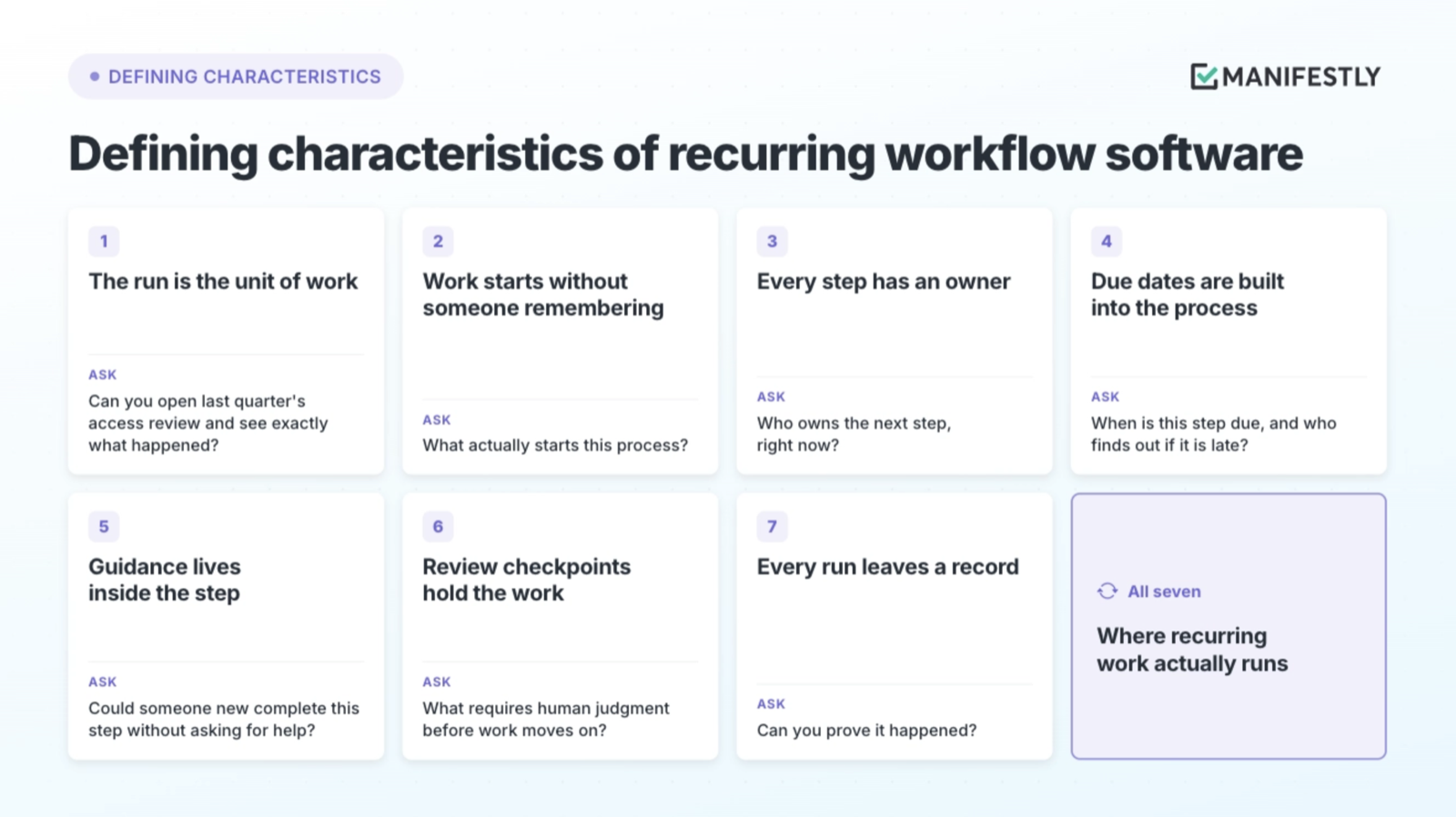
Many tools touch recurring work. A tool belongs in this category when it does all seven of the following. Each one comes with a question you can ask of your current system.
1. The run is the unit of work
Each occurrence of a process is its own instance with its own owners, dates, and history. Without runs, there is no way to tell this month’s work from last month’s.
Ask: Can you open last quarter’s access review and see exactly what happened?
2. Work starts without someone remembering
Runs begin on a schedule or from a trigger in another system. A process that depends on someone remembering to kick it off is fragile before the first step.
Ask: What actually starts this process?
3. Every step has an owner
Ownership is assigned at the step level, not the project level, and roles resolve to named people for each run. Inviting someone to a tool is not the same as assigning them a step.
Ask: Who owns the next step, right now?
4. Due dates are built into the process
Deadlines are calculated from when the run starts or from the step before, so timing is part of the workflow instead of a separate calendar entry. Reminders reach the owner before the deadline, not after.
Ask: When is this step due, and who finds out if it is late?
5. Guidance lives inside the step
The instructions for a step appear where the step is completed. People should not need to find the SOP, or the person who wrote it, to do the work correctly.
Ask: Could someone new complete this step without asking for help?
6. Review checkpoints hold the work
Where judgment matters, the run stops until a person signs off. A checkpoint is different from a notification: a notification says something happened, while a checkpoint decides whether the work can move forward.
Ask: What requires human judgment before work moves on?
7. Every run leaves a record
Completion is captured as the work happens, with timestamps, the person responsible, and any data, files, or approvals attached. Proof is a byproduct of doing the work, not a separate task at audit time.
Ask: Can you prove it happened?
A tool that covers some of these can still be useful. A tool that covers all seven is where recurring work actually runs.
Recurring workflow software vs. related categories
Recurring workflow software overlaps with several tools most teams already own. That overlap is not a problem, since most teams need more than one of them. The useful question is which job each tool was built to do.
Categories of workflow software
| Category | Common examples | Built for | Unit of work | What recurring work still needs |
|---|---|---|---|---|
| Project management | Asana, monday.com, ClickUp | One-off initiatives with timelines, milestones, and changing scope | Project or task | The same process run repeatedly, with step-level guidance and history for each run |
| SOP and documentation tools | Google Docs, Notion, SweetProcess, Trainual | Capturing how work should be done and training people on it | Document | Someone assigned this time, a due date, and proof it happened |
| Workflow automation | Zapier, n8n | Moving data between systems with no person involved | Trigger and action | Steps that need judgment, an owner, and a sign-off |
| Process app builders | Pipefy | Building custom process applications with their own data models | Configured pipeline | A faster path when the process is already known and just needs to run |
| Task managers with repeating tasks | Todoist, Microsoft To Do | Personal and small-team reminders | Single task that resets | Multiple steps, multiple owners, and a record of each occurrence |
| AI assistants and agents | Claude, ChatGPT, Copilot | Drafting, analyzing, and increasingly taking action | Prompt and output | Ownership, review, and proof that the output was right |
| Recurring workflow software | Manifestly, Process Street, Tallyfy | Running repeatable, multi-step processes reliably | Run | Connects the rest: the doc becomes guidance, the automation becomes a trigger, the AI becomes a step |
Project management software
Project tools are good at what they were designed for: coordinating people toward a goal with a deadline. Recurring operations have different requirements. A monthly close is not a project with a finish line. It is the same process, run again, where the value comes from consistency and from comparing each run to the last.
SOP and documentation tools
Documentation is the right starting point, and most teams already have it. The gap appears after the SOP is written, when nothing connects the document to who does the work this month. A checklist describes the work. A workflow runs it.
Workflow automation
Automation platforms like Zapier and n8n move data between systems without a person in the loop, and they do it well. Recurring workflow software handles the steps that need a person: judgment, sign-off, and accountability for the result. The two work together. An automation can start a run or pass data into it, while the run holds the owners and the record.
Process app builders
Platforms that let teams build custom process apps are a strong fit when the process needs its own data model and interface. When the process is already known and the job is making it run on time, that flexibility can add more setup than the team needs.
AI assistants and agents
AI can produce a draft, a reconciliation, or a summary faster than any team. It does not, on its own, decide who is accountable for that output, whether it needs review, or where the record lives.
Where AI fits in recurring workflows
AI changes the economics of recurring work. Drafting the client report, reconciling the accounts, and summarizing the inspection notes all get faster and cheaper. That is useful, and it also means more output enters the system every week, each piece of which someone needs to review, trust, and stand behind.
We tend to treat AI output as completed work. It is not the same thing. Producing a reconciliation is different from someone accountable confirming it is correct and moving the close forward. Output is becoming abundant. Accountable execution is not.
That is why AI fits inside recurring workflows rather than replacing them. A run already defines who owns each step, when it is due, and where judgment is required. An AI agent can take a step in that run the same way a teammate would: assigned to it, working within it, and leaving its actions on the same record. Where the output matters, the step is gated behind a person’s sign-off before the work moves on.
A useful way to see the distinction is as a ladder. Inviting someone to a tool is not assigning them a step. Assigning a step is not automating it. Automating a step is not owning the outcome. An AI agent can run the step. A named person still owns the result.
Before giving AI a role in any recurring process, it helps to ask:
- Who is accountable when the AI does the work?
- What happens when the output is wrong?
- Which steps require human judgment before work moves on?
- Will the record show what the AI did, and who approved it?
Examples of recurring workflows by team
Recurring operations look different in every department, but they share a pattern: a known process, more than one owner, and a cost when a step is missed.
| Team | Recurring workflow | How a run starts | What the run proves |
|---|---|---|---|
| Accounting | Month-end close | Scheduleeach month | Each reconciliation was completed and reviewed before the books closed |
| HR | Employee onboarding and offboarding | Triggerper new hire or departure | Access was granted or removed, and each department finished its steps |
| Client services | Client onboarding | Triggerper new client | Every handoff happened in order, with the client’s information captured |
| Property management | Move-in and move-out inspections | Triggerper unit | Each inspection item was checked, with photos attached |
| IT | Quarterly access review | Scheduleeach quarter | Every account was reviewed and a manager signed off |
| Marketing | Campaign launch checklist | Triggerper campaign | Copy, compliance, and tracking were approved before launch |
In each case, the team already knows what the process should be. What recurring workflow software adds is the run: an owner for every step, a due date, a checkpoint where judgment matters, and a record when it is done.
Who needs recurring workflow software
The clearest signal is not team size or industry. It is how you answer a simple question about your most important recurring process: did the right work happen, on time, with someone accountable for it? If the honest answer is “let me check,” the process is running on memory and follow-up.
That tends to show up in a few roles first:
- Operations leaders who spend their week chasing status on work that should run on its own, and who want to see what is done, late, or stuck without calling a meeting.
- Finance, compliance, and quality owners who need a record of what happened, who did it, and who approved it, captured as the work happens rather than reconstructed at audit time.
- Multi-location and client-serving teams where the same process has to run the same way across many sites, clients, or people.
- Small teams outgrowing memory, where one or two people have been holding recurring processes together, and adding clients or hires is starting to show the cracks.
The practical starting point is one process your team still chases manually. Once that process runs on its own with clear owners and a record, it becomes obvious which process to move next.
If you are comparing tools, see our guide to the best recurring workflow and checklist software for operations teams.
Recurring work needs somewhere to run
Once you see documentation and execution as two different layers, the familiar fixes start to look incomplete. A more detailed SOP, another reminder, or one more status meeting all improve the description of the work. None of them give the process an owner, a due date, a checkpoint, and a record every time it comes due.
If the same handoff fails every month, continuing to rely on someone remembering it is not simplicity. It is a design choice. Recurring workflow software is how teams make a different one.
Start with one recurring process your team still chases manually. Build it once in Manifestly, set it to recur, and let the next run start on its own. Start your free 14-day trial.
FAQ
What is the difference between a recurring task and a recurring workflow?
A recurring task is a single item that resets on a schedule, usually with one owner. A recurring workflow is a multi-step process with several owners, due dates, and checkpoints, and each occurrence is kept as its own run with its own history. Recurring tasks help one person remember. Recurring workflows help a team execute.
Is recurring workflow software the same as workflow automation?
No. Workflow automation tools like Zapier and n8n move data between systems without a person involved. Recurring workflow software manages work that people own, review, and sign off on. The two are complementary: an automation can start a run or send data into it.
Is recurring workflow software the same as SOP software?
No. SOP software documents how a process should be done. Recurring workflow software runs that process on a schedule, assigns each step, and records completion. Many teams use both, with the SOP becoming the guidance inside each workflow step.
What is a workflow run?
A run is a single occurrence of a recurring workflow, such as the March close or one new hire’s onboarding. Each run has its own assigned owners, due dates, and completion record, so teams can see what happened in any given cycle and compare runs over time.
Can AI agents run recurring workflows?
AI agents can complete steps within a recurring workflow, such as drafting, reconciling, or summarizing. Accountability for the outcome still sits with a named person, and steps that need judgment should be gated behind human review at defined checkpoints. The run records what the agent did and who approved it.
How is recurring workflow software different from BPM software?
Business process management (BPM) platforms are typically built to model, automate, and optimize processes across an enterprise, often with significant configuration. Recurring workflow software focuses on making known, repeatable processes run reliably, with owners, due dates, checkpoints, and a completion record, and is usually faster for operations teams to adopt.