
What Is Checklist Software? And When Do You Need Workflow Software Instead?
August 25, 2026
Checklist software is a digital tool for organizing, completing, and tracking a set of steps. It works well for simple, repeatable work where responsibility and timing are straightforward. Workflow software adds assignments, deadlines, handoffs, approvals, reminders, and completion records when a process spans multiple people or runs repeatedly. A checklist shows what to do. A workflow makes sure it gets done.
Is a checklist enough?
A checklist may be all you need when the work is simple, the sequence is clear, and one person or a small team owns most of the process.
For example, a checklist can work well for reviewing a document before publication, preparing a meeting room, inspecting a piece of equipment, or completing a routine opening procedure. The main goal is to make the steps visible so they are not forgotten.
You may need workflow software when the process becomes harder to coordinate than to remember.
That usually happens when:
- different people own different steps
- deadlines depend on a hire date, closing date, inspection date, or reporting period
- one person’s work must be completed before another person can begin
- required approvals or compliance steps cannot be skipped
- managers need to see what is late or blocked without asking for updates
- the process needs to start automatically on a schedule or trigger
- or the organization must retain a clear record of how the work was completed
The question is not whether the process has a checklist. Most workflows do.
The question is whether the checklist can carry the execution structure the process now requires.
What is checklist software?
Checklist software replaces a paper list, spreadsheet, or static document with a digital set of steps that people can follow and complete.
At its simplest, it shows what needs to be done and which items are finished. More capable checklist tools may also support assignees, due dates, comments, attachments, instructions, reminders, and reusable templates.
The defining idea is still straightforward: checklist software helps people follow a known procedure without relying entirely on memory.
A team might use it to:
- open or close a location
- review a contract
- prepare a customer deliverable
- publish a blog post
- inspect equipment
- set up a new account
- conduct a quality check
- or complete a routine administrative process
The checklist turns a procedure into something people can actively follow rather than a document they are expected to remember.
What checklist software does well
Checklists are one of the simplest and most effective ways to improve consistency.
They are especially valuable when the work is already understood but important steps are easy to miss.
They reduce reliance on memory
A checklist moves the steps out of someone’s head and into a shared format.
The employee does not need to remember every detail of the process or ask an experienced coworker what happens next. The required actions are visible in the order they should be completed.
This is particularly useful for work that happens infrequently. A person may perform a quarterly review or annual inspection too rarely to remember every step without guidance.
They standardize routine work
A reusable checklist gives everyone the same starting point.
Instead of each employee following a slightly different version of the process, the team can agree on one set of steps. That makes the work easier to teach, repeat, and improve.
When the procedure changes, the checklist can be updated once rather than relying on every person to remember the new method.
They make procedures easier to follow
A checklist can include more than task names.
It may contain instructions, links, images, videos, examples, or supporting documents that explain how each step should be completed.
This brings the procedure closer to the work itself. The employee does not have to leave the checklist and search through an SOP library to find the relevant instruction.
They provide lightweight accountability
A digital checklist can show which items have been completed and which remain open.
For simple processes, that may provide all the accountability the team needs. The owner can review the list, finish the remaining steps, and close it when the work is done.
Checklist software is a good fit when the primary operational risk is forgetting or inconsistently performing a known step.
The limitation appears when remembering the steps is no longer the hardest part of the process.
When a checklist starts to break down
A checklist can contain every required step and still leave the process owner doing most of the coordination manually.
The signs usually appear as the process grows across people, departments, deadlines, and repeated instances.
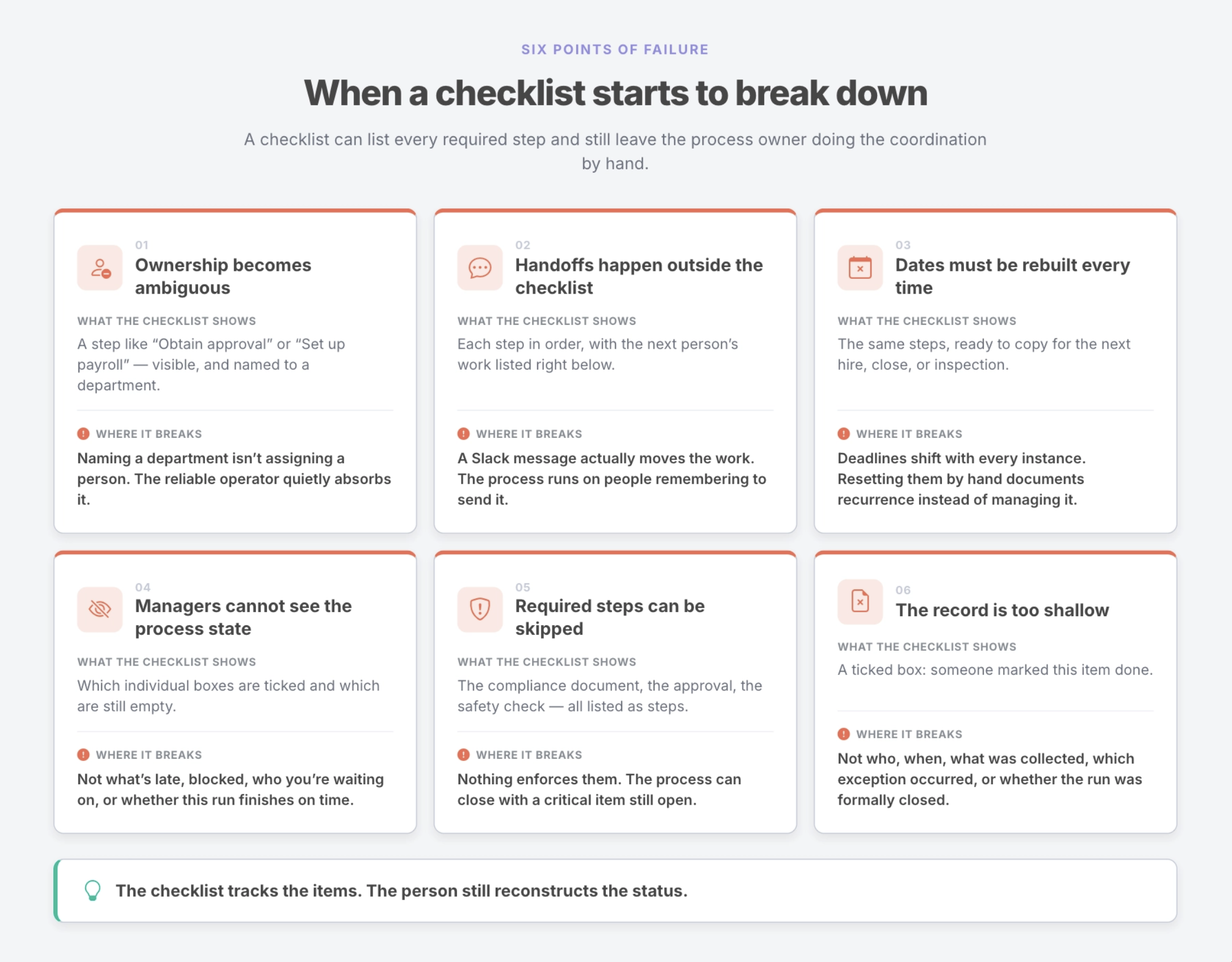
Ownership becomes ambiguous
A checklist might include a step such as “Set up payroll,” “Prepare equipment,” or “Obtain approval.”
The task is visible, but it may not establish which person is responsible for completing it for this particular employee, customer, or reporting cycle.
Naming a department in a procedure is not the same as assigning the work to a specific owner.
When ownership is unclear, the same reliable person often notices what is missing and quietly absorbs the responsibility.
Handoffs happen outside the checklist
One person completes a step and then sends a message in Slack or email to tell the next person to begin.
The checklist contains the process, but the process does not actually move through the checklist.
That creates a second, informal system of handoffs. The work depends on people remembering to send the message, noticing it, and knowing what to do next.
Dates must be rebuilt every time
The same process may run repeatedly, but the deadlines change with each instance.
An onboarding checklist depends on the employee’s start date. A closing checklist depends on the transaction date. A monthly finance process depends on the reporting period. An inspection process depends on the scheduled visit.
If someone has to copy the checklist and reset every deadline manually, the checklist is documenting recurrence rather than managing it.
Managers cannot see the full process state
The individual boxes may be visible, but the process owner still cannot quickly answer:
- What is late?
- What is blocked?
- Who are we waiting on?
- Which required steps remain open?
- Is this run likely to finish on time?
The manager has to open several tasks, review comments, or ask multiple people for updates.
The checklist tracks the items. The person still reconstructs the status.
Required steps can be skipped
Some work should not be optional.
A compliance document must be received. An approval must be recorded. A safety check must be completed. A financial review must occur before the process can close.
A simple checklist may allow the user to finish the process even when a critical item remains incomplete. The step is listed, but the system does not enforce it.
The record is too shallow
A completed checkbox tells you that someone marked an item done.
It may not tell you:
- who completed it
- when it was completed
- what information was collected
- which exception occurred
- which approval was received
- or whether the entire process was formally closed
That may be enough for a routine internal task. It is not always enough for onboarding, compliance, client work, finance, safety, or other processes where the record matters.
What is workflow software?
Workflow software manages how a process moves from start to completion.
It usually includes a checklist or sequence of steps, but it also defines the operating structure around those steps.
A workflow can establish:
- who owns each step
- when each step is due
- which steps depend on others
- what information must be entered
- which approvals are required
- what happens when work becomes overdue
- which tasks prevent the process from closing
- how the process starts and repeats
- and what record remains after completion
Checklist software standardizes the steps. Workflow software standardizes the execution.
That distinction matters most when the process spans several people or must be completed reliably many times.
What workflow software adds
Workflow software turns a reusable checklist into a managed process run.
Named ownership
Each step can be assigned to the person or role responsible for completing it.
An employee onboarding workflow might assign payroll setup to HR, account provisioning to IT, equipment delivery to Operations, and first-week planning to the hiring manager.
The assignments are part of the process design. They do not need to be rebuilt manually every time the workflow begins.
Run-specific deadlines
Workflow software can calculate dates for each execution.
If a new employee starts on September 14, the workflow might schedule equipment ordering seven days before, access setup three days before, the welcome email on day one, and a first-week check-in five days after.
The same workflow can run for the next employee with a different start date, and the deadlines adjust automatically.
Defined handoffs
The process can assign or reveal the next step as earlier work is completed.
The handoff no longer depends entirely on one person sending a message and another person noticing it. The workflow itself shows what is ready, what is waiting, and who owns the next action.
Required approvals and gates
Some steps can be made mandatory before the process moves forward or closes.
A workflow might require a manager’s approval before a customer deliverable is sent, or prevent an onboarding run from finishing until a compliance document has been received.
The system does not merely remind people that the step exists. It makes the requirement part of the process.
Structured data capture
A workflow can collect the information produced during execution.
That might include an employee ID, equipment tracking number, approval decision, inspection result, exception reason, customer response, or review notes.
The process record becomes more useful than a collection of checked boxes.
Visibility across the full run
Managers can see the state of the entire process rather than reviewing each step separately.
They can identify what is complete, late, blocked, or waiting on another person. This reduces the need for status meetings and manual follow-up.
A durable completion record
Each run creates a distinct record for a specific employee, customer, location, audit, transaction, or reporting period.
The organization can later reconstruct who did what, when it happened, what was recorded, and whether the process reached completion.
Checklist software vs. workflow software
Checklist and workflow software overlap. Many checklist tools include workflow features, and most workflow platforms use checklists to define the work.
The difference is how much execution structure the system provides.
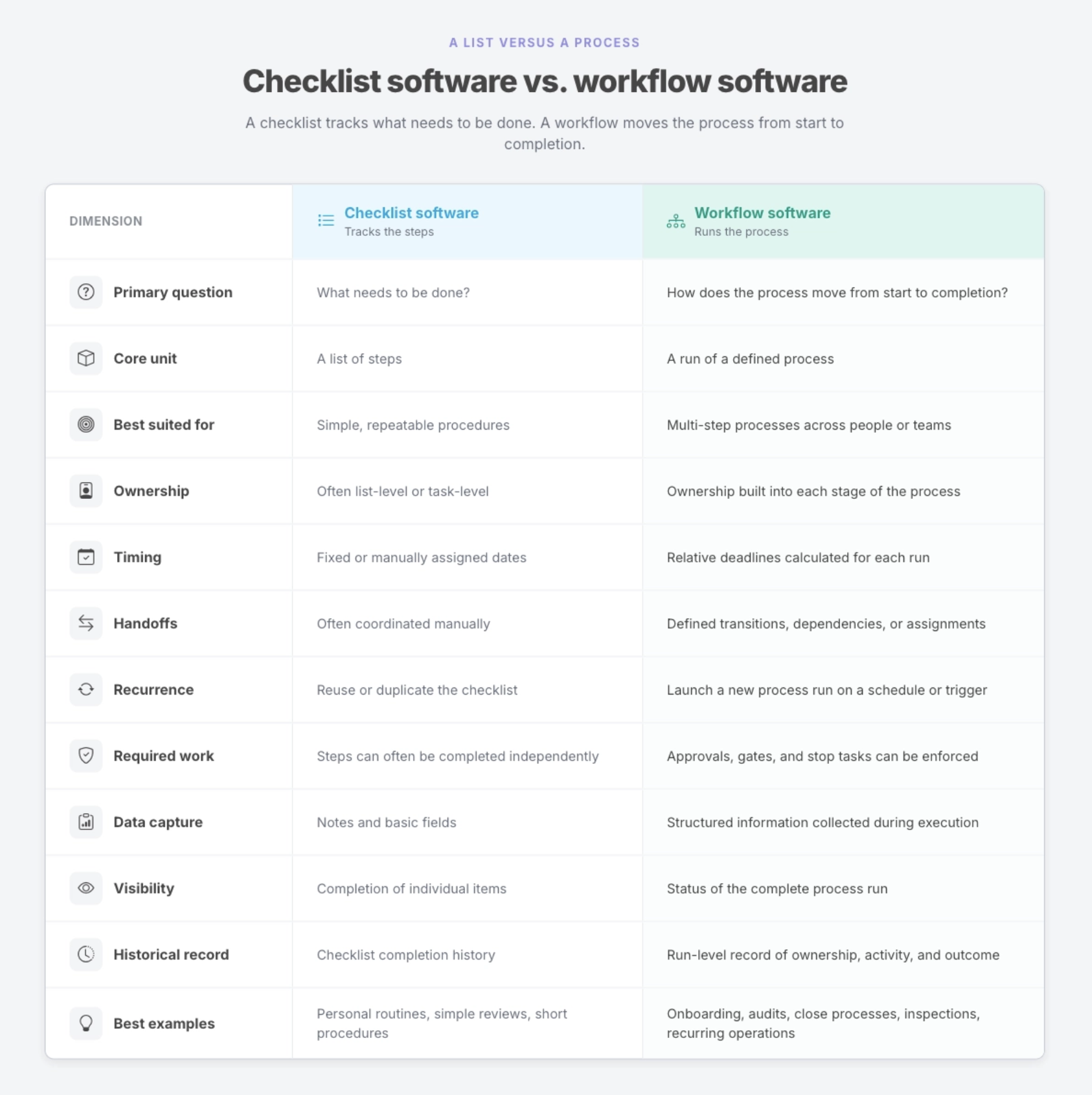
A checklist may include assignees, dates, and reminders. That does not automatically make it a complete workflow system.
The distinction is whether those features are organized around one reusable process and its repeated executions.
Checklist, project, or workflow?
Checklist software is not the only alternative to workflow software.
Some work belongs in a project management platform instead.
A simple way to distinguish the three categories is:
A checklist remembers the steps.
A project organizes changing work.
A workflow runs a repeatable process.
Use checklist software when the work is simple and known
Choose a checklist when one person or a small team needs to follow a stable sequence of steps.
Examples include:
- reviewing a document
- preparing a meeting
- completing a routine equipment check
- publishing a piece of content
- or following a short opening procedure
The work repeats, but the coordination requirements are limited.
Use project management software when the work is unique and evolving
Choose project management software when the team is working toward a deliverable and the plan is likely to change.
Examples include:
- launching a product
- redesigning a website
- implementing a new system
- running a campaign
- or delivering a complex client project
The team needs flexibility to add tasks, adjust priorities, move deadlines, and respond to new information.
Use workflow software when the process is known and must run reliably
Choose workflow software when the steps are broadly understood, but the process must move consistently across people, deadlines, approvals, and repeated instances.
Examples include:
- employee onboarding and offboarding
- month-end close
- customer onboarding
- compliance reviews
- recurring audits
- access reviews
- inspections
- and standardized client delivery
The challenge is not planning new work. It is making sure known work is executed correctly every time.
How Manifestly combines checklists and workflows
Manifestly combines the clarity of checklist software with the accountability of recurring workflow software.
Teams use checklists to define the steps of a process. Each step can include instructions, images, videos, links, data fields, and supporting material that explain how the work should be completed.
Manifestly then adds the execution layer around that checklist.
You can define:
- who owns each step
- how deadlines are calculated
- when the workflow should begin
- which steps are required
- what data must be collected
- when reminders should be sent
- which tasks block completion
- and what record should remain after the run closes
Each execution becomes a separate workflow run.
An employee onboarding workflow can run once for Priya and again for Marcus. A monthly close workflow can create one run for January and another for February. An inspection workflow can create a distinct record for each location and visit.
The checklist defines what good execution looks like.
Manifestly provides the system that makes that execution repeatable, visible, and accountable.
Turn one checklist into a workflow
A checklist is often the right place to begin.
It captures the steps, creates consistency, and reduces reliance on memory. But as the process grows across more people, deadlines, handoffs, approvals, and repeated instances, the checklist may need an execution system around it.
That is the point where workflow software becomes useful.
A checklist shows what to do.
A workflow makes sure it gets done.
Start your free Manifestly trial and turn one recurring checklist into an accountable workflow.
Frequently asked questions
What is checklist software used for?
Checklist software is used to organize and track the steps in a routine or repeatable procedure. Teams use it for inspections, reviews, publishing processes, opening and closing procedures, onboarding tasks, quality checks, and other work where important steps should not be forgotten.
What is the difference between a checklist and a workflow?
A checklist shows the steps that need to be completed. A workflow also defines how those steps move across people, deadlines, approvals, handoffs, and completion.
A checklist focuses on the work. A workflow manages the execution around the work.
When should I use workflow software instead of checklist software?
Workflow software is more useful when several people own different steps, deadlines change for each run, approvals are required, handoffs matter, managers need process-level visibility, or the organization needs a clear record of how each execution was completed.
Can checklist software assign tasks and deadlines?
Yes. Many checklist tools support assignees, due dates, reminders, and comments.
The distinction is not whether those features exist. It is whether they are part of a complete process model that can repeatedly assign, schedule, advance, and record the work.
Can a checklist be part of a workflow?
Yes. A checklist often forms the core of a workflow.
The checklist defines the required steps. The workflow adds ownership, timing, handoffs, approvals, data capture, visibility, and a completion record.
Is workflow software the same as project management software?
No.
Project management software is generally built to organize work around projects, deliverables, and changing plans. Workflow software is built to execute a defined process consistently across repeated runs.
A team may use project management software for a product launch and workflow software for employee onboarding, monthly close, or recurring compliance reviews.
Is Manifestly checklist software or workflow software?
Manifestly combines both.
Teams use checklists to define the steps and instructions for a process. Manifestly’s workflow features assign the work, calculate deadlines, send reminders, collect data, enforce required steps, show the state of each run, and retain a completion record.