
Recurring Workflow Software vs. Project Management Software
August 11, 2026
Project management software organizes tasks, resources, and timelines around projects or bodies of work. Recurring workflow software organizes repeated runs of a defined process, with the steps, owners, deadlines, and completion record recreated each time. Most teams need both, and the mistake is running recurring operational work inside a tool designed primarily for managing projects.
Recurring workflow software vs. project management software
The two categories overlap. Both can contain tasks, assignees, due dates, comments, notifications, and automations.
The difference is not that project management software cannot support recurring work. Most major platforms can repeat tasks, duplicate templates, or recreate items on a schedule.
The difference is what the software is organized around.
Project management software is organized around a project, initiative, board, list, or collection of tasks. Recurring workflow software is organized around a reusable process and each individual run of that process.
A project management tool helps a team coordinate work toward a deliverable.
A recurring workflow tool helps a team answer a different question:
Did this process run correctly this time?
That distinction becomes important when the work repeats across employees, clients, reporting periods, locations, audits, or operational cycles.
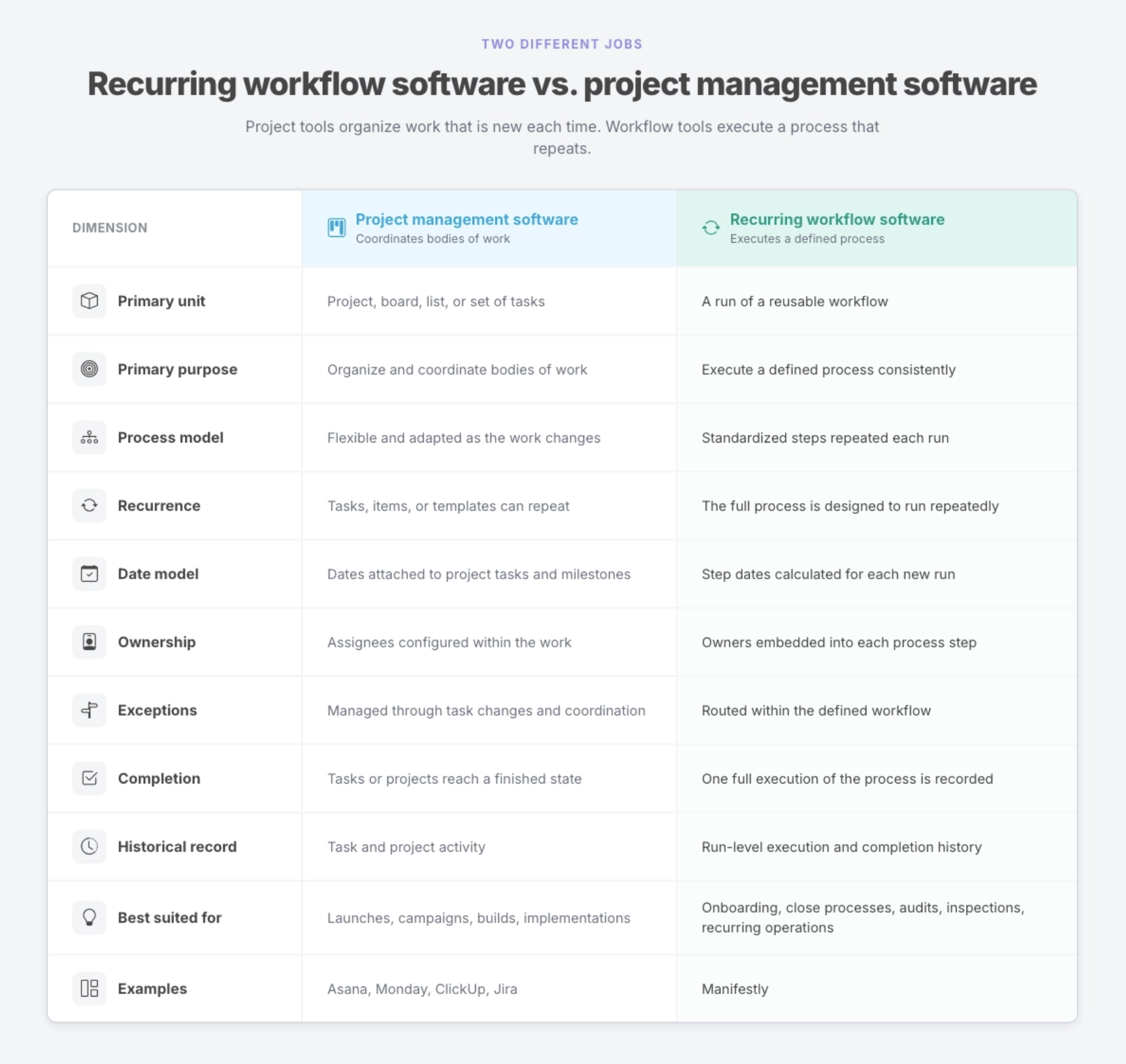
What project management software is built for
Project management software is designed to organize work that needs to move from an initial plan toward a result.
That work might be a product launch, marketing campaign, software implementation, website redesign, client engagement, or internal initiative. The team defines the tasks, assigns responsibilities, sets milestones, manages dependencies, and works toward an end date or deliverable.
The plan often changes as the project develops. New tasks appear. Priorities shift. Deadlines move. The team learns something and adjusts the work.
That flexibility is a strength.
Tools such as Asana, Monday, ClickUp, and Jira are good at helping teams see what needs to happen, organize work across people, and coordinate progress toward a larger outcome. They can provide boards, lists, timelines, calendars, dashboards, dependencies, custom fields, and automations.
They are especially useful when the team is planning and coordinating work that is at least partly unique.
A product launch may follow a familiar structure, but each launch has different assets, stakeholders, risks, and deadlines. A client implementation may use a standard project template, but the requirements will change from one customer to the next. A campaign may repeat quarterly, but the strategy and deliverables will evolve.
In those situations, the project is the right unit of management.
What recurring workflow software is built for
Recurring workflow software is designed for work that should run consistently each time.
The value does not come from creating a new plan for every execution. It comes from making sure a known process happens correctly, with the right people completing the right steps at the right time.
Examples include:
- employee onboarding and offboarding
- month-end financial close
- compliance reviews
- access audits
- customer onboarding
- recurring client delivery
- equipment inspections
- safety checks
- location opening and closing procedures
- and scheduled operational reviews
The reusable workflow defines how the process should run. Each time it is launched, the software creates a separate run for a specific employee, customer, location, month, audit, or event.
That run contains the complete operating structure for that instance:
- the required steps
- the owner of each step
- deadlines calculated for that run
- instructions and supporting materials
- required data fields
- reminders
- approval or stop points
- comments and exceptions
- and the final completion record
The process does not have to be reconstructed each time. Its accountability is already designed in.
The key difference is the project versus the run
The most useful way to understand the categories is to look at their primary unit.
In project management software, the primary unit is usually the project or the task.
In recurring workflow software, the primary unit is the run.
Consider employee onboarding.
In a project management tool, a team might create an “Employee Onboarding” project template and duplicate it for each hire. The copied project contains tasks for HR, IT, payroll, and the hiring manager.
That can work, especially when the process is simple and the team is disciplined about maintaining it.
But the duplicated project may still require someone to rename it, reset dates, confirm assignees, remove irrelevant tasks, add the employee’s details, check which required steps can be skipped, and ensure the project is closed correctly.
A recurring workflow system treats each onboarding as a new execution of the same process.
The employee’s name and start date are entered when the run begins. Tasks are assigned according to the workflow. Relative deadlines calculate from the start date. Required steps remain required. The team can see the status of the complete run, and the finished workflow becomes the record of how that employee was onboarded.
The distinction is subtle until the process has been repeated dozens or hundreds of times.
Then it becomes operationally significant.
Recurring tasks are not the same as recurring workflows
Most project management tools support recurring tasks or recurring automations.
A task can be recreated every Monday. A group of items can be added at the beginning of each month. A project template can be duplicated for the next client or campaign.
Those features are useful. For many teams, they are enough.
But repeating a task is not the same as recreating the complete operating structure around a process.
A recurring task tells the system:
Create this work again.
A recurring workflow tells the organization:
Run this complete process again, with the required owners, dates, instructions, controls, and record.
That difference matters when the process contains several people, staggered deadlines, required information, approval points, or steps that cannot be skipped.
For example, a monthly close process might include:
- reconciling bank accounts
- reviewing accounts receivable
- processing accruals
- checking deferred revenue
- reconciling payroll
- reviewing exceptions
- obtaining controller approval
- and recording final close confirmation
Repeating eight independent tasks does not necessarily show whether the complete close process ran correctly. It may be difficult to see which month a task belongs to, whether a required approval was missed, or whether the entire process was formally completed.
A recurring workflow creates one distinct run for the January close, another for February, and another for March. Each has its own deadlines, assignments, collected information, exceptions, and completion history.
The history belongs to the process run, not only to the individual tasks.
Ownership works differently in a repeatable process
Both project management and recurring workflow software can assign work to people.
The difference is how ownership functions inside the operating model.
In a project, assignments are often configured as the team plans the work. Tasks may move between people as the project changes. That flexibility is appropriate because the work itself may still be taking shape.
In a recurring workflow, ownership is part of the reusable process.
The workflow may define that IT always owns account provisioning, HR owns compliance documents, the hiring manager owns the first-week schedule, and Finance owns payroll setup.
Each new run recreates that ownership structure.
This reduces the chance that a step will be listed without anyone being clearly responsible for completing it. It also prevents the process owner from having to assign every task manually whenever the workflow begins.
Naming a department in an SOP is not the same as assigning the work to a specific person. Adding someone to a project is not the same as defining what they own within the process.
Recurring workflow software makes that ownership explicit at the step level.
Dates work differently too
Projects usually organize dates around a plan and a final delivery.
Recurring workflows often calculate dates from an event specific to each run.
An employee onboarding workflow might calculate deadlines backward and forward from a start date:
- order equipment seven days before the employee starts
- complete system access three days before
- prepare the first-week schedule one day before
- send the welcome email on day one
- complete the first-week check-in five days after
- and schedule the 30-day review during the first week
A real estate closing workflow might calculate dates from the closing date. An inspection workflow might calculate them from the scheduled inspection. A client onboarding process might calculate them from the contract start date.
The workflow contains the timing logic. Each run receives the dates that apply to that specific employee, client, location, or event.
The process owner does not have to rebuild the schedule every time.
Completion means more than checking off tasks
In project management software, completion typically means that the relevant tasks or project have reached a finished state.
In recurring workflow software, completion also answers whether one full instance of a defined process was executed.
That requires more than a collection of checked boxes.
A complete process record may show:
- which steps were completed
- who completed them
- when they were completed
- what information was collected
- which comments or exceptions were recorded
- whether approvals were received
- whether any required step blocked further progress
- and when the entire run was closed
This matters when the organization needs to review the work later.
An HR team may need to show how a particular employee was onboarded. A finance team may need to reconstruct a monthly close. A compliance manager may need to prove that an access review occurred. A consultant may need to show a client how a recurring process was executed.
An activity feed can show that work changed over time. A run-level completion record shows how one specific process execution finished.
When project management software is enough
Not every recurring task needs dedicated workflow software.
Your existing project management tool may be enough when:
- the process contains only a few tasks
- one person owns most of the work
- the risk of a missed step is low
- the schedule is simple
- each cycle changes substantially
- no formal completion record is required
- or your current template already runs reliably without manual repair
A small team may manage a weekly meeting agenda, monthly newsletter, or routine content review perfectly well with recurring tasks in Asana, Monday, or ClickUp.
Adding another platform would not automatically improve the process.
Recurring workflow software becomes more valuable as the execution requirements increase. More steps, owners, deadlines, handoffs, locations, clients, required fields, exceptions, or compliance obligations create more opportunities for the process to break.
The right question is not whether the work repeats. It is whether the complete process needs to run consistently and leave a clear record each time.
Signs your team needs recurring workflow software
The need usually becomes visible through repeated operational friction.
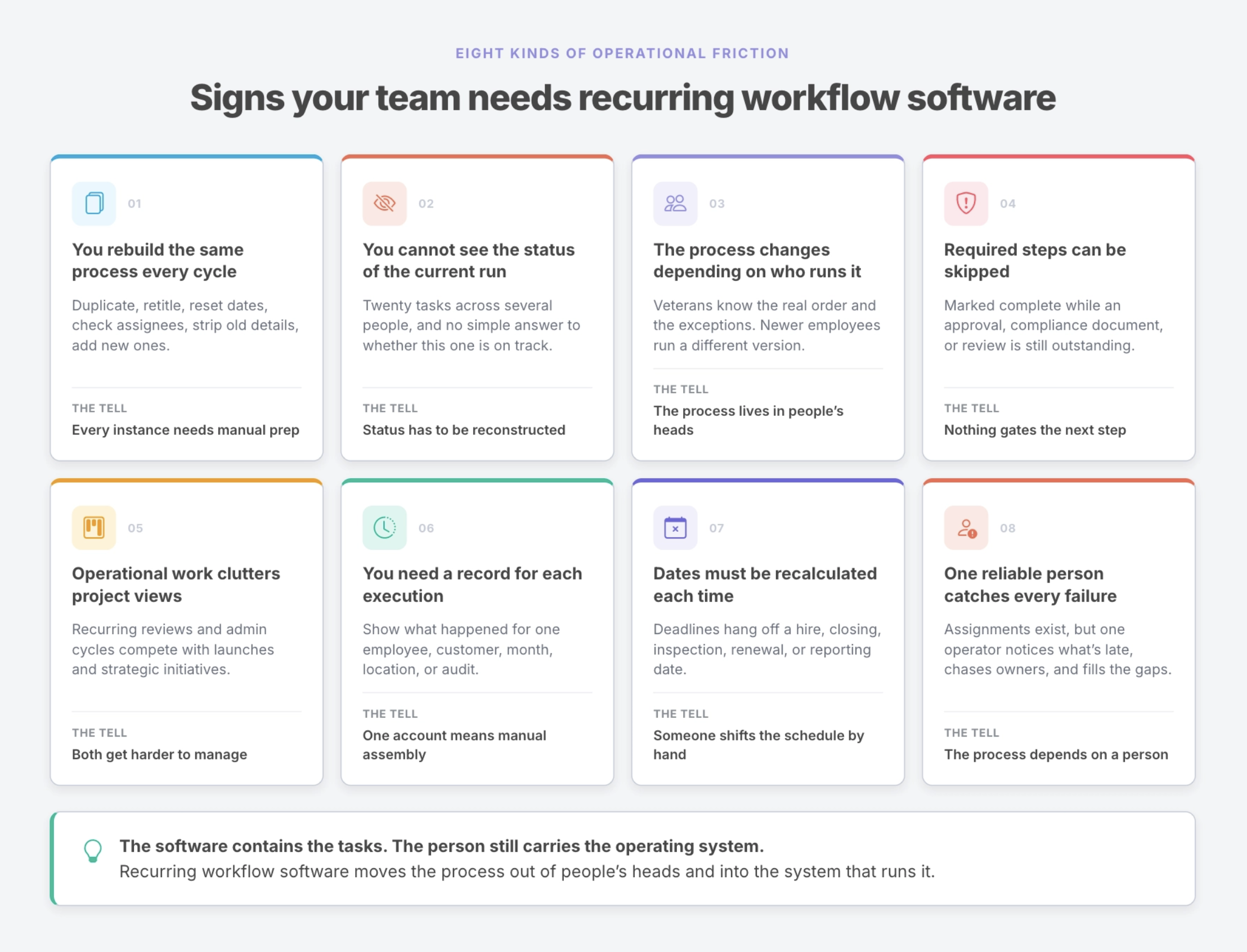
You rebuild the same process every cycle
Someone duplicates a project, updates the title, resets dates, checks assignees, removes old information, and adds the details for the current cycle.
The template saves some time, but every new instance still needs manual preparation.
You cannot see the status of the current run
The process may contain twenty tasks across several people, but there is no simple answer to whether this month’s close, this employee’s onboarding, or this location’s inspection is on track.
The process owner must open several tasks or ask several people to reconstruct the current state.
The process changes depending on who runs it
Experienced operators know which steps matter, what order to follow, and where exceptions usually appear. Less experienced employees follow a different version of the process or miss steps that were never made explicit.
The organization has a process, but much of it still lives in people’s heads.
Required steps can be skipped
The project can be marked complete even though an approval, compliance document, or review remains outstanding.
There is no gating mechanism that prevents the process from moving forward before required work is finished.
Operational work clutters project views
Recurring reviews, checks, and administrative cycles compete for attention with launches, implementations, and strategic initiatives.
The project workspace becomes a mixture of genuinely changing projects and repeated operational processes, making both harder to manage.
You need a separate record for each execution
You need to show what happened for a specific employee, customer, month, location, or audit.
The task history exists, but producing one coherent account of the full process requires manual reconstruction.
Dates must be recalculated each time
Deadlines depend on a hire date, closing date, inspection date, renewal date, or reporting period. Someone must manually shift the schedule every time the process begins.
The same reliable person catches every failure
Assignments exist, but one conscientious operator still notices what is late, chases the owners, fills the gaps, and keeps the process from breaking.
The software contains the tasks. The person still carries the operating system.
When to use each type of software
Project management and recurring workflow software solve different problems. Most established teams will benefit from using both.
Use project management software for work such as:
- product launches
- marketing campaigns
- website redesigns
- client implementations
- software development
- strategic initiatives
- research projects
- and work where the plan will evolve during execution
Use recurring workflow software for work such as:
- employee onboarding and offboarding
- month-end financial close
- recurring compliance reviews
- access audits
- customer onboarding
- recurring client service delivery
- equipment and safety inspections
- quality-control procedures
- and repeatable operations where consistency and proof matter
A project asks the team to coordinate toward something new.
A recurring workflow asks the team to execute something known without allowing important steps to disappear.
How Manifestly fits alongside your project management software
Manifestly does not need to replace Asana, Monday, ClickUp, Jira, or the rest of your project stack.
Keep launches, campaigns, implementations, and strategic projects in the tools your team already uses to plan and coordinate them.
Move repeatable operational processes into Manifestly when you need the process itself to carry more of the execution structure.
In Manifestly, you can define:
- the steps that should happen every time
- who owns each step
- how dates should be calculated for each run
- what instructions or supporting materials people need
- which information must be collected
- which steps require approval
- which tasks block further progress
- when reminders should be sent
- and what counts as a completed process
Each employee, client, location, reporting period, or audit receives its own workflow run. The team can see the status of that run, identify what is late, and retain the completed record.
This makes Manifestly especially useful for systems-minded operators and consultants.
You do not have to dismantle the stack that already works. You can identify the recurring processes that require more consistency and move those into a system built around repeatable execution.
Start with one recurring process
The difference between project management software and recurring workflow software is not whether either category can display a task.
It is what the system is designed to help the organization manage.
Project management software helps teams organize work around projects and deliverables. Recurring workflow software helps teams run the same process reliably across repeated instances.
Most teams need both.
The mistake is forcing recurring operational work into a project structure and then relying on someone to repair the process every time it runs.
Start with one recurring process your project management software was never built to carry.