
How to Add an Accountability Layer to Your Zapier Workflows
October 20, 2026
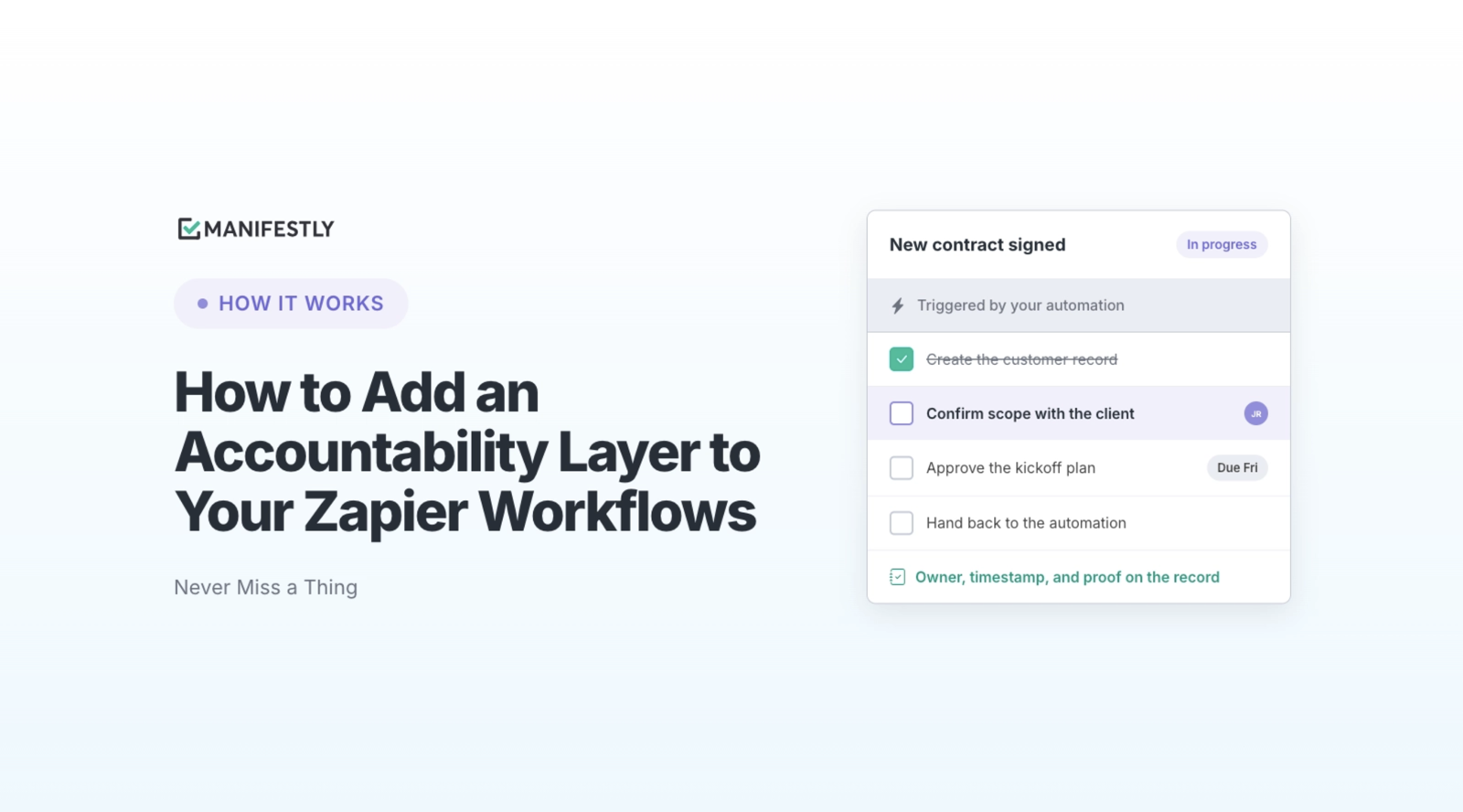
A deal closes in your CRM. Zapier creates the customer folder, updates the billing system, and notifies the onboarding team. An AI agent prepares a handoff summary. A person receives a request to approve the next step.
Before they can approve it, someone still needs to confirm the promised scope, verify payment terms, collect missing documents, and prepare the kickoff. The automation has started the work. The team needs a way to carry it through.
You can add a human checkpoint directly to a Zap. When the work behind that checkpoint involves several contributors, deadlines, and follow-ups, you can connect the automation to a Manifestly workflow run. People and AI agents receive assigned steps, reviewers get the context they need, and the process owner can see what remains incomplete.
The useful question is how much work must happen before the process is actually finished.
Can Zapier include AI agents and human approval steps?
Yes. Zapier can connect applications, perform automated actions, incorporate AI work, and pause for human input. Its Human in the Loop capabilities let a person review information before a Zap continues.
That can be enough structure for many tasks. A reviewer might correct information extracted from a document, approve a proposed CRM update, or review an AI-generated message before it is sent. The automation prepares the information, the person responds, and the next action follows their decision.
Teams using n8n can build similar patterns. For example, n8n supports human approval before selected AI agent tool calls, allowing a person to approve or deny a proposed action before it executes.
These are useful controls. If the reviewer has everything needed to decide and the response lets the automation continue, a checkpoint may be all you need.
More coordination becomes necessary when the decision depends on work that has not happened yet.
An action, a checkpoint, and a workflow run
An onboarding process can contain automated actions, human decisions, and work that takes several days. Each has different requirements.
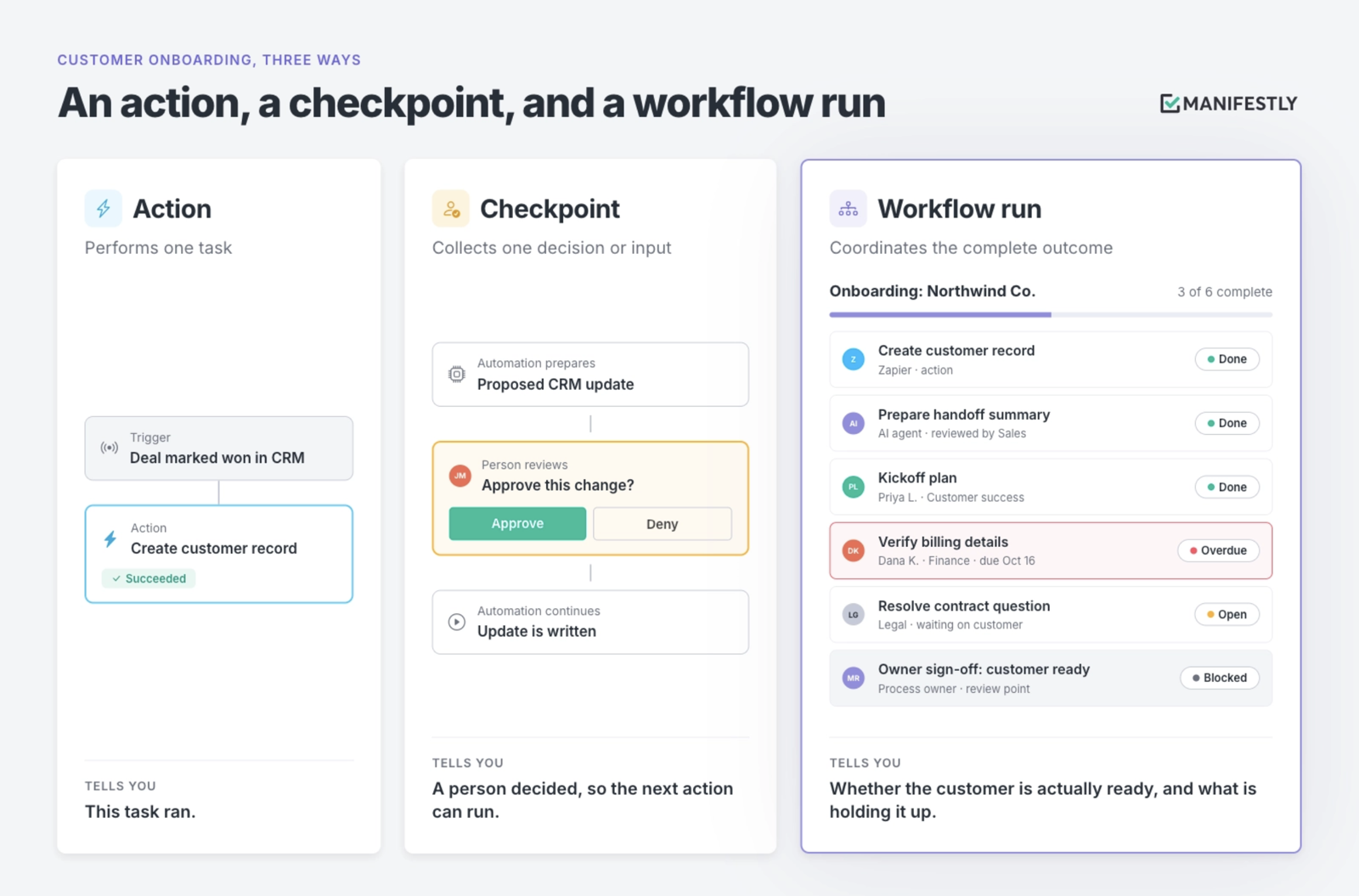
An action performs a task
Zapier creates a customer record. An agent prepares a handoff summary. An integration copies approved information into another system.
Each action contributes to the outcome. Its success tells you that a particular task ran; you still need to know whether the rest of the process is ready.
A checkpoint collects a decision or input
A person reviews a proposed change, corrects a value, supplies missing information, or authorizes the next action.
A useful checkpoint gives the reviewer enough context to act. If they need to investigate, collect evidence, or coordinate with colleagues first, that work also needs to be managed.
A workflow run coordinates the complete outcome
A run is one execution of a reusable workflow: onboarding this customer, reviewing this vendor, or closing this month’s books.
It brings the required contributions together. People and agents have assigned work. Steps have due dates and instructions. Review happens at defined points, and the run keeps a record of progress and decisions.
The onboarding summary may be ready while billing verification is overdue. The kickoff plan may be complete while a contract question remains unresolved. The process owner needs to see those conditions together before declaring the customer ready.
When does a checkpoint need a broader workflow?
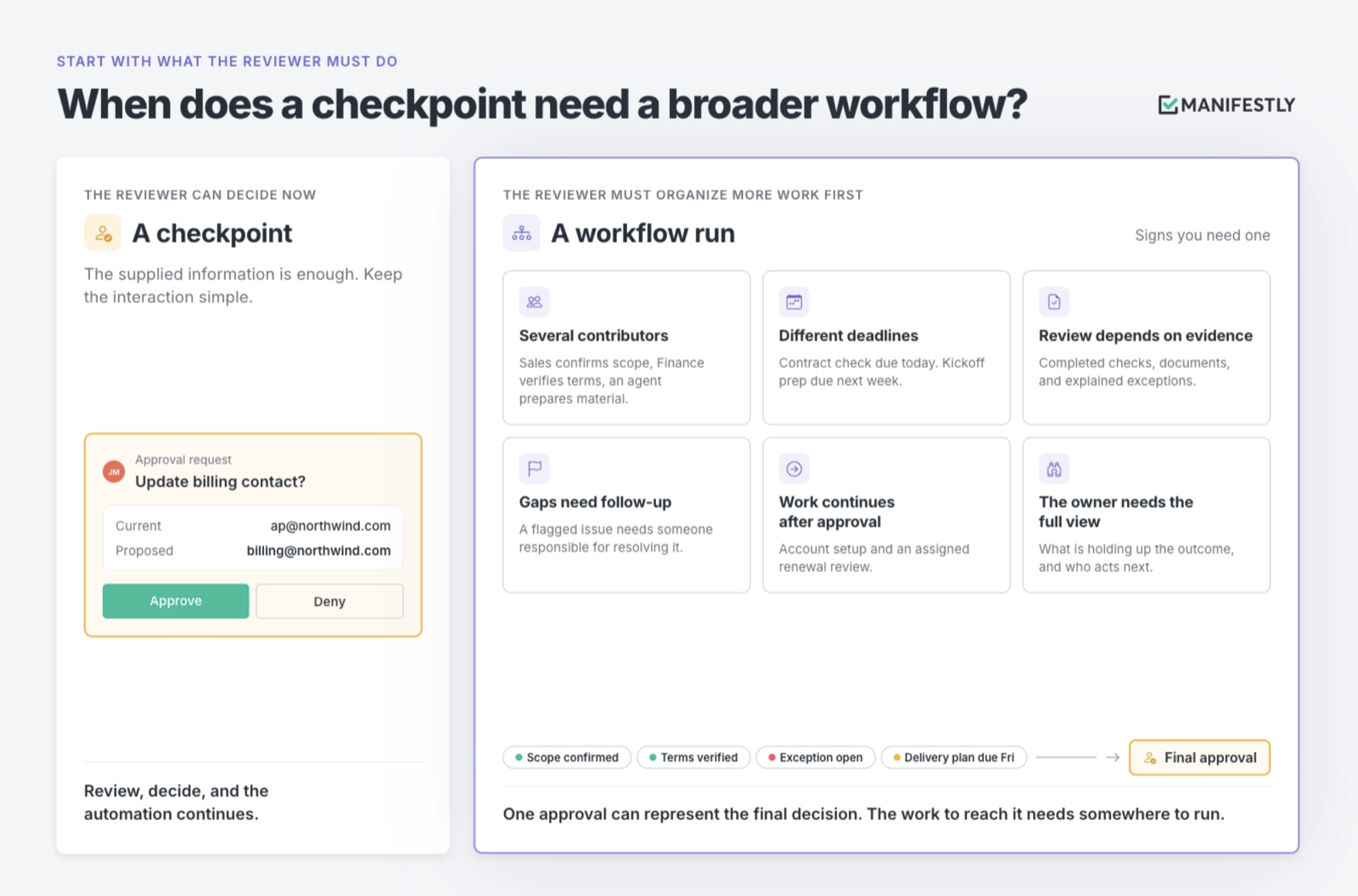
Start with what the reviewer must do before they can answer.
If they can review the supplied information and make a decision, keep the interaction simple. If they must organize additional work, give that work its own assignments and follow-up.
Several conditions make a broader workflow useful:
- Several contributors are involved. Sales confirms scope, Finance verifies terms, an agent prepares supporting material, and Operations plans delivery.
- Steps have different deadlines. A contract check may be due today while kickoff preparation is due next week.
- Review depends on evidence. The approver needs completed checks, supporting documents, and explanations of exceptions.
- Missing information requires follow-up. A flagged issue needs someone responsible for resolving it.
- Work continues after approval. An approved vendor may still need account setup and an assigned renewal review.
- The process owner needs a complete view. They need to know which contribution is holding up the outcome and who acts next.
A single approval request can represent the final decision. The work required to reach that decision still needs somewhere to run.
How Zapier and Manifestly work together
Zapier and Manifestly can participate throughout the same process.
Zapier connects systems and executes configured automation. An external AI agent performs the work it has been given. Manifestly coordinates the workflow run: assignments, due dates, review, exceptions, and the record of completion.
There are two useful ways to connect that work.
An event starts a Manifestly run
A deal closes, a form arrives, or a record reaches a status that requires review. Through the Zapier integration, the event can start the appropriate Manifestly workflow run and pass in relevant information.
The run gives each contributor a defined part of the process. A sales owner can confirm the handoff, Finance can verify billing, and an implementation owner can prepare delivery. Where an agent is configured, it can receive assigned steps alongside the team.
Later in the process, completion of a step or run can trigger downstream automation. The team defines which event should authorize which next action.
A workflow step delegates work to an external agent
With AI Agents in Manifestly, an agent can be added as a team member and assigned workflow steps. Manifestly notifies its configured endpoint when work needs attention. The external integration retrieves the permitted context, performs the work, and reports back through Manifestly’s MCP server or API.
Manifestly does not host the agent or choose its model. You bring the agent and connect it to the workflow. Its actions in Manifestly are attributed to its own identity, so the team can distinguish its contributions from a person’s work.
For teams building with n8n or Zapier, this provides a possible integration pattern: use the automation platform to receive an assignment and coordinate the external execution, while Manifestly maintains the shared run. That connection requires configuration; adding an agent in Manifestly alone does not build or deploy the automation.
AI Agents is currently available in beta, enabled per account.
Example: client onboarding with people and an AI agent
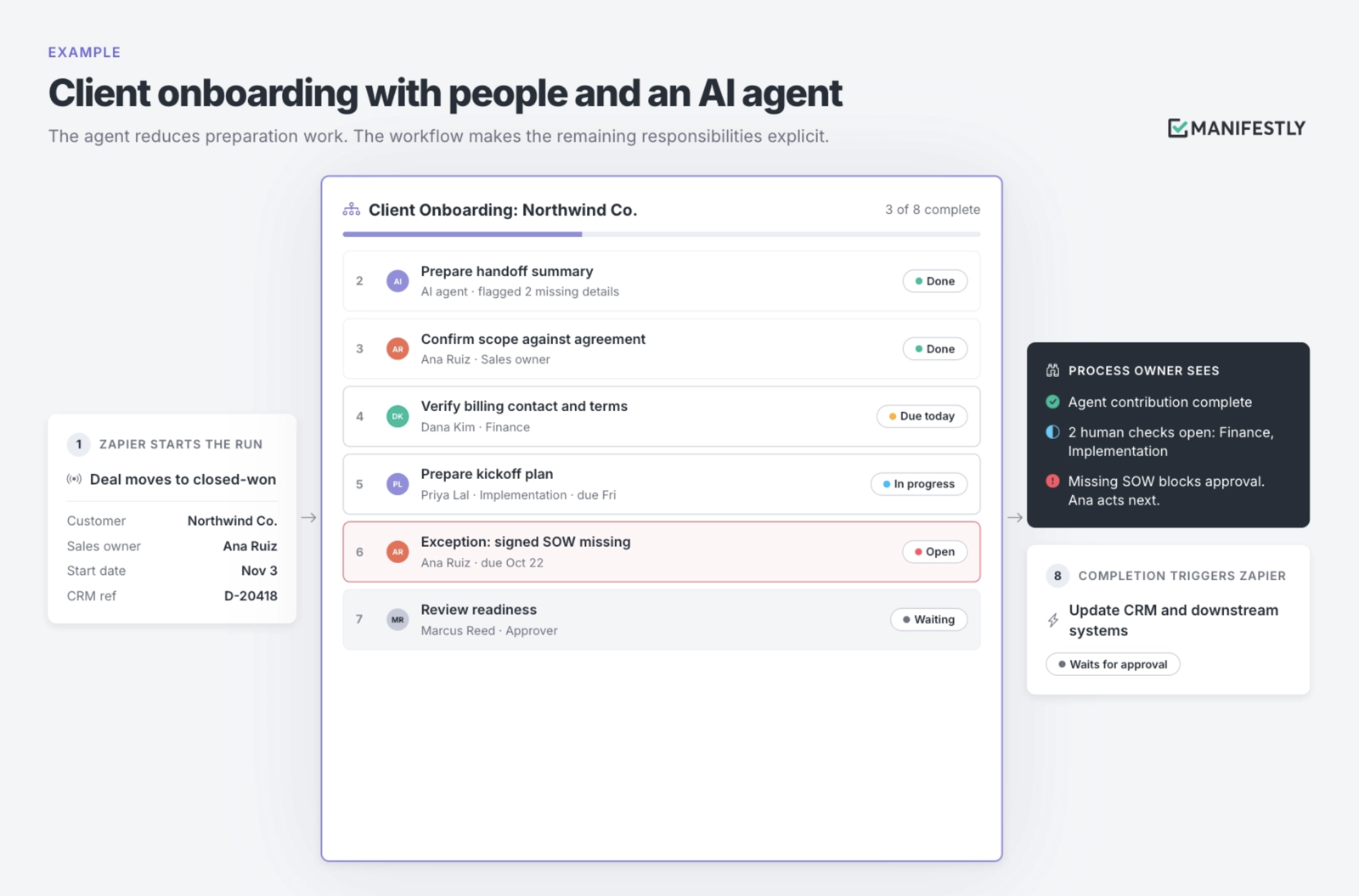
Consider a team that already uses Zapier to move closed-won deals from the CRM into its delivery systems.
Today, a Slack notification tells the team that onboarding can begin. Someone then reads the deal notes, chases missing information, assigns follow-ups, and decides whether the kickoff is ready.
The notification reaches the team. Coordination still depends on someone remembering every handoff.
A connected client onboarding workflow could work like this:
- Zapier starts the run. The CRM deal moves to closed-won, and Zapier creates a Client Onboarding run with the customer name, sales owner, proposed start date, and CRM reference.
- An agent prepares the handoff. Through a configured integration, the agent reads the available information, prepares a summary, and flags missing details. Its assignment specifies where to record the result and what to do when information is unavailable.
- Sales confirms the scope. The sales owner checks the summary against the agreement, corrects inaccuracies, and resolves open questions about what was promised.
- Finance verifies billing. The assigned reviewer confirms the billing contact, payment terms, and other required details.
- The implementation owner prepares the kickoff. They confirm the delivery owner, required assets, and proposed plan.
- Exceptions receive follow-up. Missing documents or conflicting information receive an assigned owner and due date.
- A named approver reviews readiness. The decision comes after the required preparation, with the supporting information available in the run.
- Approved completion starts the next automation. The configured completion event triggers Zapier to update the CRM and carry the result into downstream systems.
At any point, the process owner can see the agent’s completed contribution, the human checks still open, and the issue preventing approval.
The agent reduces preparation work. The workflow makes the remaining responsibilities explicit.
Put approval before the action it governs
An agent preparing a recommendation and an agent changing an external system are different assignments. The approval must match the action you intend to control.
Suppose an onboarding agent drafts a welcome message. A reviewer can check that draft before a later automated step sends it. If the agent sends the message first and asks for review afterward, the review cannot prevent an incorrect message from reaching the customer.
The same principle applies to provisioning access, changing billing details, or updating a system of record. Where approval is required, configure the execution path so the action waits for it. An instruction asking the agent to seek permission should be supported by the controls governing its tools and integrations.
In Manifestly, place a workflow approval where the decision belongs. Identify the reviewer, the information they need, and the work that should wait for their response. External actions must also be configured to respect that decision.
Define rejection as carefully as approval. Who corrects the work? Where does the reviewer record the issue? What must happen before the decision is requested again?
An agent can have an assigned step and an attributed completion record. A person still needs responsibility for consequential decisions, unresolved exceptions, and the overall outcome.
When is Zapier alone enough?
Zapier may provide all the structure you need when the automated path is clear, the human decisions are bounded, and participants can act from the context supplied. If the existing setup gives the team reliable follow-up and the record it needs, keep using it.
Adding Manifestly becomes useful when the process needs a shared place for ongoing work across people and agents.
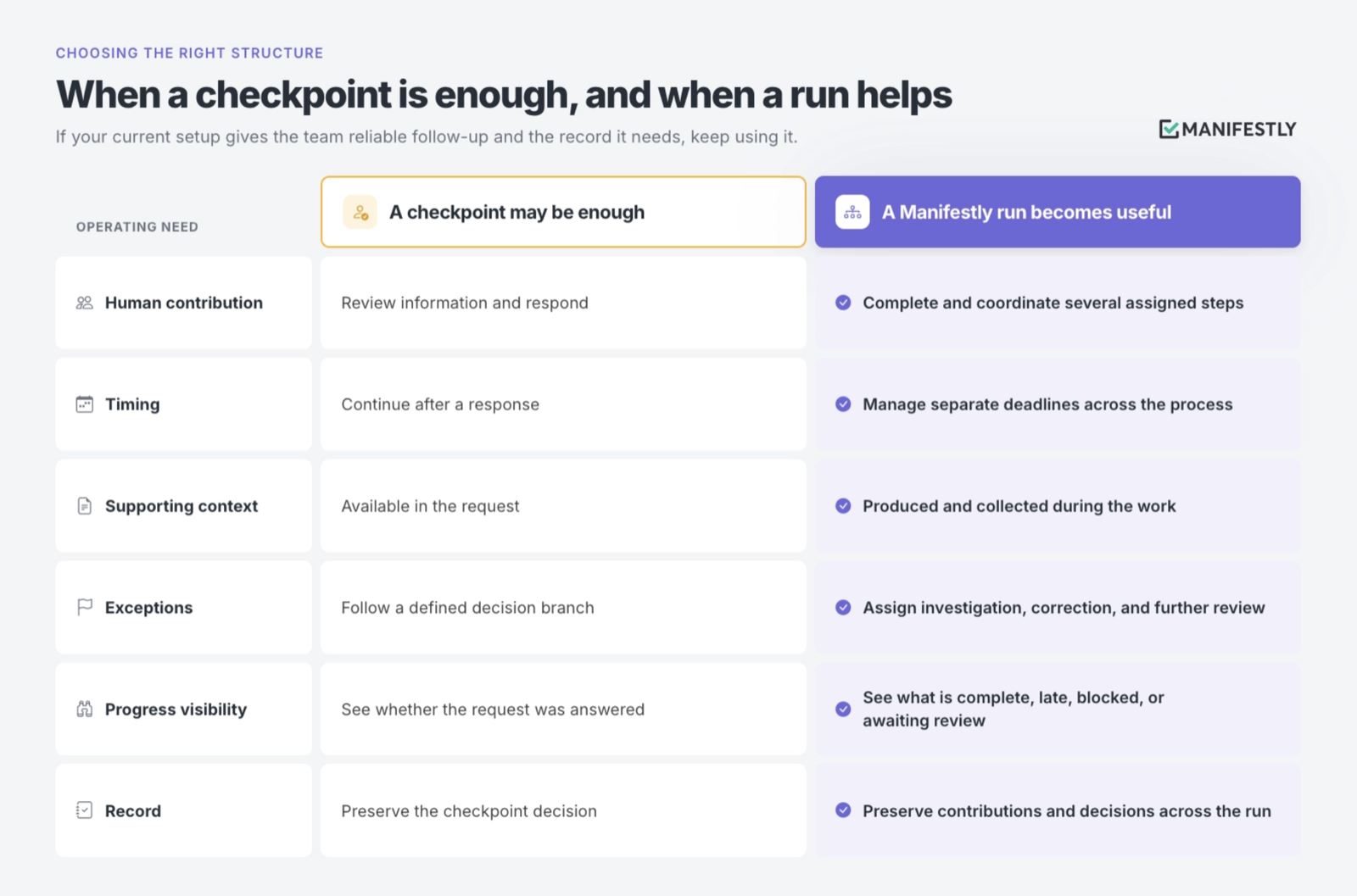
Teams can build broader coordination in automation platforms. The practical question is how people will operate the result: where they find assignments, how they resolve problems, and how the process owner checks progress without tracing every branch of an automation.
Choose the structure that makes the recurring work easiest to run reliably and maintain as it changes.
Make the next handoff explicit
As agents take on more preparation and execution, the remaining handoffs deserve closer attention. A summary is ready, but someone must confirm the scope. A check finds an exception, but someone must resolve it. A proposed action is prepared, but someone must authorize it before it runs.
Start with one recurring process. Decide which steps automation can perform, which an agent can take on, and which require a person’s judgment. Then make the next assignment, review point, and completion requirement clear.
The team should be able to answer who acts next and what still stands between today’s progress and a completed outcome.
Start a free trial and connect one Zapier automation to a Manifestly workflow. Give each contribution an assignment, each required decision a reviewer, and the complete process a record.