
Best MCP-Native and AI-Integrated Workflow Automation Tools in 2026
July 30, 2026
AI assistants can now summarize, draft, reason, and trigger actions across business tools. The problem is that most operational work still needs more than a good suggestion. It needs a defined process, an accountable owner, a due date, and a checkpoint before the next step moves forward.
That is where MCP-native and AI-integrated workflow automation tools are starting to matter. The best tools do not just let AI talk about work. They let AI trigger defined actions, connect to business systems, and route work through the right human or automated checkpoints.
This guide compares MCP-native and AI-integrated workflow automation tools for 2026, with a focus on native MCP support, AI-triggered execution, app automation, human checkpoints, and the difference between general automation platforms and AI-triggered human workflow execution.
What does MCP-native workflow automation mean?
MCP-native workflow automation means an AI assistant can use the Model Context Protocol to connect directly to a workflow system and take defined actions inside it. In practice, that can include starting workflow runs, checking status, completing steps, assigning work, updating fields, or triggering predefined automations through an MCP server.
That is different from simply adding AI text generation to a workflow app. It is also different from generic app automation. MCP-native workflow automation gives the AI assistant a standardized way to interact with external tools, data, and workflows.
The Model Context Protocol is an open-source standard for connecting AI applications to external systems, including data sources, tools, and workflows. The MCP documentation describes it as a “USB-C port for AI applications,” giving AI systems a standard way to connect to the tools they need to access information and perform tasks.
Four types of MCP and AI workflow automation tools
AI workflow automation tools are often grouped together, but they do not all solve the same problem.
MCP-native human workflow execution tools help AI assistants interact with defined workflows that still run through assigned owners, due dates, approvals, checkpoints, and completion history.
General automation platforms with MCP support connect AI assistants to broad app automation across many services. These tools are strongest when the main job is moving data or triggering actions across a large SaaS stack.
Developer-controlled automation platforms give technical teams more control over APIs, self-hosting, code, event-driven workflows, and custom integrations.
AI-native automation builders help teams create model-driven automations, AI agents, and workflows that often include human review, AI output checks, or human-in-the-loop steps.
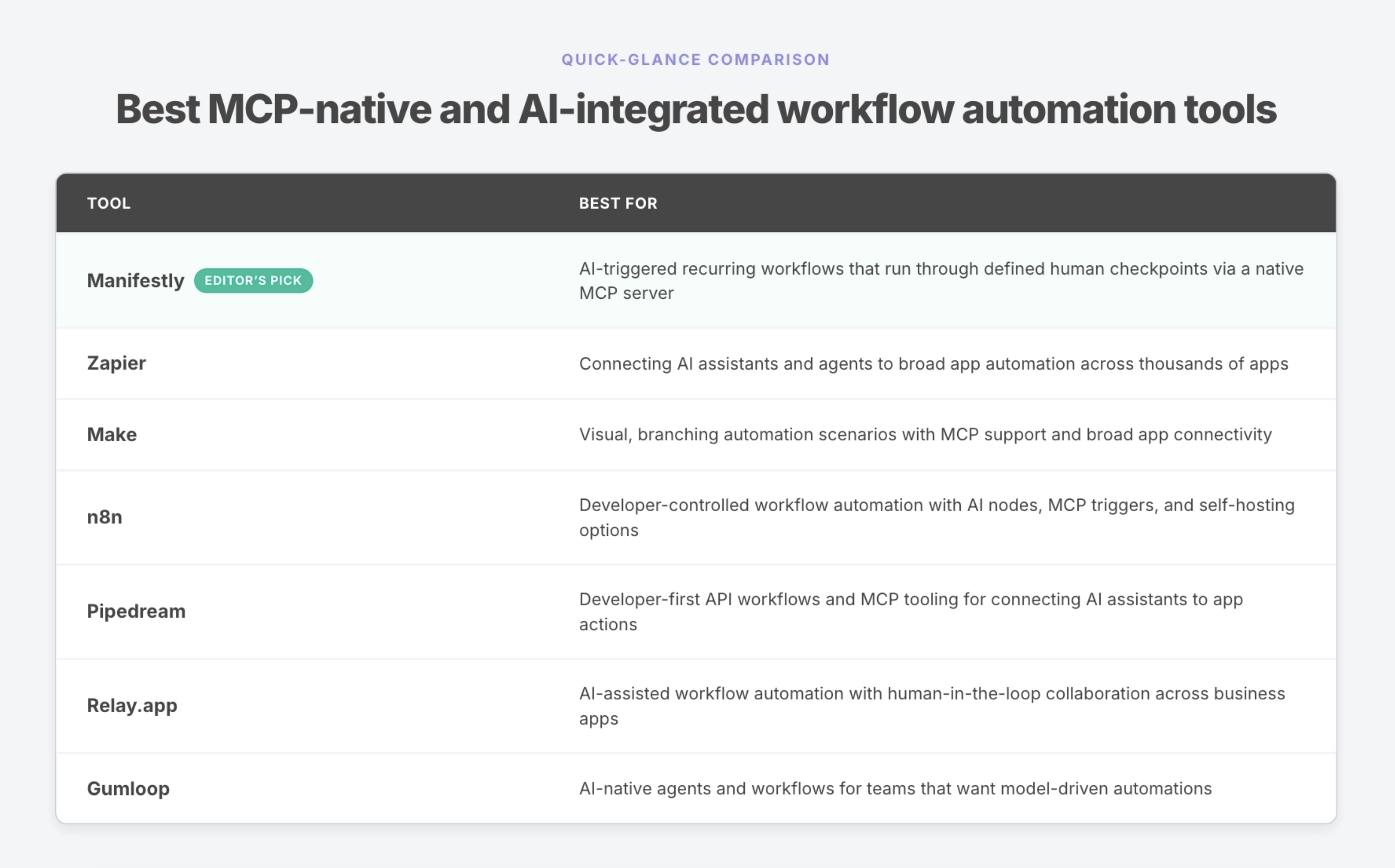
The right choice depends on what you need AI to do. If you need app-to-app automation, choose a broad automation platform. If you need developer control, choose a technical automation layer. If you need AI to trigger recurring human workflows while preserving accountability, choose a workflow execution tool built around checkpoints and records.
How we evaluated these tools
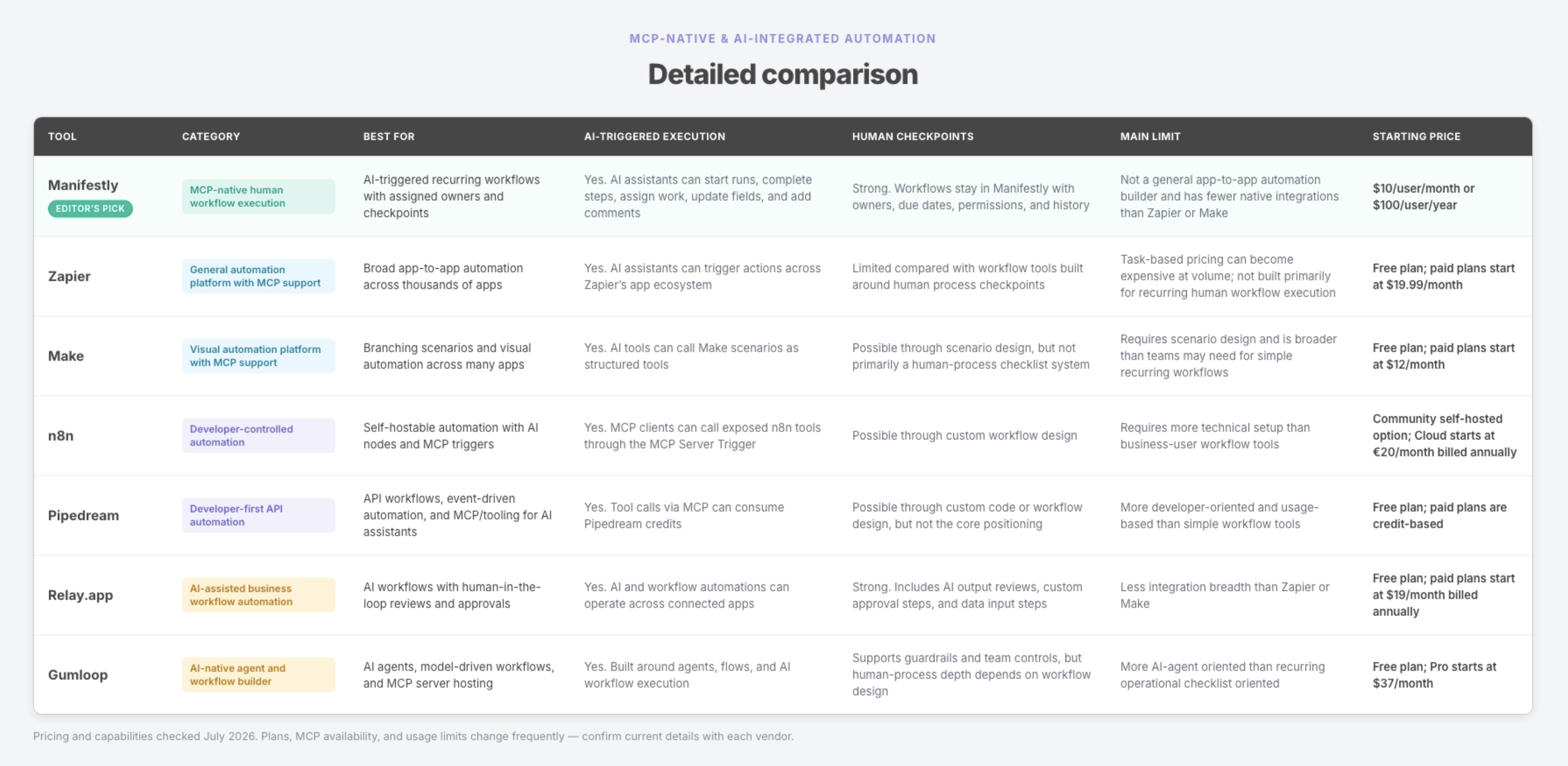
We classified each product before comparing features. General automation platforms were evaluated on app connectivity, automation breadth, AI features, and MCP support. Developer automation platforms were evaluated on API control, self-hosting or code extensibility, and technical flexibility. Human-workflow tools were evaluated on whether AI-triggered actions still run through assigned owners, due dates, checkpoints, permissions, and completion history.
We did not treat these categories as interchangeable. A workflow execution tool should not be expected to replace Zapier or Make for broad app automation. A developer automation platform may be more flexible than a business team needs. An AI-native automation builder may be better for model-driven tasks than for recurring operational workflows with accountable owners and audit history.
Evaluation criteria
- Native MCP support: Does the tool provide a native MCP server, MCP connector, MCP trigger, or MCP-compatible surface?
- AI-triggered execution: Can an AI assistant trigger real actions, not just summarize or draft?
- App-to-app automation breadth: How many apps, services, or APIs can the tool connect?
- Human checkpoints: Can workflows pause for human review, approval, input, or completion?
- Recurring scheduling: Can teams run repeatable workflows on a schedule?
- Per-run accountability: Can each workflow run have owners, due dates, assignments, and status?
- Authentication and permissions: Does the tool respect user permissions or provide access controls?
- Action attribution and audit history: Can teams see what happened, who triggered it, and what changed?
- Developer control: Does the tool support code, APIs, custom logic, self-hosting, or technical deployment?
- Pricing transparency: Is pricing clear, usage-based, credit-based, or sales-led?
1. Manifestly
Best for: AI-triggered recurring workflows that still run through defined human checkpoints.
Category: MCP-native human workflow execution.
MCP support: Native Manifestly MCP server.
Manifestly is best for teams that want AI assistants to trigger recurring workflows while keeping the work assigned, checkpointed, and recorded. It is not a general app-to-app automation builder like Zapier or Make, and it is not trying to replace developer automation platforms like n8n or Pipedream.
Manifestly’s MCP server connects MCP-compatible AI clients to Manifestly workflows. From an AI assistant, users can check overdue work, start workflow runs, complete or skip steps, assign work, update due dates, fill fields, add comments, and review workflow status. Manifestly’s setup guide lists the endpoint as https://mcp.manifest.ly, with Streamable HTTP transport and OAuth 2.1 authentication.
The important distinction is that Manifestly remains the system of record. Claude or another MCP-compatible assistant becomes a natural-language way to interact with the work, but the workflow still lives in Manifestly with the team’s assignments, permissions, due dates, comments, fields, and completion history.
Key features
- Native MCP server
- Support for MCP-compatible clients, including Claude, Claude Code, ChatGPT, Gemini, Cursor, and others
- OAuth-based authentication
- Workflow run creation from AI assistants
- Step completion, assignment, comments, and field updates
- Recurring workflow scheduling
- Assigned owners and due dates
- Reminders and notifications
- Completion history and audit records
- Data collection and file uploads
- API, webhooks, and Zapier integrations
Human checkpoint model
Manifestly’s strength is not unattended automation. Its strength is defined execution.
AI can help trigger and update the work, but the process still runs through Manifestly workflows. That means recurring work can keep owners, deadlines, required fields, approvals, comments, and completion records attached to the process.
This is especially useful for workflows like onboarding, compliance reviews, property management inspections, weekly operations reviews, accounting close checklists, and recurring customer success handoffs.
Limits
Manifestly is not a broad app-to-app automation platform. It does not compete with Zapier or Make on integration count, visual automation breadth, or arbitrary cross-app automation.
Manifestly is strongest when the work is recurring, human-owned, and operationally important. If your primary need is to move data between hundreds or thousands of apps, use a general automation platform. If your primary need is developer-controlled API automation, use a developer automation platform.
Choose Manifestly if you want AI to trigger recurring workflows that still run through accountable people and defined checkpoints.
Manifestly is a strong fit when your team needs to ask an AI assistant to:
- Start a workflow run from an existing template
- Show overdue workflow assignments
- Summarize what is stuck
- Assign a step to a team member
- Add comments or context to a step
- Fill in required workflow fields
- Complete a step after the work is done
- Keep the process record in one place
2. Zapier
Best for: Connecting AI assistants and agents to broad app automation across thousands of apps.
Category: General automation platform with MCP support.
MCP support: Zapier MCP.
Zapier is one of the strongest choices when the main job is connecting apps. Its MCP materials describe Zapier MCP as a way for AI assistants to securely interact with tools across Zapier’s large app ecosystem, and its pricing page says Zapier MCP is available to all accounts, with each MCP tool call using two tasks from the account’s task quota.
For technical operators, Zapier is useful when AI needs to take action across many business systems without building and maintaining individual integrations.
Key features
- Thousands of app integrations
- Zaps for app-to-app automation
- Zapier MCP
- AI agents and AI-assisted automation features
- Webhooks
- Multi-step workflows
- Filters, paths, and conditional logic
- Tables, forms, and connected automation tools
Human checkpoint model
Zapier can support human review or approval patterns depending on how the automation is designed, but its core strength is app-to-app automation. It is not primarily a recurring human workflow execution system with per-run owners, due dates, and checklist completion history.
Limits
Zapier is broader than Manifestly, but that breadth is not the same as human-process accountability. If the process needs a recurring checklist with owners, deadlines, comments, evidence, and completion records, Zapier may need to work alongside a workflow execution tool.
Task-based pricing is also important to model carefully. MCP tool calls use Zapier tasks, and high-volume automations can consume tasks quickly.
Choose Zapier if your main need is broad app-to-app automation across many SaaS tools.
Avoid Zapier if your main need is recurring human workflow execution with structured checkpoints, owners, due dates, and completion records.
3. Make
Best for: Visual, branching automation scenarios with MCP support and broad app connectivity.
Category: Visual automation platform with MCP support.
MCP support: Make MCP Server.
Make is a visual automation platform for building scenarios across apps. Its MCP Server page says Make MCP links ChatGPT, Claude, Cursor, and other MCP-compatible clients to more than 3,000 apps, and that AI tools can call Make scenarios as structured tools.
Make is a strong fit when teams want visual control over branching automations, structured inputs and outputs, and broad app connectivity.
Key features
- Visual automation scenarios
- 3,000+ app connections
- Make MCP Server
- MCP Client support
- AI agents and AI apps
- Branching logic
- Scenario scheduling
- Error handling and execution logs
- Team automation features
Human checkpoint model
Make can support human checkpoints if a scenario is designed that way. For example, a scenario can route work into an approval tool or trigger a task in another system. But Make itself is primarily a visual automation platform, not a recurring human checklist system.
Limits
Make is powerful, but it requires scenario design. Teams that simply need recurring human workflows with accountable steps may find a purpose-built workflow execution tool easier to adopt.
Choose Make if you need visual, branching automation across many apps and want to expose Make scenarios to AI tools through MCP.
Avoid Make if your main need is to run recurring checklists through assigned humans rather than design app automation scenarios.
4. n8n
Best for: Developer-controlled workflow automation with AI nodes, MCP triggers, and self-hosting options.
Category: Developer-controlled automation.
MCP support: MCP Server Trigger / MCP support.
n8n is a flexible workflow automation platform often used by technical teams that want more control than a no-code automation tool provides. It supports AI agent integrations and provides an MCP Server Trigger node that acts as an entry point for MCP clients. n8n’s documentation says the MCP Server Trigger exposes a URL that MCP clients can interact with to access n8n tools.
n8n is a strong fit for teams that want to build automation with more technical control, including self-hosting, custom logic, APIs, AI nodes, and workflow extensibility.
Key features
- Visual workflow builder
- AI nodes and AI agent integrations
- MCP Server Trigger
- Self-hosting options
- API and webhook support
- Custom logic
- App integrations
- Workflow execution history
- Developer-friendly automation patterns
Human checkpoint model
n8n can support human checkpoints through workflow design, integrations, and custom logic. It is flexible enough to build approval steps, but teams need to design and maintain those patterns themselves.
Limits
n8n is more technical than business-user workflow tools. It is a strong fit for builders, technical operators, and automation teams, but may be more setup than an operations team needs for recurring checklist execution.
Choose n8n if you want developer-controlled automation, self-hosting options, AI nodes, MCP triggers, and flexible workflow design.
Avoid n8n if your main need is a simple recurring workflow system for non-technical operators.
5. Pipedream
Best for: Developer-first API workflows and MCP tooling for connecting AI assistants to app actions.
Category: Developer-first API automation.
MCP support: Pipedream MCP and Connect tooling.
Pipedream is built for technical users who want to connect APIs, events, workflows, and app actions. Its pricing documentation describes Pipedream Connect as a way to add integrations to an app or AI agent, with API usage and external users as pricing inputs. It also says tool calls via MCP consume credits.
Pipedream is a strong fit when technical teams need API-level flexibility, event-driven automation, workflow code, and MCP or tool-use infrastructure for AI applications.
Key features
- API workflow automation
- Event sources and triggers
- Code steps
- App integrations
- Pipedream Connect
- MCP/tool-use support
- Webhooks
- API proxy
- Workflow execution history
- Developer-oriented deployment model
Human checkpoint model
Pipedream can support human checkpoints if the workflow is designed to include them, but it is not primarily a business-user workflow checklist system. Its strength is API automation and developer control.
Limits
Pipedream is more technical than most operations teams need for recurring human workflows. It can be powerful for builders, but it may be more flexible than necessary if the core requirement is assigned, recurring checklist execution.
Choose Pipedream if you want developer-first API automation and MCP/tooling infrastructure for AI assistants.
Avoid Pipedream if your main need is a simple workflow system for recurring human processes.
6. Relay.app
Best for: AI-assisted workflow automation with human-in-the-loop collaboration across business apps.
Category: AI-assisted business workflow automation.
MCP support: Custom MCP servers and MCP connectors.
Relay.app is a workflow automation platform with a strong human-in-the-loop orientation. Its pricing page lists custom MCP servers, MCP connectors, AI output reviews, custom approval steps, and custom data input steps among its feature set.
Relay.app is a strong fit for teams that want AI-assisted automations, app connectors, and built-in human review or approval steps without moving fully into developer-first automation.
Key features
- Multi-step workflows
- AI builder
- Custom MCP servers
- MCP connectors
- AI output reviews
- Custom approval steps
- Custom data input steps
- App connectors
- Shared workflows
- Run history
Human checkpoint model
Relay.app is strong on human-in-the-loop workflows. It includes AI output reviews, approval steps, and data input steps, making it useful when automation should pause for human judgment or input.
Limits
Relay.app has less app-automation breadth than Zapier or Make. It is also less focused than Manifestly on recurring checklist execution as a system of record for operational workflows.
Choose Relay.app if you want AI-assisted automations with human review, approval steps, and collaborative workflow building.
Avoid Relay.app if your main need is either maximum app integration breadth or a recurring operational checklist system.
7. Gumloop
Best for: AI-native agents and workflows for teams that want model-driven automations.
Category: AI-native agent and workflow builder.
MCP support: MCP Server Hosting on paid plans.
Gumloop is an AI-native workflow and agent builder. Its pricing page lists a Free plan with 5,000 credits per month, a Pro plan starting at $37 per month, and Enterprise custom pricing. The Pro plan includes MCP Server Hosting, connector policies and guardrails, unlimited seats, and additional concurrent runs.
Gumloop is a strong fit when the work is AI-first: extraction, enrichment, research, summarization, classification, content operations, or other model-driven workflow patterns.
Key features
- AI agents
- AI workflow builder
- Flows
- Agent interactions
- Connector policies and guardrails
- MCP Server Hosting
- Team controls
- Enterprise security options
- Credits-based usage
Human checkpoint model
Gumloop can support guardrails and team controls, but its fit for human-process checkpoints depends on how the workflow is designed. It is more AI-agent and model-workflow oriented than recurring operational checklist oriented.
Limits
Gumloop is not primarily a recurring human workflow execution system. It is stronger for AI-native automations and agent workflows than for assigned operational checklists with scheduled runs and completion history.
Choose Gumloop if you want to build AI-native agents and model-driven workflows with MCP hosting and team guardrails.
Avoid Gumloop if your main need is recurring human workflow execution with owners, due dates, reminders, and completion records.
How to choose the right MCP or AI workflow automation tool
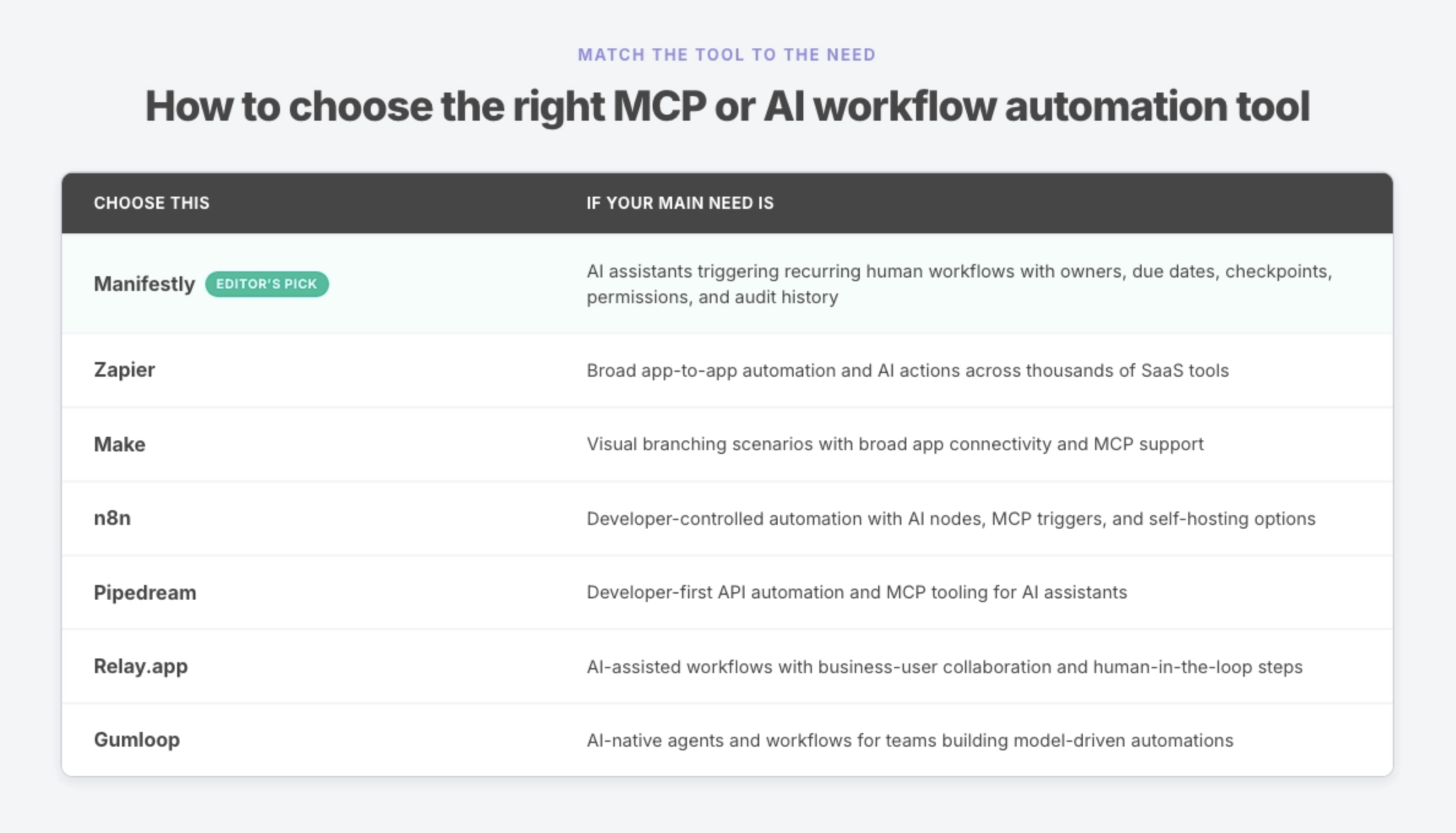
The right tool depends on whether you need app automation, developer control, AI-native workflows, or human-process execution.
For many teams, the right answer is not one platform.
Zapier or Make can move data between apps. n8n or Pipedream can give technical teams more control over APIs, code, and event-driven automation. Gumloop can support AI-native workflows and agents. Relay.app can help teams build AI-assisted automations with review steps.
Manifestly can run the recurring human workflows around that automation, such as onboarding, approvals, audits, handoffs, reviews, and operational checklists.
In that setup, the automation platform connects systems. Manifestly keeps the human process assigned, checkpointed, and recorded.
When Manifestly is the right fit
Manifestly is the right fit when AI should help start or update the workflow, but the workflow still needs accountable human execution.
Examples include:
- Starting a new hire onboarding workflow from Claude
- Checking overdue customer onboarding steps
- Assigning an IT access review task to the right owner
- Adding context to a compliance checklist
- Updating fields in a recurring operations review
- Completing a step after a human confirms the work is done
- Summarizing incomplete workflow runs before a meeting
- Keeping comments and completion records attached to the workflow
This is the bridge between AI assistance and operational execution. AI helps trigger the work. Manifestly makes sure the work remains structured, assigned, visible, and recorded.
Final recommendation
The best MCP-native or AI-integrated workflow automation tool depends on what you want AI to do.
Choose Zapier or Make if you need broad app automation. Choose n8n or Pipedream if you want developer-controlled automation. Choose Relay.app or Gumloop if you are building AI-assisted or AI-native workflows.
Choose Manifestly if you want AI assistants to trigger recurring workflows while the work still runs through assigned owners, defined checkpoints, permissions, due dates, and completion history.
That is the difference between AI suggesting work and AI helping your team get the work done.
FAQ
What does MCP-native workflow automation mean?
MCP-native workflow automation means an AI assistant can connect to a workflow system through the Model Context Protocol and take defined actions inside that system.
For Manifestly, that means an MCP-compatible assistant can interact with Manifestly workflows by checking status, starting workflow runs, completing steps, assigning work, filling fields, and adding comments. The workflow still lives in Manifestly.
Can Claude run my workflows?
Yes, with the right MCP server and permissions. In Manifestly, Claude can connect through Manifestly’s MCP server and take defined workflow actions such as starting runs, checking overdue work, completing steps, assigning work, filling fields, and adding comments.
That does not mean Claude runs workflows unattended or outside your operating model. The workflow still runs in Manifestly, where owners, permissions, due dates, checkpoints, and completion history remain attached to the work.
Is Manifestly an MCP server?
Manifestly provides an MCP server that connects MCP-compatible AI clients to Manifestly workflows. Manifestly’s setup guide lists the MCP endpoint as https://mcp.manifest.ly and describes support for Claude, Claude Code, ChatGPT, Gemini, Cursor, and other MCP-compatible clients.
What is the difference between workflow automation and AI workflow execution?
Workflow automation usually means a system triggers actions based on predefined rules, events, or schedules. For example, a form submission creates a CRM record and sends a Slack message.
AI workflow execution means an AI assistant can understand a request and trigger defined actions inside a workflow system. The key question is whether those AI-triggered actions still respect permissions, checkpoints, assignments, and records.
Is this the same as Zapier?
No. Zapier is a broad app-to-app automation platform. It is excellent for connecting many tools and triggering actions across a large SaaS ecosystem.
Manifestly solves a different problem. It helps AI assistants interact with recurring human workflows that need owners, due dates, reminders, comments, fields, and completion history.
The two tools can be complementary. Zapier can connect apps. Manifestly can run the accountable human process.
Do I need Zapier or Make if I use Manifestly?
You may still need Zapier or Make if your main requirement is broad app-to-app automation.
Manifestly is strongest when the process itself needs to be assigned, scheduled, completed, and recorded. Zapier or Make may be better for moving data across apps. Manifestly may be better for making sure the recurring human workflow actually runs.
Can AI-triggered workflows still require human approval?
Yes. In many operational settings, they should.
An AI assistant can trigger a workflow, gather context, fill fields, or suggest the next action, while the workflow still requires a human to approve, complete, or verify important steps. This is especially important for onboarding, compliance, customer handoffs, financial operations, and other processes where accountability matters.
What should technical teams look for in an MCP workflow tool?
Technical teams should look for native MCP support, secure authentication, permission handling, clear tool definitions, action attribution, audit history, human checkpoints, API or webhook support, and pricing that matches expected usage.
They should also decide whether they need general app automation, developer automation, AI-native agents, or human workflow execution. The right tool depends on which layer of the system needs to be automated.