
What Is Process Execution? Definition, Examples, and How to Improve It
October 01, 2026
The employee onboarding procedure is documented. It says HR should collect paperwork, IT should set up accounts, the manager should prepare a first-week plan, and someone should make sure the new hire has what they need on day one.
Then a new employee accepts an offer, and the manager still has to tell each team to begin, check whether access is ready, and follow up on anything missing. The process exists on paper. Running it still depends on one person holding the pieces together.
That is a process execution problem.
Process execution is carrying out a defined business process in a specific instance of work. It starts when an event or schedule puts the process into motion and continues through assignments, handoffs, reviews, exceptions, and completion. For important recurring work, execution should also leave a record of what happened, who did it, and when.
What does process execution look like?
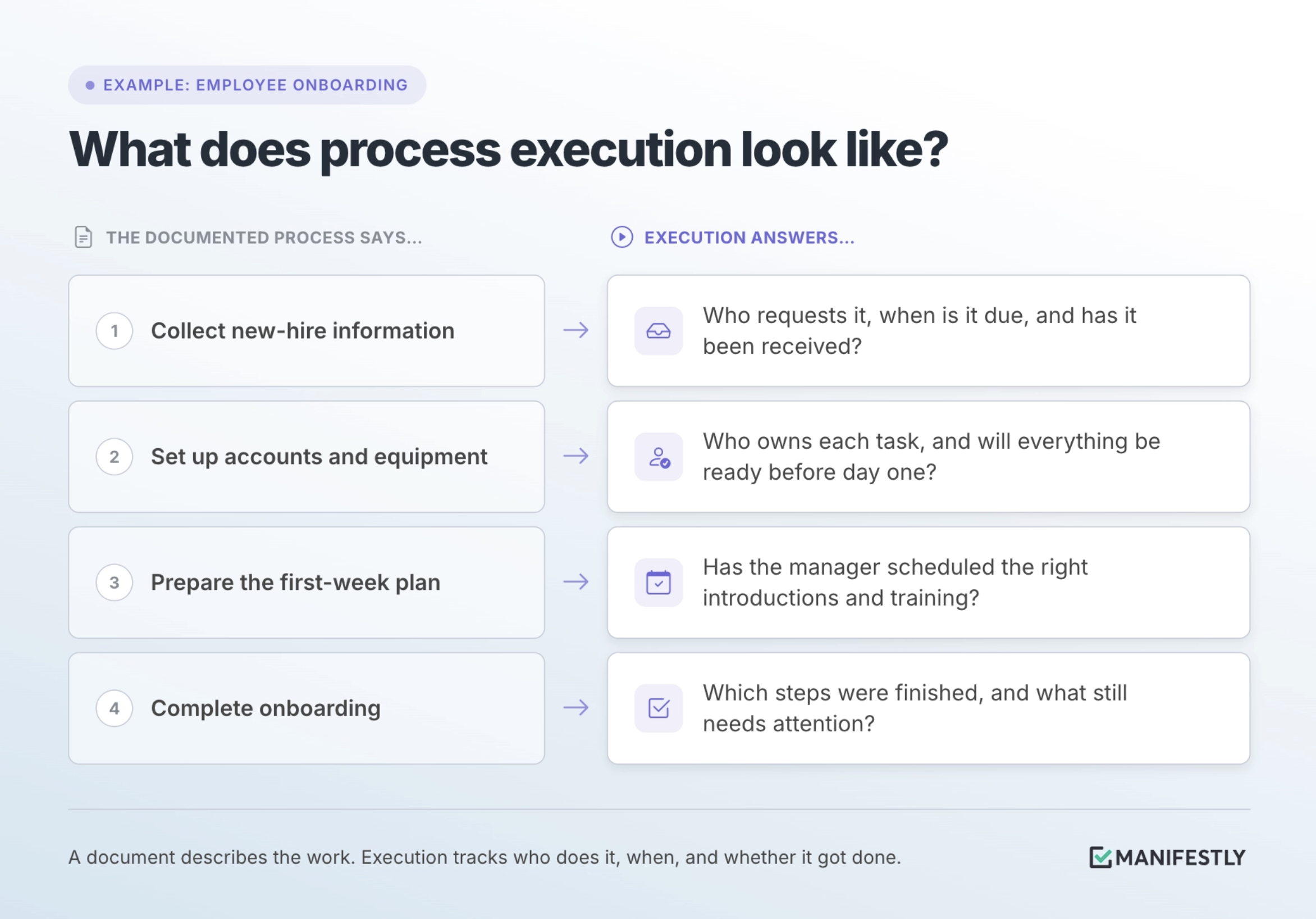
Consider employee onboarding. A company may have an SOP that describes everything required to welcome and prepare a new hire. Each new employee creates another instance of that process.
For that hire, HR needs to collect the right information. IT needs to prepare accounts and equipment before the start date. The manager needs to plan introductions and training. If a laptop shipment is delayed or access is blocked, someone must decide how to keep the first day on track.
The SOP tells the team what should happen. Execution answers whether it happened for this employee.
The same distinction applies to customer onboarding, month-end close, property inspections, access reviews, and other work a team repeats. The process may be well designed, yet each run still needs people to act, make decisions, and account for the result.
How is process execution different from an SOP or a workflow?
These terms describe related parts of the work. Keeping them distinct helps you see where a process is breaking.
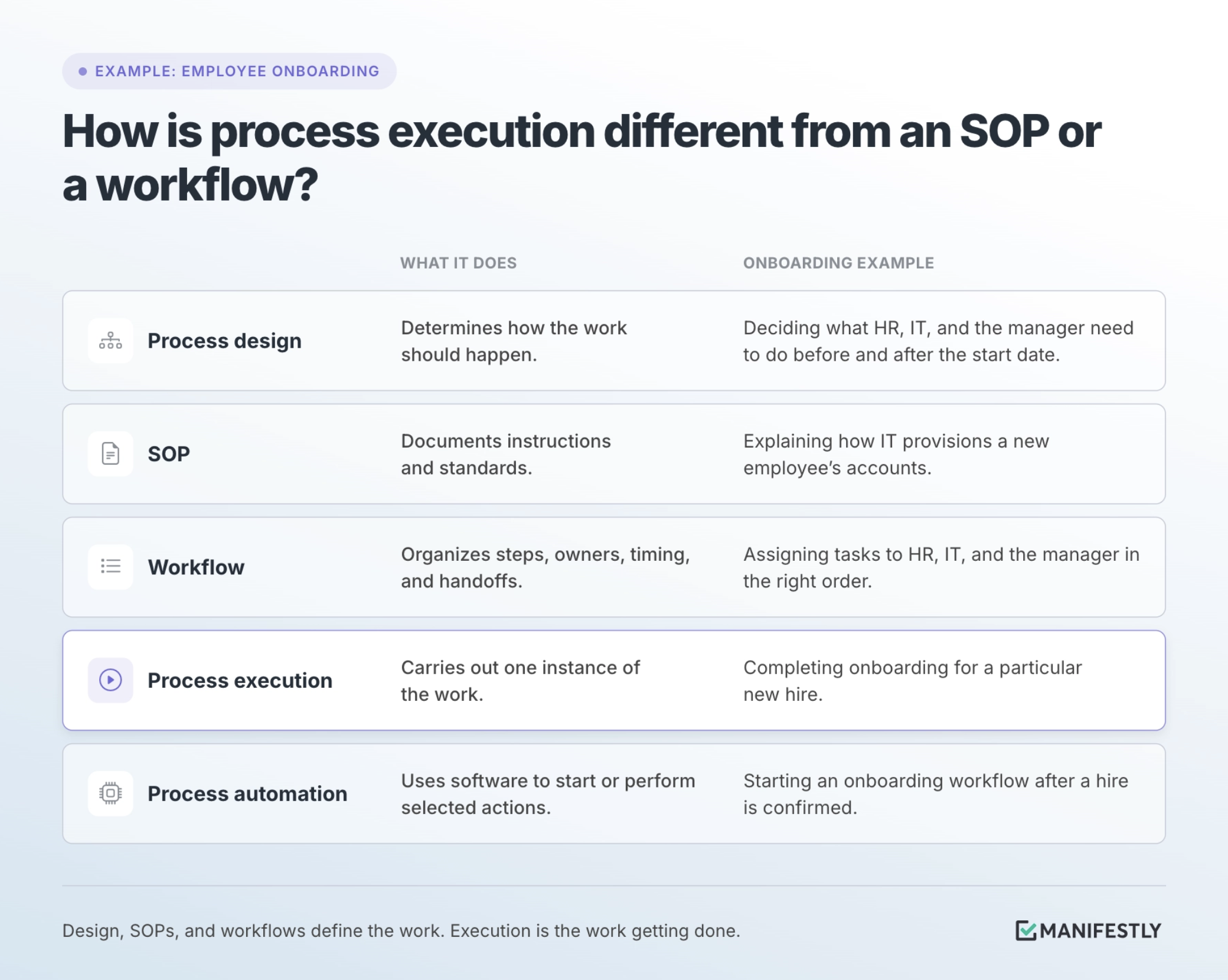
These parts work together. A clear SOP helps someone perform a step correctly. A workflow helps the right people receive and coordinate their work. Automation can remove some manual actions. Execution is what happens when the process runs for a real employee.
This is why better documentation does not always fix a missed handoff. If nobody is responsible for starting onboarding or confirming that IT has what it needs, a more detailed SOP leaves that gap in place.
What makes process execution reliable?
A process runs reliably when the team can answer a few practical questions each time it starts.
1. What triggers the work?
Some processes begin on a schedule. Others begin when something happens: a new hire is confirmed, a customer signs, an inspection is due, or a request is approved.
Define the trigger so the process does not depend on someone noticing the event and remembering to start a separate chain of tasks. For onboarding, the trigger might be confirmation of the hire and start date.
2. Who owns each step?
Every step needs a person or role responsible for moving it forward. That includes handoffs between teams.
“IT sets up access” is a useful instruction. For a particular hire, someone also needs to know which IT person owns the task, what access the employee needs, and when it must be ready. Ownership should be clear before the new hire arrives.
3. When is the work due?
A final deadline may not be enough. Steps can depend on one another, and some must happen before the employee’s first day.
IT may need details about the new hire’s role before provisioning accounts. The manager may need equipment and access ready before scheduling certain training. Due dates and dependencies make those expectations visible to everyone involved.
4. Can people find the instructions they need?
The person completing a step should be able to see what to do, what information to enter, and what evidence to provide. If instructions live in a separate document that nobody can find during the work, the team is more likely to rely on memory or ask the process owner for help.
5. Can someone see where the process stands?
An onboarding owner should be able to tell what is complete, what is due soon, and what needs attention before the start date. That visibility lets them help when there is a problem without asking every team for a status update.
Visibility is useful to the people doing the work, too. They should know what they own and what comes next.
6. What happens when the usual path does not fit?
Real work produces exceptions. A laptop may arrive late. A new hire may need access that was not included in the original request. A required form may be incomplete.
A reliable process identifies who can make the decision and where that decision should be recorded. Otherwise, exceptions move into messages and side conversations, where the rest of the team may lose track of them.
7. How is completion recorded?
A completed process should leave a clear account of the work, especially when it matters for security, compliance, training, or the employee’s experience.
That record may include who completed each step, when accounts were provisioned, which forms were received, and which training was completed. Capturing those details during the work is easier than trying to reconstruct them later.
Why do documented processes still fail during execution?
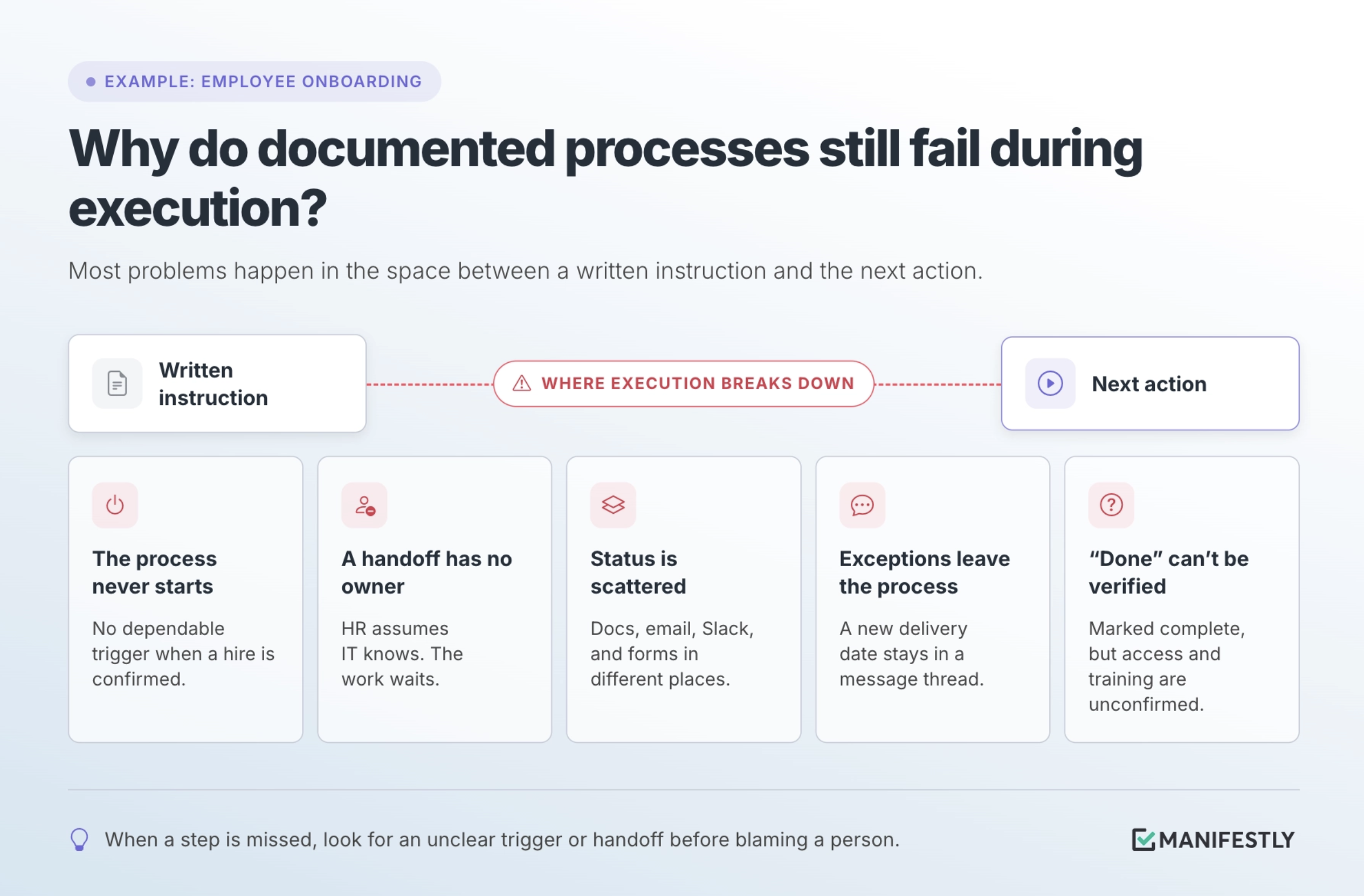
Most execution problems are ordinary. They happen in the space between a written instruction and the next action someone needs to take.
The process never starts. The onboarding procedure is available, but no one has a dependable way to initiate it when a hire is confirmed.
A handoff has no clear owner. HR records the start date and assumes IT or the manager knows to begin. The work waits until someone follows up.
Status lives in too many places. Instructions are in a document, assignments are in email, updates are in Slack, and completed forms are stored elsewhere. Someone has to assemble the full picture by hand.
An exception leaves the process. The team resolves a delayed equipment order in a message thread, but the new delivery date never reaches the manager or the onboarding record.
“Done” is difficult to verify. A task is marked complete, but nobody can tell whether the new hire actually received the right access or finished the required training.
When the same issue happens repeatedly, examine what the process asks people to remember, infer, or coordinate. A missed step may point to an unclear trigger or handoff, rather than a person who failed to care about the work.
How can you improve process execution?
Start with one recurring process that your team already runs. Employee onboarding is a useful candidate if every new hire requires the same teams to coordinate work against a start date.
Look at a recent instance first. Trace how onboarding actually happened. When did the team learn the start date? Who assigned IT’s tasks? Which updates required a message or meeting? Where did someone have to ask what to do next? The real path may differ from the documented one.
Remove work that no longer serves a purpose. If a step is duplicated or an approval adds no useful review, decide whether it belongs in the process. Automating an unnecessary step will only make it happen more consistently.
Define the parts that keep work moving. Identify the trigger, step owners, due dates, dependencies, review points, and the person responsible for exceptions. Decide what information should be captured as onboarding progresses.
Run the revised process and watch it closely. You do not need to redesign every company process at once. Use the improved workflow for the next hire, notice where people still have to guess or chase, and adjust it.
A process should become easier to run as the team learns from each instance. That requires a way to see where execution slowed down and update the instructions or workflow for the next new hire.
When does process execution software help?
A small team may be able to run a simple process with a document and direct communication. As onboarding spans more people, departments, roles, or locations, manual coordination becomes harder to sustain.
Process execution software helps when the team needs a consistent way to start each instance, assign steps, set due dates, provide instructions, track progress, handle reviews, and keep a record. It gives the work a place to run.
Manifestly turns SOPs and recurring processes into workflow runs. Teams can assign onboarding steps, set deadlines and reminders, collect information and files during the work, and see what is complete or needs attention. Each run keeps a history that the team can return to later.
The value is straightforward: the person responsible for onboarding can see where help is needed without becoming the person who personally starts, chases, and verifies every step.
How do you measure process execution?
Start with measures that tell you where the process needs attention:
- Start reliability: Did onboarding begin promptly after each hire was confirmed?
- On-time completion: Were accounts, equipment, paperwork, and other important steps ready when needed?
- Handoff delays: Where did work wait for another team?
- Exceptions and rework: Which steps repeatedly needed correction or a decision outside the usual path?
- Record completeness: Was the required information captured as the work happened?
The measures are most useful when they help you improve the process. If account setup is late for several new hires, investigate when IT receives the request, what information it receives, and how much time it has before adding another reminder.
Frequently asked questions
What is an example of process execution?
Employee onboarding is one example. Each time someone joins, the team starts an onboarding process, assigns tasks to the appropriate people, completes and reviews the required steps, handles exceptions, and records what happened.
Is process execution the same as workflow management?
Process execution is the act of carrying out a process. Workflow management organizes and tracks how that work moves between steps and people. A workflow can provide the structure for execution, but the work still has to be performed and verified.
Can process execution be automated?
Parts of it can. Software can start an onboarding process when a hire is confirmed, assign tasks, send reminders, route work, or perform certain steps. Other steps may require a person to review information, welcome the new employee, resolve an exception, or take responsibility for the outcome. Automation works best when those responsibilities are clear.
Who owns process execution?
An overall process owner is responsible for how the process works and whether it achieves its purpose. Individual steps should also have clear owners. For onboarding, an HR or operations lead may own the overall process while IT and the hiring manager own specific tasks.
What is the difference between process execution and process improvement?
Process execution is running the process for a new hire. Process improvement uses what the team learns from onboarding runs to change how the process works. A recurring workflow should make both possible: complete today’s work and reveal what needs to change before the next hire.
A documented onboarding process gives people a shared understanding of what should happen. If each new hire still depends on one person remembering every handoff, that person remains the coordination system.
Put one process into practice
If every new hire still depends on one person remembering the handoffs, the onboarding process needs a clearer way to run. Start with the next hire: define the trigger, assign each step, set the deadlines, and decide how completion will be recorded.
Ready to put that process into a workflow? Start a free trial of Manifestly and build your employee onboarding workflow.