
How to Use Claude and Manifestly for New Hire Onboarding
August 04, 2026
To use Claude and Manifestly for new hire onboarding, connect Claude to Manifestly through MCP and ask it to start your Employee Onboarding workflow for a named hire and start date. Claude can launch the workflow, check progress, surface overdue work, and help resolve exceptions. Claude helps with the work. Manifestly makes sure the work gets done.
By the end of this guide, you will have a live onboarding workflow with named owners, deadlines tied to the employee’s start date, and one place to see what is complete, overdue, or still waiting on someone.
Why new hire onboarding breaks
Most companies already have some version of an onboarding checklist.
The steps may be documented in an HR platform, a shared document, a project template, or an internal wiki. IT knows which accounts to create. HR knows which forms need to be completed. The hiring manager knows that a first-week schedule needs to be prepared.
The problem is that knowing the process is not the same as running it.
A single onboarding process may stretch across HR, payroll, IT, security, facilities, and the hiring manager. Some steps happen before the employee starts. Others need to happen on day one or during the first week. Each department may manage its part in a different system.
That makes it difficult for the person responsible for onboarding to answer basic questions:
- Has the laptop been ordered?
- Who is setting up system access?
- Were the compliance documents returned?
- Did the hiring manager prepare the first-week schedule?
- What is still open before the employee starts?
A task named in an onboarding document has been documented. It has not necessarily been assigned to a named person with a deadline.
That gap is where onboarding quietly fails. It is also why HR and People Operations teams spend so much time sending reminders, checking Slack threads, and asking other departments for updates.
The most visible failures tend to happen on day one: the new employee has no laptop, cannot access a required system, or has no clear schedule. But the process usually broke several days earlier, when an important pre-start task had no clear owner or follow-up mechanism.
Claude and Manifestly address different parts of this problem.
Claude gives you a conversational way to start the process, ask questions, and handle changes. Manifestly provides the workflow underneath: owners, deadlines, reminders, required steps, and a lasting completion record.
What you need before you begin
Before starting an onboarding workflow through Claude, you will need:
- A Manifestly account
- An Employee Onboarding workflow in Manifestly
- Manifestly connected to Claude through MCP
- The new hire’s name and start date
- The people or roles responsible for HR, IT, payroll, and manager tasks
- Permission to start and manage the relevant workflow
You can begin with Manifestly’s Employee Onboarding template and adapt it to your company’s process. The workflow should represent the standard process you want the team to follow for every new employee.
Step 1: Connect Claude to Manifestly
Manifestly’s MCP integration allows Claude to interact with the workflows and workflow runs available to your Manifestly account.
Once connected, you can ask Claude to start workflows, check their status, identify overdue work, reassign steps, add comments, and help create new workflow variations.
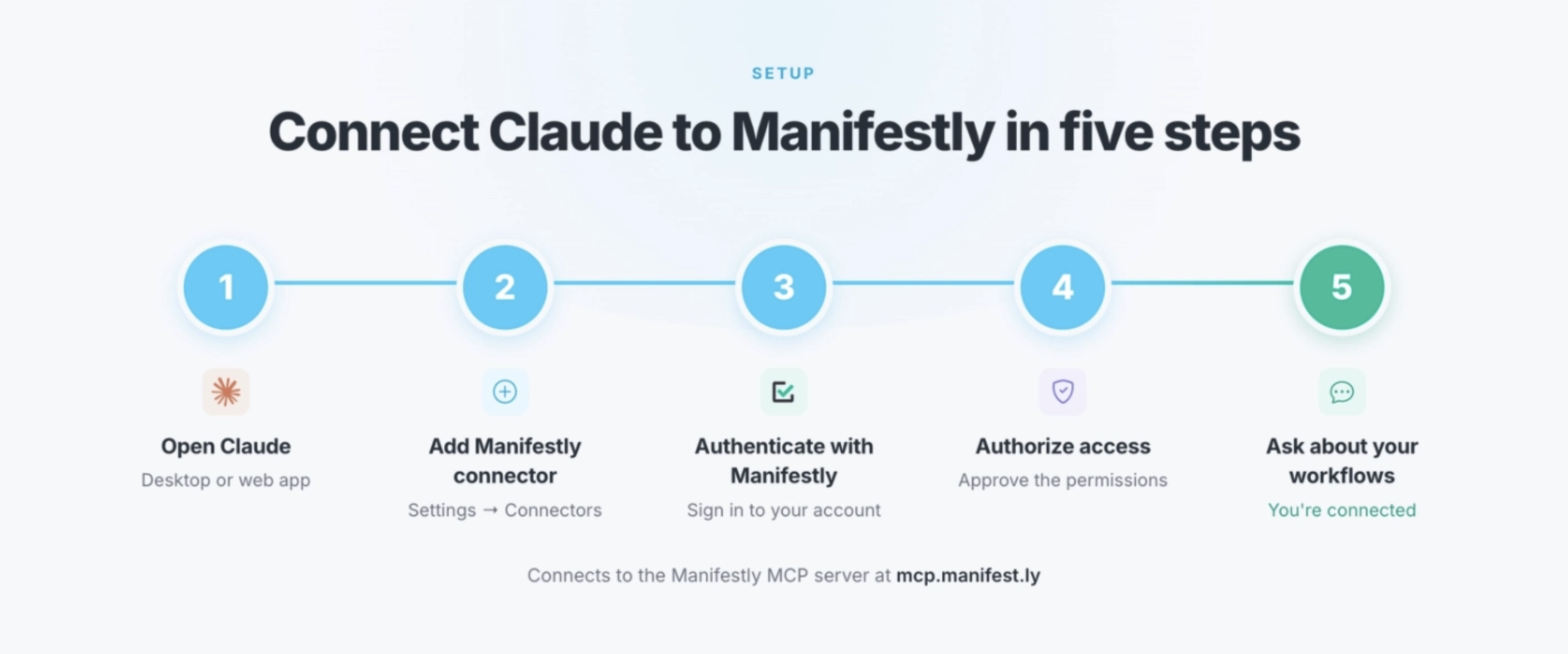
This article focuses on using the connection for employee onboarding rather than walking through the full technical setup.
For complete instructions, see How to Connect Claude to Manifestly Using MCP.
After completing the connection, test it with a simple question:
What Manifestly workflows can I access?
Claude should return the workflows your connected Manifestly account permits you to view.
Step 2: Prepare your Employee Onboarding workflow
Before using Claude to start onboarding, make sure the process exists as a recurring workflow in Manifestly.
It helps to distinguish between a workflow and a workflow run.
A workflow is the reusable process your organization has designed. It contains the standard steps, instructions, assignments, due-date rules, and required fields for employee onboarding.
A workflow run is one execution of that process for a specific employee.
For example, “Employee Onboarding” is the reusable workflow. “Priya Shah — August 17 start date” is an individual workflow run.
Your onboarding workflow might cover:
- Initial setup after the offer is accepted
- IT accounts and equipment
- Payroll, benefits, and compliance
- Hiring manager preparation
- Day-one activities
- First-week follow-up
Each step should have enough structure that the person responsible knows what needs to happen, when it is due, and what information must be recorded.
A task such as “Prepare employee equipment” may include subtasks for:
- Ordering a laptop
- Creating an email account
- Assigning software licenses
- Configuring VPN access
- Confirming delivery
- Testing required system access
The workflow becomes the standard. Each workflow run shows how that standard was executed for one person.
Step 3: Ask Claude to start the onboarding workflow
Once the workflow is ready, you can ask Claude to start it for a specific hire.
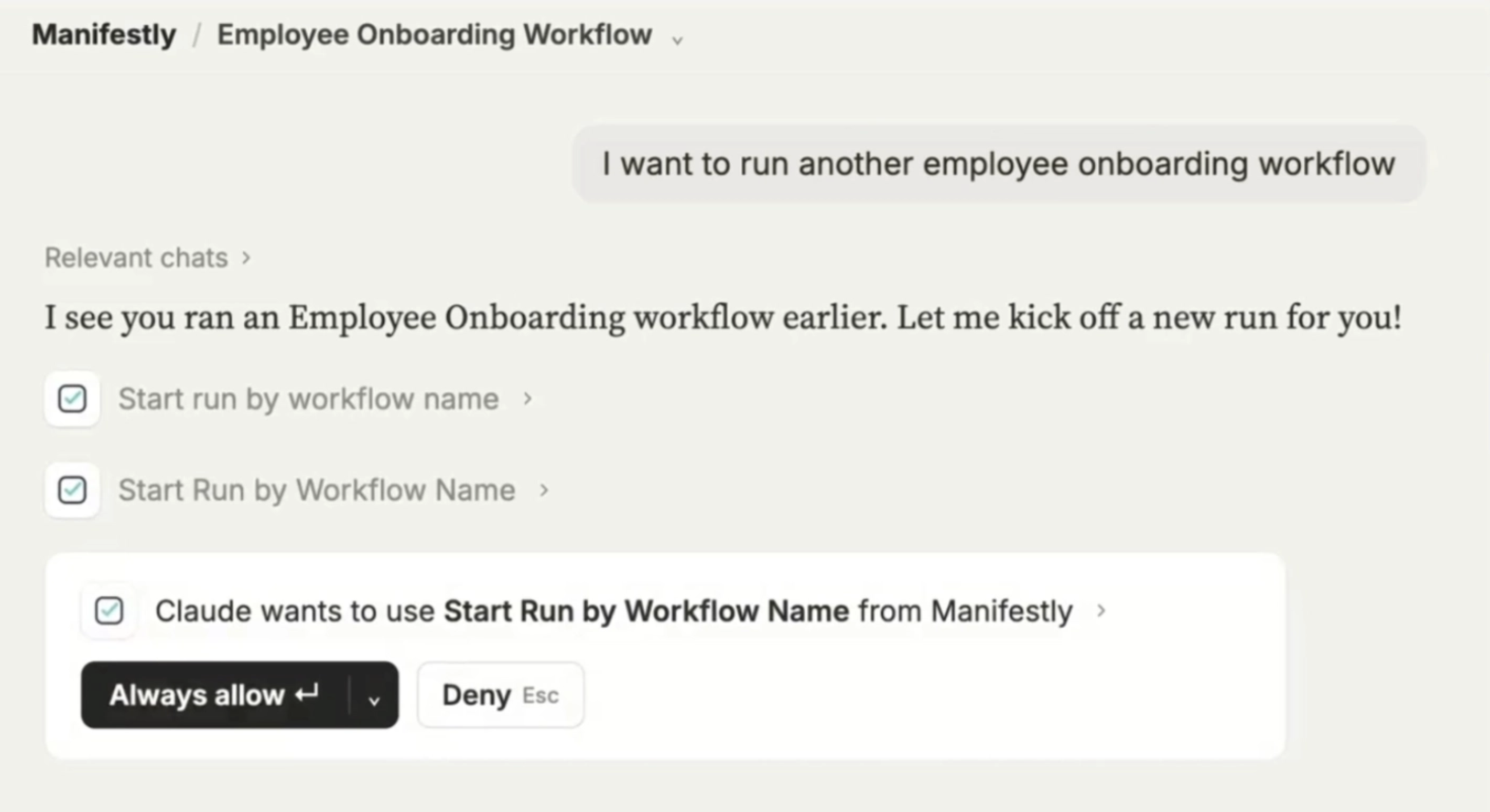
For example:
Start the Employee Onboarding workflow for Priya Shah. Her start date is August 17, 2026. Assign me as the HR owner.
Claude can use that information to identify the correct workflow and prepare the run.
When important information is missing or unclear, Claude can ask clarifying questions before acting. It may need to confirm:
- Which onboarding workflow to use
- The employee’s exact start date
- The primary HR owner
- The employee’s department or location
- Whether the employee is remote or office-based
- Which manager or IT owner should receive assigned work
This is useful when your Manifestly account contains multiple versions of an onboarding process, such as separate workflows for employees, contractors, remote hires, or different office locations.
Before the workflow begins, verify that Claude has selected the correct workflow and employee details.
Step 4: Let Manifestly assign the work and calculate the deadlines
Starting the workflow creates the operational structure for that employee’s onboarding.
The start date becomes the reference point for the rest of the process. Manifestly can use relative due dates to schedule work before and after that date.
For example, if Priya starts on August 17:
- The IT provisioning request may be due seven days before her start date.
- Equipment delivery may be due three days before her start date.
- Payroll setup may be due two days before her start date.
- The hiring manager’s first-week schedule may be due one day before her start date.
- The welcome email may be due on the morning of her first day.
- The first-week check-in may be due five business days after she starts.
- The 30-day check-in may need to be scheduled during the first week.
Instead of manually calculating and entering every deadline, the dates flow from the employee’s start date according to the rules built into the workflow.
Manifestly also assigns each step to a named person or role.
IT receives the provisioning work. HR receives payroll and compliance tasks. The hiring manager receives preparation and check-in steps. Each person can see what they own and when it is due.
This is the point where the onboarding plan becomes an accountable process.
The work is no longer simply mentioned in a document or sent to a department. It has a specific owner, a deadline, and a visible status.
Step 5: Track pre-start IT, equipment, and access
Many of the most consequential onboarding tasks happen before the employee arrives.
A new hire may be able to complete a missing profile field later. They cannot do much on their first morning without a functioning computer or access to the systems required for their role.
The IT and equipment phase might include steps such as:
- Submit the employee provisioning request
- Create the employee’s email account
- Set up required software licenses
- Configure VPN or remote access
- Order and ship equipment
- Confirm equipment delivery
- Verify that system access works
These steps can be assigned to the appropriate IT owner and scheduled backward from the employee’s start date.
Subtasks can capture the individual accounts, tools, and equipment required without turning each item into a disconnected task somewhere else.
As the start date approaches, Manifestly can remind the responsible people about incomplete work. HR does not need to rely entirely on memory or manually chase each department.
The onboarding owner can also ask Claude for a current status report:
What is still open or overdue on Priya Shah’s onboarding before her August 17 start date?
Claude can retrieve the current state from the Manifestly workflow run and summarize which steps are complete, which are overdue, and who owns the remaining work.
The answer comes from the live onboarding run. Claude is not guessing what a typical company might need to do.
Step 6: Track HR, payroll, and compliance requirements
The HR and compliance phase often includes several deadlines owned by different people.
Depending on your organization, the workflow might include:
- Enter the employee in the HR system
- Complete payroll setup
- Send benefits enrollment information
- Collect tax and employment forms
- Send policy acknowledgments
- Confirm background-check requirements
- Record the employee’s department and manager
- Confirm that required documents were received
Manifestly can require the person completing a step to enter relevant information before marking it complete.
For example, the workflow might collect:
- Employee ID
- Payroll confirmation number
- Benefits eligibility date
- Equipment tracking number
- Date documents were sent
- Date signed documents were received
- Notes about exceptions or outstanding requirements
This creates a more useful record than a simple checked box. The workflow shows not only that someone completed the step, but also the information produced during it.
Required compliance steps can also be configured as stop tasks. A stop task prevents the workflow from moving beyond a required point until that task has been completed.
That means the onboarding run cannot be treated as finished while a required compliance document is still outstanding.
Accountability is built into the workflow rather than left to someone’s vigilance.
Step 7: Use Claude to check progress and find blockers
Once the onboarding process is running, Claude gives the onboarding owner a quick way to understand its current state.
You might ask:
What is overdue or still open on Priya’s onboarding this week?
Instead of opening the workflow and reviewing every step individually, you can ask Claude to summarize:
- What has been completed
- What is still open
- Which steps are overdue
- Who owns each remaining step
- Whether required information is missing
- What could prevent the employee from being ready on day one
You could also ask a more focused question:
Is anything likely to block Priya from being ready on her first day?
Claude can review the workflow state and surface the items that deserve attention, such as equipment that has not been delivered or an access request that remains incomplete.
This is particularly helpful when HR is managing multiple hires at once. The onboarding owner can ask about one employee, compare several active runs, or identify the work that needs attention that day.
The workflow still holds the source information. Claude makes that information easier to access and act on.
Step 8: Resolve exceptions through Claude
Onboarding rarely follows the original plan perfectly.
Someone goes on vacation. A laptop shipment is delayed. The employee’s location changes. The hiring manager needs to move the first-week schedule. An IT request requires a different owner.
You can use Claude to help manage those exceptions without losing the underlying accountability.
For example:
Reassign the IT provisioning step on Priya’s onboarding to Marcus Lee and add a comment that Jordan is out this week.
Or:
Show me which required compliance items are still outstanding and who owns each one.
The workflow is updated rather than allowing the change to disappear into a private message or temporary Slack conversation.
Actions taken through Claude still follow the connected user’s Manifestly permissions. Claude can only access or change the work that the person using the connection is permitted to manage.
The resulting activity also remains connected to the workflow history. HR retains a record of the process, including assignments, status changes, comments, and completion.
There is no unexplained “the AI handled it” gap. Claude provides the interface, while Manifestly keeps the work attributable and visible.
Step 9: Manage day-one onboarding
By day one, the goal is not to begin figuring out whether onboarding happened. The essential preparation should already be complete.
The day-one portion of the workflow might include:
- Send the welcome email
- Confirm the employee can access required systems
- Complete the initial HR check-in
- Introduce the employee to the team
- Review the first-week schedule
- Confirm manager availability
- Record any equipment or access problems
The HR owner can ask Claude for a final readiness check before the employee arrives:
Give me a day-one readiness summary for Priya’s onboarding. Include anything incomplete, overdue, or waiting for confirmation.
That summary can help the onboarding owner catch the remaining exceptions without holding another status meeting or sending a round of messages to every person involved.
The goal is not to remove human involvement from onboarding. It is to give the people involved a reliable process and a clear picture of what needs their attention.
Step 10: Complete the first-week follow-up
Onboarding should not end when the employee logs in on the first morning.
The first week is where HR can confirm that the process worked and close any remaining gaps.
The final phase might include:
- Complete the first-week HR check-in
- Confirm receipt of required compliance documents
- Resolve outstanding access or equipment issues
- Collect onboarding notes or feedback
- Schedule the 30-day check-in
- Confirm that all required stop tasks are complete
- Close the onboarding workflow run
Once the required work is finished, the completed run becomes a lasting record for that employee.
HR can see who completed each part of the process, when it happened, what information was collected, and where exceptions occurred.
That record can support internal reviews, compliance questions, and future improvements to the onboarding workflow.
It can also reveal patterns. If equipment delivery is late across several hires, or managers routinely miss first-week preparation steps, the problem becomes visible enough to fix.
Why this works better than an onboarding document
An onboarding document can explain what people are supposed to do.
It does not necessarily show whether the work happened for a specific employee.
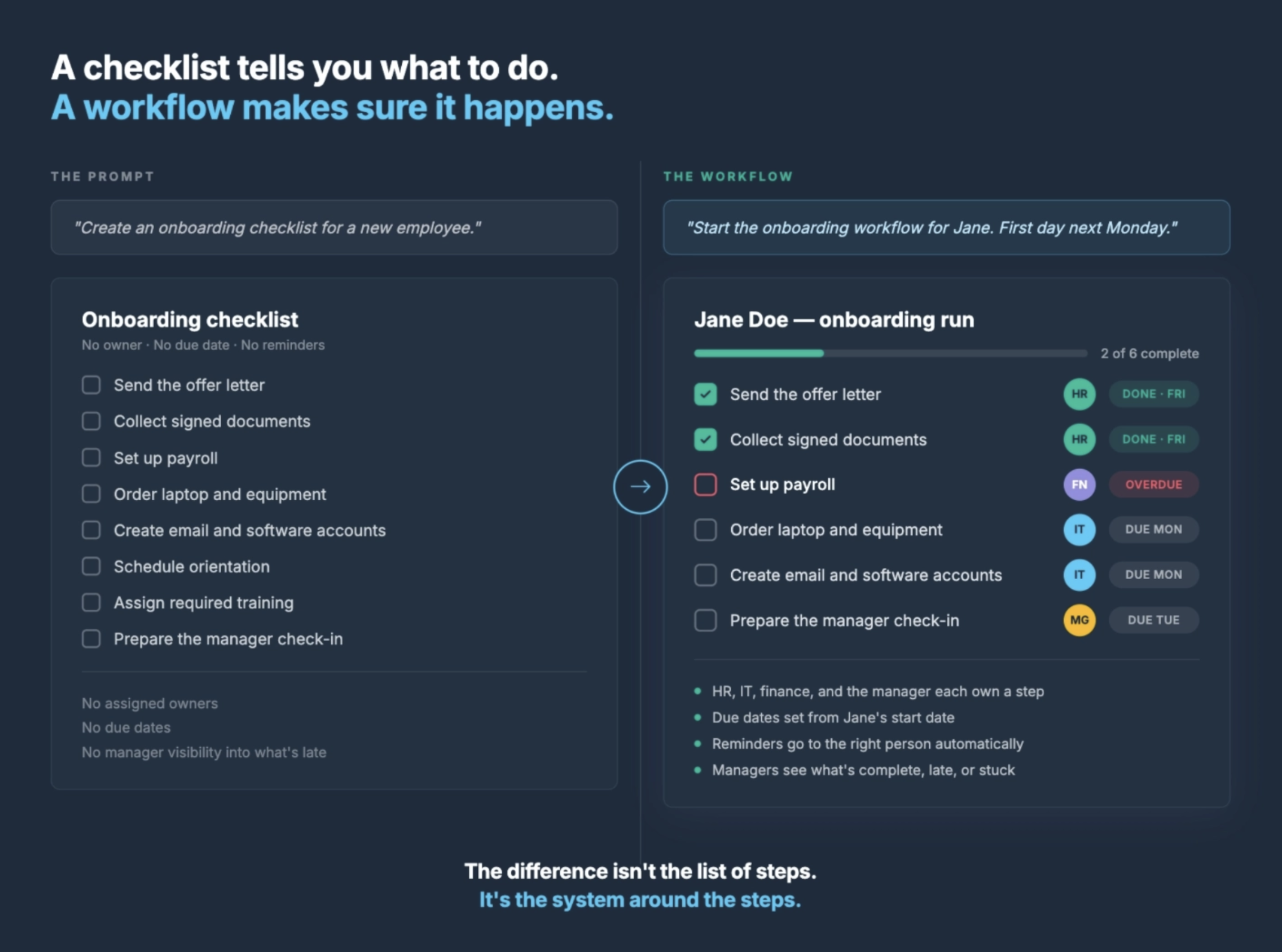
A runnable onboarding workflow establishes:
- A named owner for each step
- A deadline tied to the employee’s start date
- Reminders for incomplete work
- Required fields and supporting information
- Stop tasks for work that cannot be skipped
- A current view of open and overdue steps
- A completion record for each employee
Claude adds a conversational interface to that system.
You can ask it to start the process, check progress, surface blockers, and help manage changes. But the reliability comes from the structured workflow underneath.
Claude helps you interact with the process. Manifestly makes the process repeatable and accountable.
Claude prompts for new hire onboarding
Here are four prompts you can adapt to your own process.
Start an onboarding workflow
Start the Employee Onboarding workflow for [employee name], whose start date is [date]. Assign [person] as the HR owner.
Check onboarding progress
What is overdue, blocked, or still open on [employee name]’s onboarding?
Handle an ownership change
Reassign the IT provisioning step on [employee name]’s onboarding to [teammate] and add a comment explaining the change.
Create a remote onboarding variation
Create a remote-employee version of our standard onboarding workflow. Add steps for equipment shipping, delivery confirmation, remote access testing, and a virtual first-day schedule.
The final prompt illustrates a broader use of Claude and Manifestly.
Claude can help turn a plain-language description into a new onboarding variation. Manifestly turns that variation into a process with assignments, deadlines, reminders, and a completion record.
The result is not another onboarding document. It is a workflow the team can run.
Run one onboarding workflow with Claude and Manifestly
Start with one real new hire and one onboarding workflow.
Connect Claude to Manifestly, launch the workflow with the employee’s name and start date, and use Claude to check the process as the start date approaches.
Claude helps with the work. Manifestly makes sure the work gets done.
Connect Claude to Manifestly and try it with one onboarding workflow.