
7 recurring processes your AI assistant should not manage
July 28, 2026
AI assistants are good at drafting a process, summarizing one, and answering questions about how it works. They are not good at owning it. Recurring work needs an assigned owner, a due date, a reminder that fires whether or not anyone asks for it, and a record that outlives the conversation. These seven processes are where that gap costs the most.
The documentation problem got easier. The execution problem did not.
Something changed in the last two years, and most operations teams have felt it without naming it. You can now describe a process in a sentence and get back a clean, well-structured checklist in about twenty seconds. Onboarding, offboarding, vendor review, whatever it is, the draft comes back good enough to use.
That is real progress, and it solved a real bottleneck. It also moved the failure point downstream. When producing the document was the hard part, having the document felt like being done. Now that the document takes a minute, teams are discovering what was always true underneath it: nobody was ever short on process documentation. They were short on a system that assigns the work, tracks it, and can prove later that it happened.
An AI assistant lives inside a conversation. When the conversation ends, the process does not have an owner, a deadline, or a place to leave evidence behind. For a one-off task that is fine. For work that runs every week, every quarter, or every time a new person walks in the door, it is where things start to slip.
Here are the seven where it slips most.
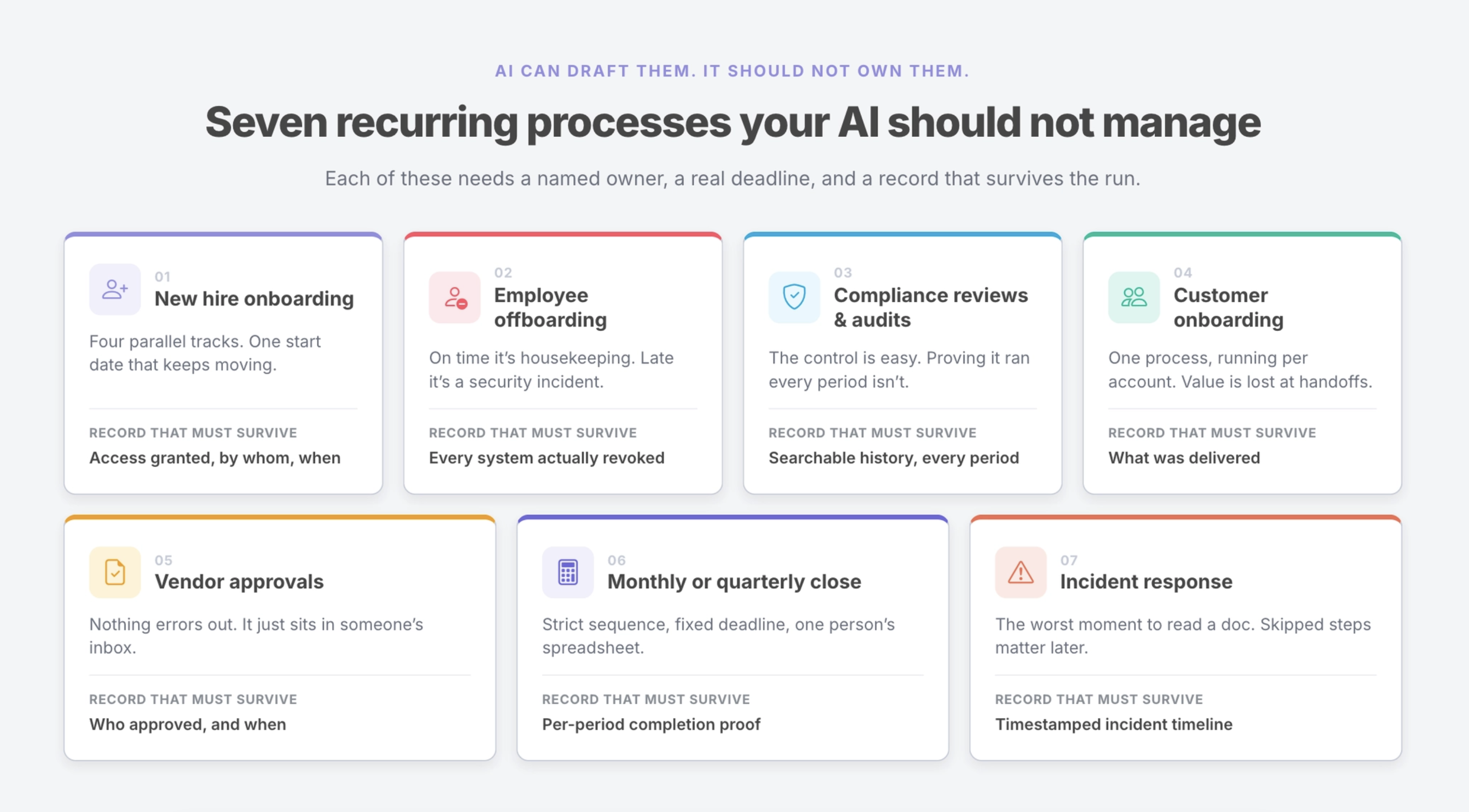
1. New hire onboarding
New hire onboarding is not one process. It is four or five processes running in parallel across HR, IT, finance, and the hiring manager, all keyed to a single start date that everyone knows and nobody owns end to end. The laptop, the payroll setup, the systems access, the first-week schedule: each has a different owner and a different lead time.
Get the New Hire Onboarding Checklist
Where AI genuinely helps. Drafting the role-specific checklist, tailoring a generic template to a new department, writing the welcome documentation, and answering a manager’s questions about what typically happens in week one.
What still needs a workflow system. IT needs to see their steps without reading HR’s. The hiring manager needs a nudge on day three, not a reminder to check a document. Every task has to be tied to the start date so the whole sequence shifts automatically when the start date moves, which it usually does.
The artifact that has to survive. A dated record showing which access was granted, by whom, and when. Six months later that record is the answer to an audit question.
2. Employee offboarding
Offboarding runs on a clock, and the clock is the whole point. Access revocation that happens on the correct day is routine housekeeping. The same revocation four weeks late is a security incident sitting in your logs waiting to be found.
Get the Employee Offboarding Checklist
Where AI genuinely helps. Building the revocation list from an inventory of the systems your company uses, drafting the exit interview questions, and generating the handoff document that captures what the departing person knew.
What still needs a workflow system. Someone has to be named on each revocation step, and that step has to close with a timestamp rather than a verbal confirmation in a meeting. Offboarding also tends to happen during an emotionally loaded week when attention is elsewhere, which is exactly when a process should be running on reminders rather than on memory.
The artifact that has to survive. Proof that every system was actually revoked, not a note saying the checklist was reviewed.
3. Compliance reviews and audits
Ask any compliance manager what the hard part of an audit is and the answer is almost never the control itself. It is producing evidence that the control was applied on schedule, by a named person, for every period in scope. A quarterly access review that everyone remembers doing but nobody documented is functionally the same as one that never happened.
Get the GDPR Compliance Review Checklist
Where AI genuinely helps. Interpreting a framework requirement in plain language, mapping controls to the internal processes that satisfy them, and drafting the review procedure itself.
What still needs a workflow system. Recurrence has to be scheduled rather than remembered, because the auditor is going to ask for every quarter and not just the recent one. Reviewers need to be assignable and reassignable as the team changes. Sign-off needs to be a recorded action attached to a person and a date.
The artifact that has to survive. A searchable history across periods. This is the difference between an audit that takes an afternoon and one that takes three weeks of reconstruction.
4. Customer onboarding
The first thirty days after a customer signs sets the tone for the entire relationship, and it is usually the least standardized process in the company. Sales knows what was promised, implementation knows what is technically true, and the customer sits between them wondering which version to believe. Handoffs are where the value gets lost.
Get the Customer Onboarding checklist
Where AI genuinely helps. Drafting the kickoff agenda, summarizing the sales conversation for the implementation team, and personalizing the standard onboarding plan for a specific account.
What still needs a workflow system. Onboarding runs per customer, which means you need the same process instantiated dozens of times at once with different owners, different dates, and different current states. Ownership has to move cleanly across teams at each handoff. Someone needs to be able to look at a dashboard and see which accounts are stuck without opening twenty threads to find out.
The artifact that has to survive. A completion record you can point at during a renewal conversation or a QBR when the customer asks what was delivered.
5. Vendor approvals
Approval processes fail quietly. Nothing breaks, nothing errors out, the request simply sits with someone who has not looked at it, and the requester assumes it is moving. Two weeks later the contract is late and the answer to what happened is that it was in someone’s inbox.
Get the Vendor Onboarding Checklist
Where AI genuinely helps. Assembling the security questionnaire, summarizing a vendor’s documentation against your requirements, and drafting the internal recommendation for the approver to review.
What still needs a workflow system. An approval needs a named approver with a deadline, an escalation path when the deadline passes, and a state that everyone can see without asking. It also needs the approver’s decision recorded as an explicit action rather than inferred from the absence of an objection.
The artifact that has to survive. Who approved this vendor, on what date, and against which version of the security review.
6. Monthly or quarterly close
Close is the clearest example of work that depends on sequence. Certain reconciliations cannot start until upstream entries are posted, and the whole thing is bounded by a reporting deadline that does not move. Most finance teams run it out of a spreadsheet that one person maintains and everyone else guesses at.
Get the Monthly Bookkeeping Close checklist
Where AI genuinely helps. Explaining an accounting treatment, drafting the close calendar, and summarizing variances once the numbers are in.
What still needs a workflow system. Close runs on the same cadence forever, so the workflow should generate itself on schedule rather than being copied from last month’s tab. Dependencies need to be visible, so the person waiting on an upstream step knows whether to wait or escalate. The controller needs a live view of what is outstanding on day four instead of a status meeting.
The artifact that has to survive. A per-period record of what was completed and reviewed, which is the first thing an external auditor asks for.
7. Incident response
An incident is the worst possible moment to be reading a process document. Attention is split, the pressure is high, and the steps that get skipped are the ones that matter later: the timeline, the customer notification, the evidence capture, the post-incident review that actually gets scheduled.
Get the Incident Response checklist
Where AI genuinely helps. Triage reasoning, drafting the customer communication, summarizing what happened for the internal write-up, and pulling the postmortem into a readable format afterward.
What still needs a workflow system. Roles have to be assigned as the incident opens rather than negotiated during it. The timeline needs to be captured as work happens instead of reconstructed from Slack scrollback two days later. Post-incident review has to be a step that stays open until someone closes it, because it is the step teams skip once the immediate pressure lifts.
The artifact that has to survive. A complete incident record with timestamps, which you will need for the customer, the auditor, or the next incident that looks like this one.
The pattern underneath all seven
These processes look different on the surface. They involve different teams, different tools, and different stakes. What they share is a structure: they recur on a known cadence or a known trigger, they cross more than one person, and the question of whether they were done correctly gets asked after the fact.
That combination is what a conversation cannot hold. An AI assistant can produce the process and can help with almost every individual step inside it. It cannot be the thing that remembers the process is due, names who owns it, notices when it is late, or answers the question a year from now about whether it happened.
Manifestly is the layer that does that part. Workflows run on a schedule, steps get assigned to real people with real due dates, reminders go out through email, Slack, or Teams without anyone triggering them, and every run leaves behind a searchable record of what was completed and by whom. AI helps your team move through the work. Manifestly makes sure the work gets done.
Pick the one process on this list your team is currently running out of a chat thread or a document, and turn it into a workflow this week.
Frequently asked questions
Can AI manage recurring workflows?
AI can help create, explain, and improve recurring workflows, and it can assist with many individual steps inside them. It cannot hold the accountability layer on its own. Recurring work needs assignment, scheduling, reminders, and a completion record that persists after the conversation ends.
What is the difference between an AI assistant and a workflow system?
An assistant responds when prompted and works inside a session. A workflow system runs on its own schedule, assigns work to named people, tracks state across time, and keeps a history. The two are complementary rather than competing.
Which recurring processes need an audit trail?
Any process where someone may later need to prove what was done, when, and by whom. In practice that includes onboarding and offboarding, compliance reviews, vendor approvals, financial close, incident response, and most regulated or customer-facing delivery work.
Can Claude assign tasks to my team?
Yes, through Manifestly’s MCP server connecting to Claude. You can create workflows, start runs, and assign steps from a conversation, and the resulting work lives in Manifestly with the same ownership, permissions, and audit history as anything else. The AI helps at defined checkpoints and a person stays in the loop.