
How to Run Recurring SOPs and Tasks from Notion
September 01, 2026
The SOP is documented. Everyone knows where to find it. And the same handoff still gets missed every time.
That is the limitation of treating documentation as execution.
Notion is an excellent place to write and maintain an SOP. You can explain the process, keep instructions current, attach screenshots and videos, and connect the SOP to the rest of your company knowledge.
You can also use databases, recurring templates, assignees, dates, and automations to help manage recurring work.
But there is an important distinction between recreating the instructions and running the process.
A recurring template creates the next copy. A workflow run carries the next execution.
That distinction starts to matter when a process crosses several people, deadlines, approvals, or recurring events. At that point, the question is no longer just whether everyone knows what should happen.
It is whether the organization can reliably cause it to happen.
What is Notion good at for SOPs?
Notion is a strong home for the knowledge behind a process.
A well-built SOP page can explain why the process exists, when to use it, what each step requires, and how to handle common exceptions. It can include screenshots, videos, links, templates, policy references, examples, and related pages.
That is a real operational advantage.
Traditional SOP files often become difficult to trust because nobody knows which copy is current. Documents get downloaded, renamed, passed between teams, and left sitting in folders long after the process changes.
Notion gives the organization a living source of truth that can be updated collaboratively and connected to the rest of the company wiki.
Database templates can also help standardize recurring work. A team might create templates for employee onboarding, client handoffs, monthly reviews, publishing processes, or recurring meetings so that every new instance begins with the same structure.
For the question, “Where should our team document how this process works?” Notion is often an excellent answer.
The mistaken assumption is that documenting the process and making it repeatable are the same as operationalizing it.
They are not.
Does Notion have recurring tasks?
Yes. Notion supports repeating database templates that can create new entries on a daily, weekly, monthly, or yearly schedule. Teams can also use properties, views, formulas, buttons, and automations to assign people, track dates, update statuses, and trigger certain actions.
For lightweight recurring work, that can be enough.
A weekly review owned by one person may work perfectly well as a recurring Notion database item. So might a meeting agenda, simple publishing checklist, or monthly administrative task.
The limits become more visible when the recurrence involves a complete process rather than a repeated item.
Imagine employee onboarding. Starting the process again does not simply mean creating another copy of the onboarding page. Someone needs to know which employee the run is for, when that employee starts, who owns each task, which deadlines fall before or after the start date, what information must be collected, and whether every required step was actually completed.
You can build much of that logic in Notion.
The question is how much execution machinery your team wants to build and maintain itself.
A recurring page is not necessarily a process run
We tend to treat recurrence as if it were enough to turn a documented SOP into an operating process.
But recurrence solves only one part of the problem: starting again.
A real process run has to coordinate a specific execution from beginning to end.
Four differences matter most.
Every run needs an identity
A process does not happen in the abstract.
An employee onboarding process belongs to a particular employee with a start date, manager, department, and location. A monthly close belongs to a specific reporting period. A client onboarding process belongs to a customer and contract. An inspection belongs to a particular location and visit.
That context should travel with the work.
A generic recurring page can recreate the structure, but someone may still need to rename it, enter the relevant details, reset dates, confirm ownership, and make sure the right version of the process is being used.
A workflow run begins with a specific instance of the work.
Ownership has to become specific
An SOP might say that HR handles employee information, IT provisions accounts, payroll handles compensation, and the hiring manager prepares the first week.
That describes responsibility in general. It does not necessarily tell you who owns each task for this employee.
That difference matters.
When ownership remains general, the process owner often becomes the fallback. They notice what is late, ask departments for updates, and quietly chase whatever nobody picked up.
A reliable process makes ownership explicit before something goes wrong.
Each person should know what they own. The process owner should be able to see what remains open. And incomplete work should not disappear inside a shared page.
Timing has to follow the run
Many recurring processes do not operate on one fixed calendar.
Employee onboarding depends on a start date. A real estate checklist depends on the closing date. A renewal process depends on contract expiration. A compliance review may depend on the date a vendor or account enters scope.
For a new employee starting September 14, equipment might need to be ordered seven days before the start date, access confirmed three days before, a welcome task completed on day one, and a manager check-in completed five days afterward.
Run the same process for someone starting October 5 and every deadline changes.
The process should understand that relationship. Someone should not have to rebuild the calendar every time the SOP runs.
Completion has to mean more than “done”
A page can be marked complete. Every visible checkbox can be checked.
That still may not tell you whether a required step was skipped, an approval was received, an exception occurred, or a document was collected.
For some work, that distinction is minor.
For other work, it is the whole point.
HR may need to reconstruct how an employee was onboarded. Finance may need to show how a monthly close was completed. IT may need evidence that access was removed during offboarding. A compliance manager may need to prove that a review actually occurred.
The question is whether the organization can reconstruct how the process ran.
That requires a record of the execution, not only a copy of the instructions.
How do I actually run an SOP I wrote in Notion?
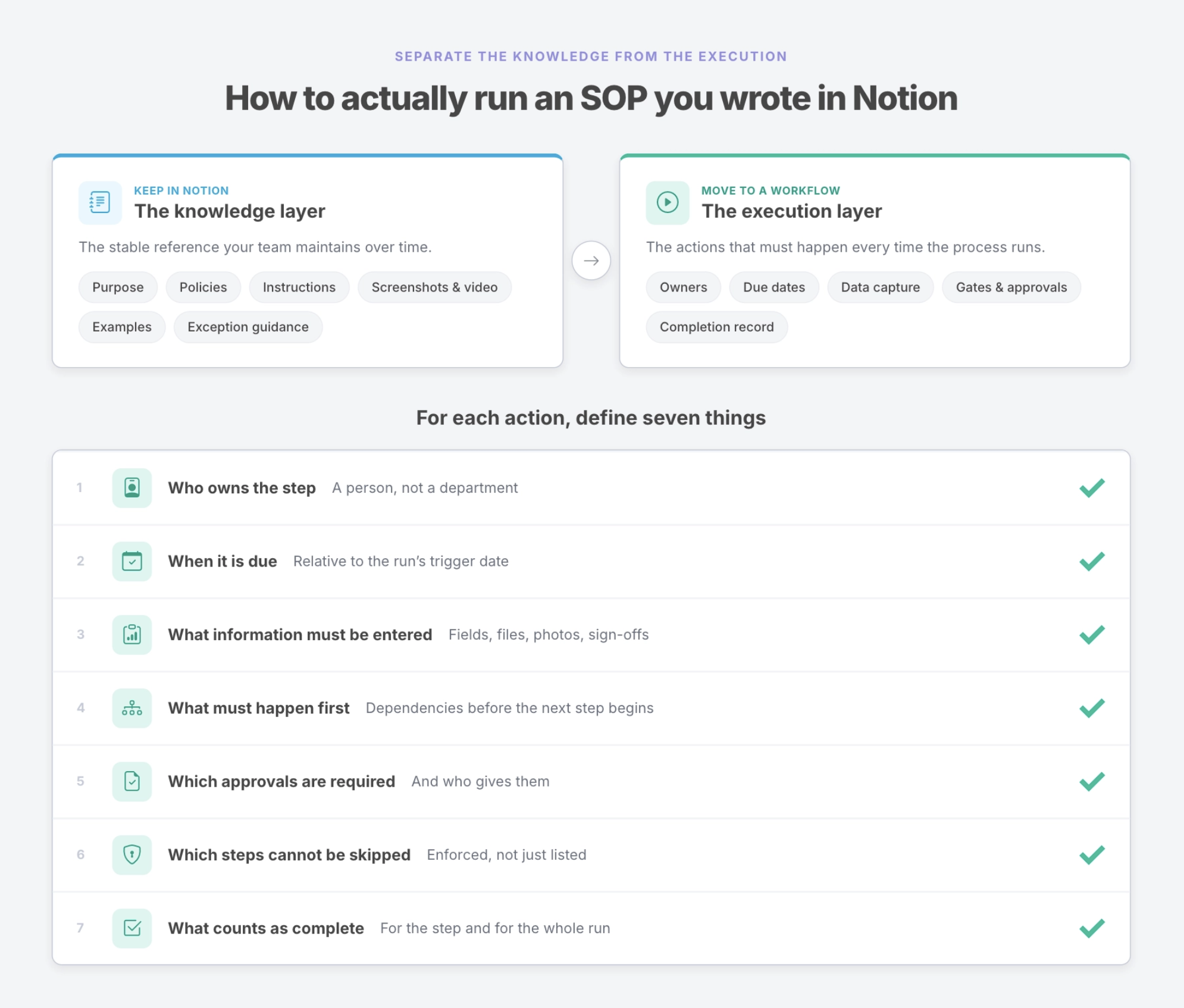
Start by separating the process knowledge from the process execution.
Keep the detailed SOP in Notion: the purpose, policies, instructions, screenshots, videos, examples, templates, and guidance for unusual situations. That information changes more slowly and needs to remain easy for the team to find and maintain.
Then identify the recurring actions that have to happen whenever the process runs.
Every action needs an owner, timing, any required inputs or approvals, and a clear definition of completion. The process also needs to define what happens when something is late, skipped, blocked, or requires an exception.
Then define what starts the work.
It might be an offer being accepted, a contract being signed, the end of the month, a scheduled inspection, a new client, an incident, or a recurring date.
Each trigger should create a new execution with its own context.
That is the point where the SOP stops being only a description of the work and becomes something the organization can actually run.
For simple processes, building this structure directly in Notion may be the right choice.
As the process becomes more complicated, a recurring workflow system can take over the execution layer while Notion remains the source of truth for the documentation.
Example: employee onboarding
Employee onboarding makes the distinction easy to see because most companies already know what should happen.
HR needs to collect employee information. IT needs to create accounts and prepare equipment. Payroll and benefits need to be configured. The hiring manager needs to prepare for the first week. Required documents need to be completed.
The problem is rarely that nobody has written those steps down.
The problem is coordinating them for one actual employee.
Suppose Sarah starts on September 14.
The Notion SOP can explain how employee onboarding works across the company: provisioning standards, benefits instructions, policies, screenshots, welcome templates, manager guidance, and instructions for exceptions.
That is the knowledge layer.
The workflow run is about Sarah.
It carries her start date, manager, role, department, and location. HR owns its tasks. IT owns its tasks. The manager owns theirs. Deadlines calculate around September 14. Required steps remain visible until they are complete, and overdue work can be surfaced before it becomes a day-one problem.
When the process finishes, the company has a record of what happened for Sarah: who completed each step, when it happened, what information was collected, and whether anything unusual occurred.
The SOP tells the company how onboarding should work.
The run shows how this onboarding actually happened.
Can Notion and Manifestly work together?
Yes. They solve different parts of the same problem.
Notion can remain the home for your SOP library, company wiki, policies, screenshots, process explanations, and supporting resources.
Manifestly can run the recurring process.
Each Manifestly workflow run can have its own owners, due dates, reminders, required steps, collected data, comments, and completion record. Detailed task instructions can still point back to the relevant Notion documentation.
Manifestly workflows can also be embedded in Notion, allowing the documentation and execution interface to remain connected inside the workspace the team already uses.
This is not an automatic conversion of a Notion page into a synchronized workflow. The workflow still has to be designed around the actions, owners, timing, approvals, and controls the process actually requires.
That is also the advantage.
The team does not have to move its knowledge base simply because recurring execution has become more demanding.
When is Notion alone enough?
Not every recurring process needs a separate workflow system.
Notion may be enough when the process is simple, one person owns most of the work, recurrence follows a fixed schedule, missed steps have limited consequences, and the organization does not need a formal record of each execution.
A weekly content review, recurring meeting agenda, or simple administrative checklist may fit comfortably inside a Notion database.
Notion may also work well when the team has already built the databases, formulas, automations, relationships, and views it needs and is comfortable maintaining them.
The case for a dedicated workflow system becomes stronger when the process crosses several people or departments, deadlines change with each run, required work cannot be skipped, reminders and escalation matter, information must be collected during execution, or the organization needs a separate record for every employee, client, location, audit, or reporting period.
The question is not whether Notion can do it.
It is how much machinery your team wants to maintain in order to make the process run reliably.
The SOP is only one part of the process
There is nothing wrong with keeping your SOP in Notion.
In many cases, that is exactly where it belongs.
But once a recurring process starts crossing people, deadlines, approvals, and real operational consequences, knowing what should happen is no longer enough.
Someone needs to know what happens next. Someone needs to own it. And when the work is finished, the organization should be able to tell whether it actually happened.
That is the difference between an SOP your team can find and a process your organization can rely on.
Start free and turn one Notion SOP into a recurring Manifestly workflow.