
How to Use AI and Manifestly Before Your Weekly Operations Meeting
September 22, 2026
Most weekly operations meetings begin with a status check.
Each person explains what they completed, what is late, and what they are waiting on. The meeting leader asks who owns the next step and someone takes notes and promises to follow up. By the time everyone shares the same picture of the work, little time remains to solve the problems that required meeting.
We tend to assume this is what an operations meeting is for, but the shared view of the work should exist before the meeting begins. Meetings are best used when the team applies judgment: resolving exceptions, making decisions, approving changes, and fixing handoffs that repeatedly fail.
When your recurring processes run in Manifestly, an AI assistant connected through MCP can help you prepare that view. You can ask what is overdue, which steps remain incomplete, where a handoff appears to be stuck, and who owns what happens next.
AI makes the work easier to inspect. Manifestly makes sure it keeps moving.
Why So Many Operations Meetings Become Status Checks
Most teams do not schedule status meetings because they enjoy giving updates. They schedule them because status is otherwise difficult to see.
The work may be spread across project boards, spreadsheets, Slack threads, and email. One person knows the vendor review is waiting on finance. Someone else knows a customer launch slipped because security has not approved access. A third person knows the monthly report is almost finished, but the final numbers have not arrived.
The meeting becomes the place where those fragments are assembled.
That’s an important meeting to have. It is where the team should resolve exceptions and decide what happens next. The problem is using that time to discover the state of the work instead of acting on it.
If the meeting is the only place where ownership and status become clear, the workflow is not doing enough between meetings. A reliable process should already show:
- What has been completed
- What is late or due soon
- Who owns each open step
- Which handoffs are blocked
- What requires approval or review
- What happened after the last meeting
The meeting should not have to create this record. It should act on it.
Move Status Out of the Meeting
Moving status checks out of the meeting does not mean removing people or judgment from the process. It means separating two kinds of work that are often treated as the same.
Status answers factual questions: What’s complete? What’s overdue? Who owns the next step?
Judgment answers operational questions: Should we move the deadline? Does this exception need approval? Should ownership change? Is the same handoff failing often enough that the workflow needs to be redesigned?
Status can usually be retrieved from a current workflow record. Judgment still belongs with the team.
That changes the purpose of the weekly meeting. Instead of reviewing every active item, the team can focus on exceptions and moving the work forward.
How AI and Manifestly Prepare the Meeting Agenda
This is where AI can help. When an AI assistant is connected to Manifestly, it can review the current workflow record before the meeting and surface what needs attention. Instead of asking each person for an update, you can ask the AI agent which workflow runs are overdue, which steps remain incomplete, where handoffs appear to be stuck, and who owns what happens next.
Manifestly provides the structured record: workflows, owners, due dates, comments, and completion history. AI makes that record easier to review and can organize the exceptions into a meeting agenda.
To prepare for your next operations meeting with AI and Manifestly, you will need:
- A Manifestly account
- The recurring processes you want to review set up as Manifestly workflows
- Current owners and due dates for the relevant steps
- An MCP-compatible AI assistant, such as Claude or ChatGPT
- Manifestly connected to that assistant through MCP
- Permission to view the relevant workflows and workflow runs
If you have not connected an AI assistant yet, follow the Manifestly MCP setup guide. The connection uses your existing Manifestly permissions, so the assistant can only access the work available to your account.
Begin with read-only questions. Ask the assistant to retrieve and organize the workflow data without changing it. Once your team is confident in the connection, you can use it to prepare updates to assignments, due dates, comments, and steps.
Step 1: Define What Belongs in the Weekly Review
Don’t begin by asking AI for a general summary of everything in your account. Decide which recurring workflows belong in the meeting.
Your weekly operations review might cover customer onboarding, employee onboarding and offboarding, vendor approvals, compliance checks, IT access reviews, recurring reports, location inspections, or finance processes.
The exact mix matters less than consistency. The team should know which workflows are reviewed each week and what makes an item worthy of discussion.
It also helps to define what stuck means. A handoff may be stuck when:
- A step is overdue.
- The next required step cannot begin.
- An approval is missing.
- A step has no clear owner.
- No progress has been recorded for a set number of days.
AI can surface these conditions when the workflow contains the owners, due dates, dependencies, and current status needed to identify them.
Step 2: Ask AI to Find the Exceptions
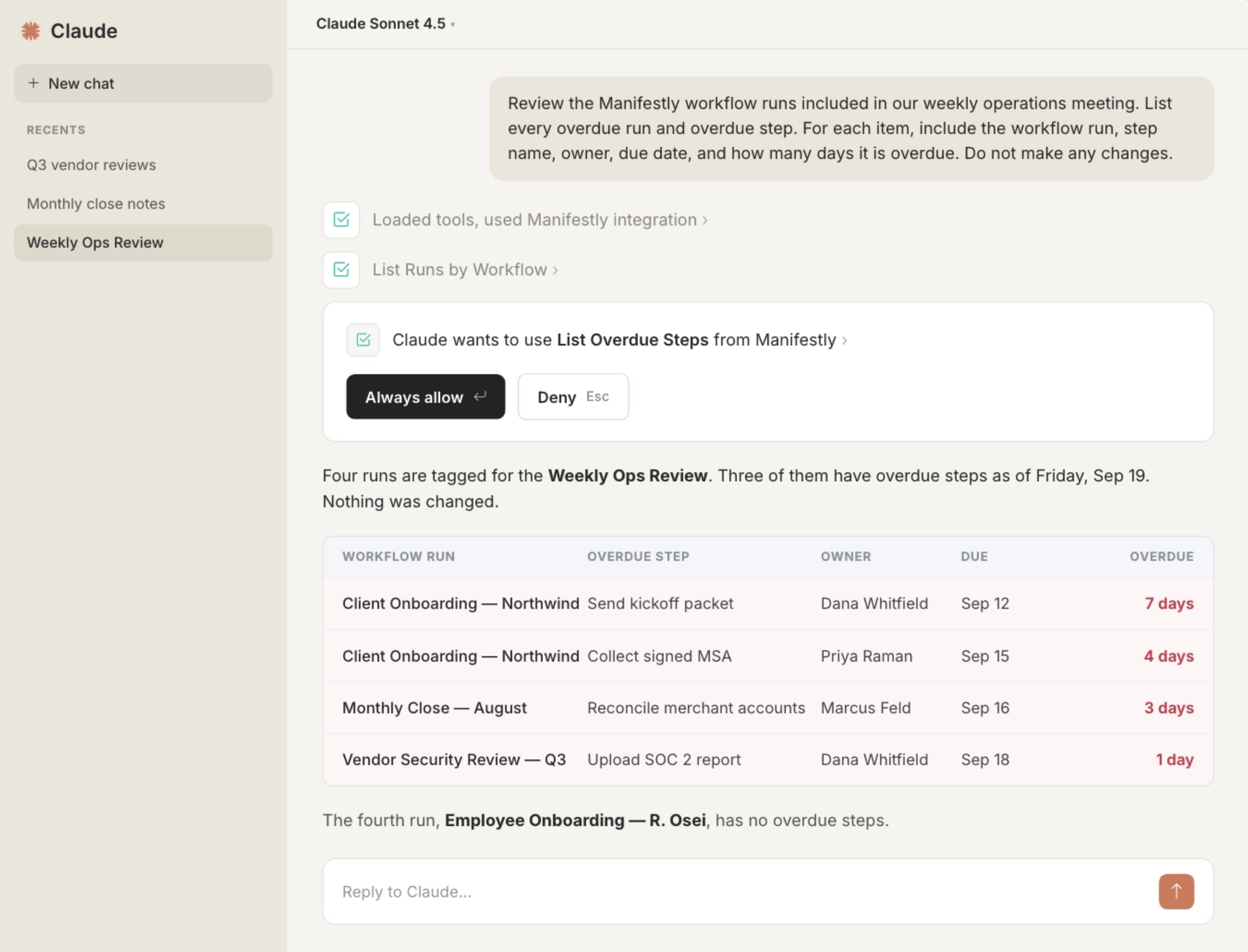
Start with the clearest signal: overdue work.
Review the Manifestly workflow runs included in our weekly operations meeting. List every overdue run and overdue step. For each item, include the workflow run, step name, owner, due date, and how many days it is overdue. Do not make any changes.
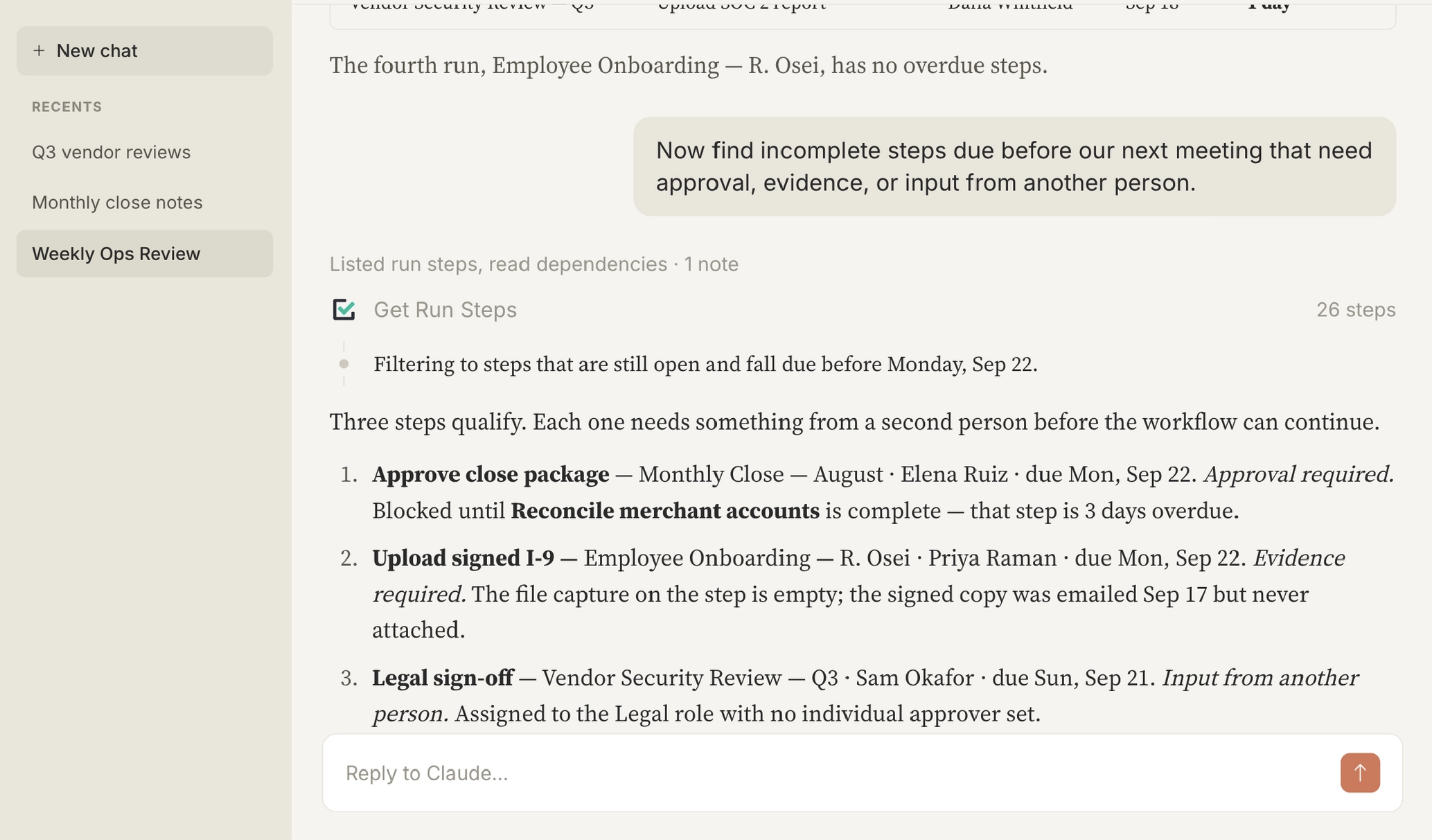
Then look beyond what is already late. An incomplete step may still need attention if it could affect a customer, employee, compliance requirement, or downstream deadline.
Review the same workflow runs for incomplete steps due before our next meeting. Identify any steps that require approval, evidence, or input from another person before the workflow can continue. Include the owner, due date, and any recorded dependency.
Finally, ask the assistant to find handoffs that appear to be stuck:
Find handoffs where the next step is overdue, has no owner, is waiting for approval, or is blocked by an earlier step. Include the workflow run, blocked step, current owner, and the information in Manifestly that indicates the handoff is stuck.
That final instruction matters. The assistant should organize the evidence in the workflow record, not invent a reason the work is late. If the record does not explain the delay, missing context becomes an exception for the team to resolve.
Step 3: Turn the Exceptions Into a Meeting Agenda
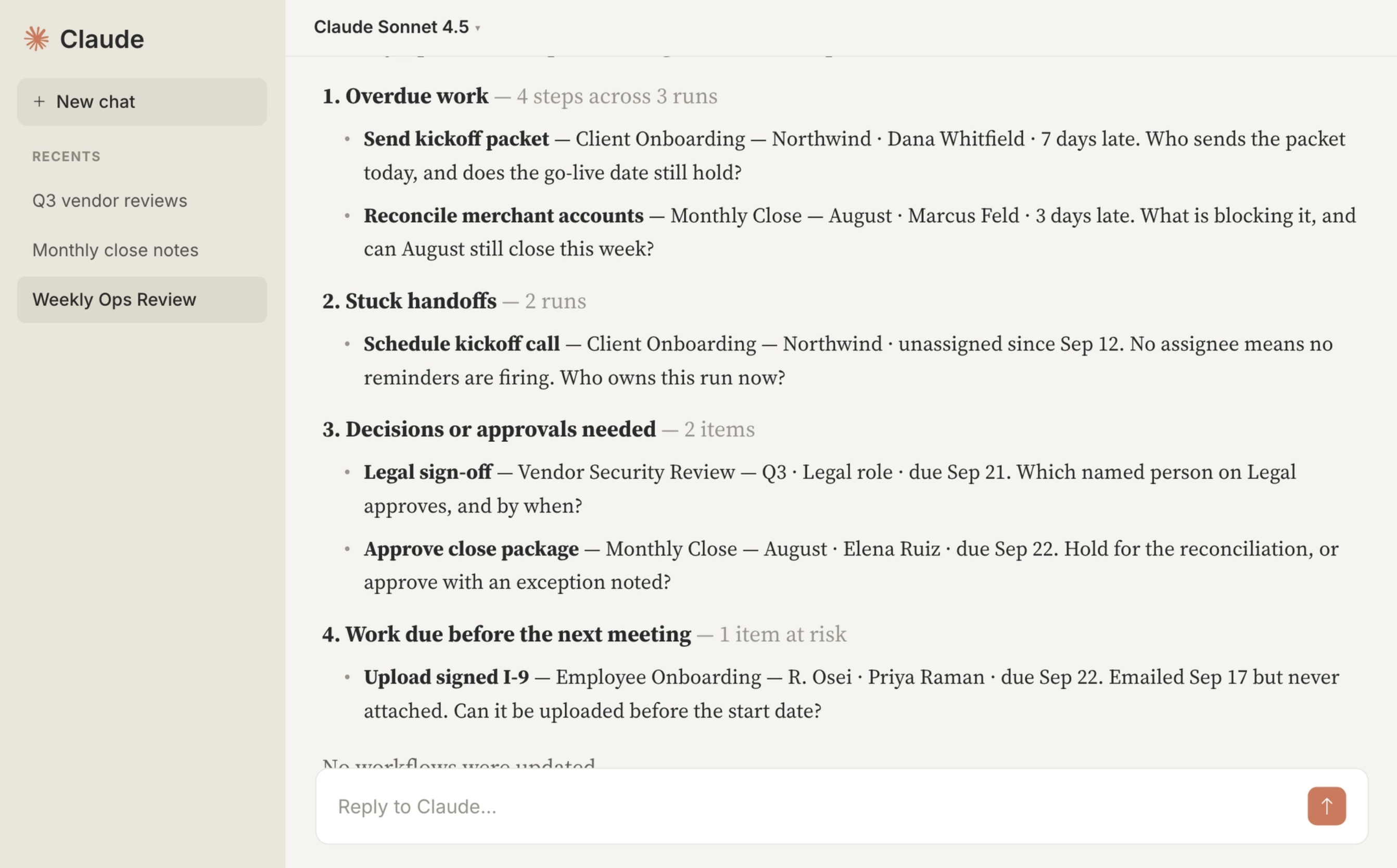
Once the assistant has retrieved the overdue work, incomplete steps, and stuck handoffs, ask it to prepare a concise agenda:
Create a pre-meeting operations brief from the Manifestly data you reviewed. Organize it into:
1. Overdue work
2. Stuck handoffs
3. Decisions or approvals needed
4. Work due before the next meeting
For each item, include the workflow run, owner, due date, and the specific question the team needs to resolve. Leave out completed or on-track work unless it provides necessary context. Do not update any workflows.
The agenda should not become another activity report. Its purpose is to separate routine work from the exceptions that require attention.
Routine work can remain in the workflow. The meeting begins with what needs judgment.
Step 4. Make Meeting Preparation a Recurring Workflow
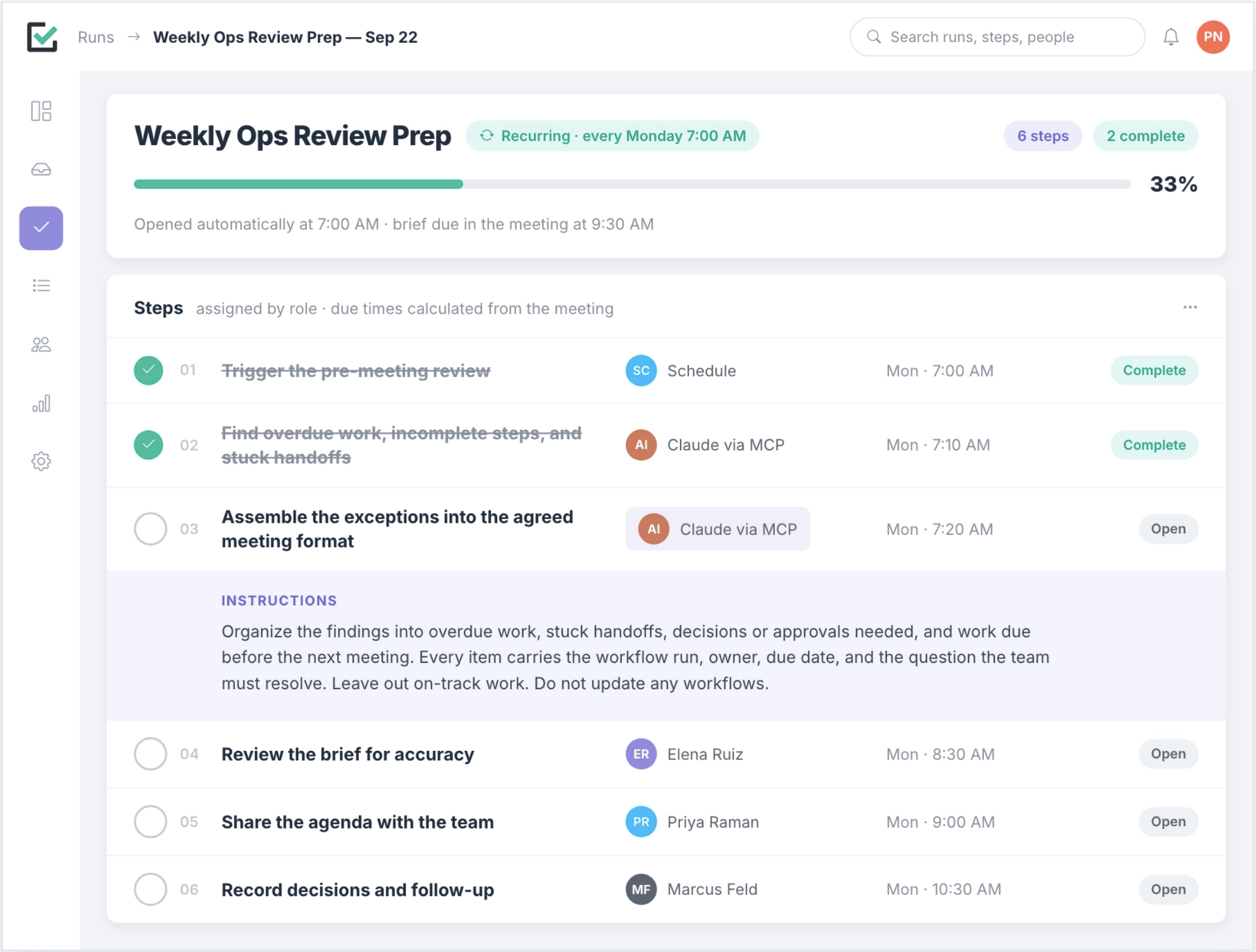
Preparing for the weekly operations meeting is itself a recurring process. Once you know what the review should include, you can turn it into a Manifestly workflow rather than relying on someone to remember each step.
Schedule a new workflow run for the morning of the meeting. The workflow might:
- Trigger the pre-meeting review.
- Ask the AI agent to find overdue work, incomplete steps, and stuck handoffs.
- Assemble the exceptions into the agreed meeting format.
- Assign someone to review the brief for accuracy.
- Share the agenda with the team.
- Record any decisions and follow-up after the meeting.
The AI agent can do the retrieval and organization. The workflow defines when that work happens, what it must include, who reviews it, and where the result is recorded.
Step 5: Run the Meeting Around Decisions
With the brief prepared, the weekly meeting can follow a simpler agenda:
- Confirm that the exceptions are accurate.
- Resolve overdue work and blocked handoffs.
- Make the required decisions or approvals.
- Assign an owner and due date to each follow-up.
- Identify recurring failures that may require a workflow change.
This does not mean the team should ignore completed work or progress. It means routine updates no longer have to consume the meeting. People can open the workflow record when they need the full history.
Use the shared meeting for the work that benefits from shared attention.
Step 6: Record Decisions Where the Work Lives
A better meeting can still produce a weak process if its decisions disappear into meeting notes.
After the team agrees on an action, update the underlying Manifestly workflow run. That may mean changing a due date, assigning an owner, adding a comment, recording an exception, or starting a follow-up workflow.
If you use your AI assistant to prepare those updates, be specific and require confirmation before important changes:
In the Acme Customer Onboarding run, prepare these updates for confirmation: reassign the security questionnaire step to Jordan Lee, move the due date to September 24, and add the comment, “Extension approved in the weekly operations meeting while we wait for the customer’s security contact.” Do not make the changes until I confirm.
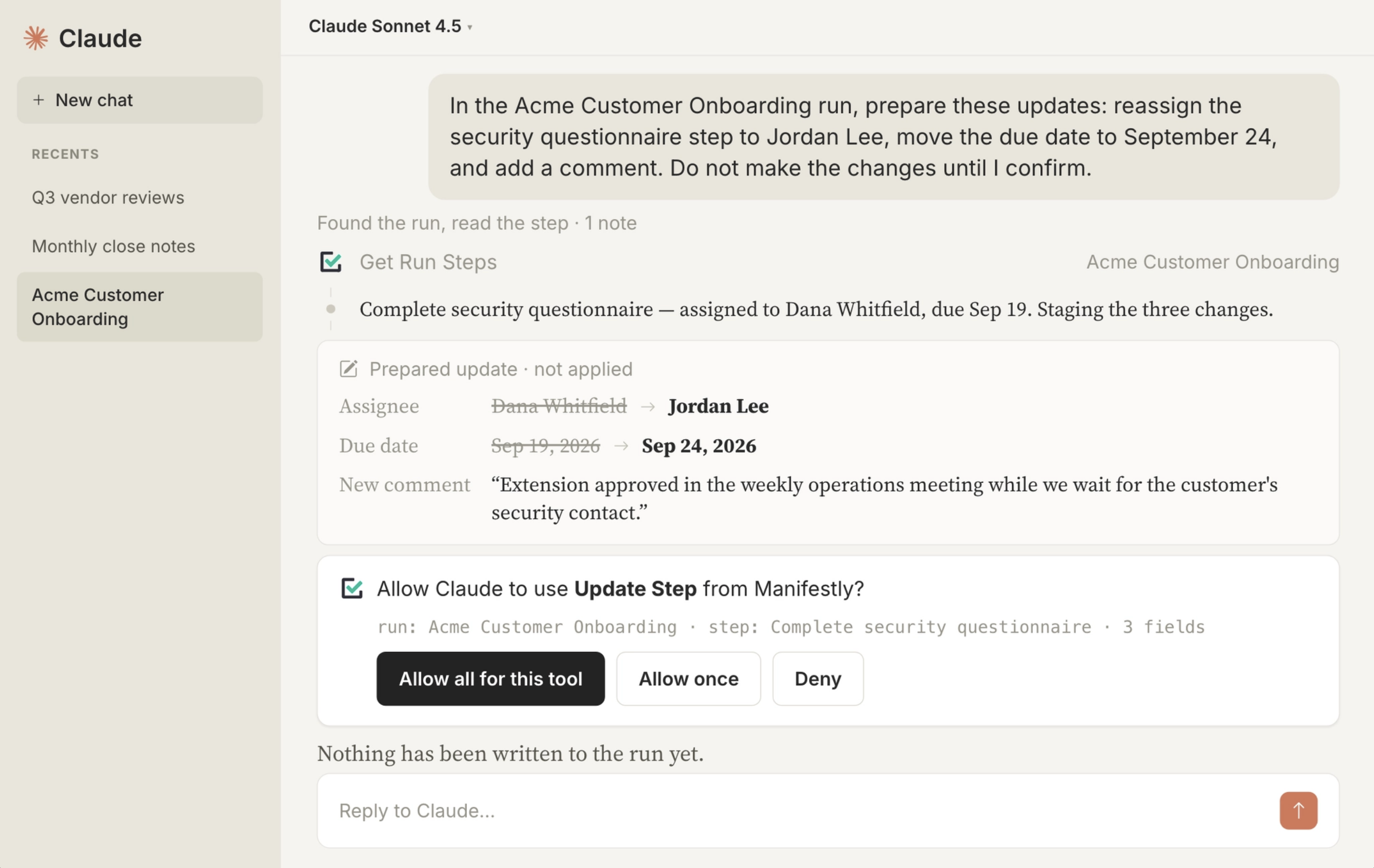
Then verify the updates in Manifestly, especially while your team is learning the process.
Meeting notes can explain the discussion. The workflow should show what changed, who owns the next step, when it is due, and what eventually happened.
Why Manifestly Remains the System of Record
An AI-generated brief is only as reliable as the system beneath it.
If assignments are missing, due dates are outdated, or people complete work without updating the workflow, the assistant cannot produce an accurate operational view. It can summarize the available data clearly. It cannot repair a record the team has not maintained.
The AI assistant and Manifestly therefore play different roles.
The assistant gives you a conversational way to inspect the work and organize the exceptions. Manifestly keeps the reusable workflow, individual runs, owners, due dates, comments, collected data, and completion history.
The chat is an interface. It should not become the only place where the team can see what happened.
Replace One Status Check With a Workflow Review
Once the team can see what is late, blocked, and waiting for a decision before the meeting begins, spending the meeting reconstructing that status becomes a choice.
Routine work can stay in the workflow. The meeting can focus on the exceptions that require human judgment.
Start with one recurring process that consumes meeting time because the team has to reconstruct its status. Before your next operations meeting, use AI and Manifestly to review the workflow instead of asking everyone for an update.
Start a free 14-day Manifestly trial and turn one recurring process into a workflow before your next meeting.