
Right Click Step Actions Menu
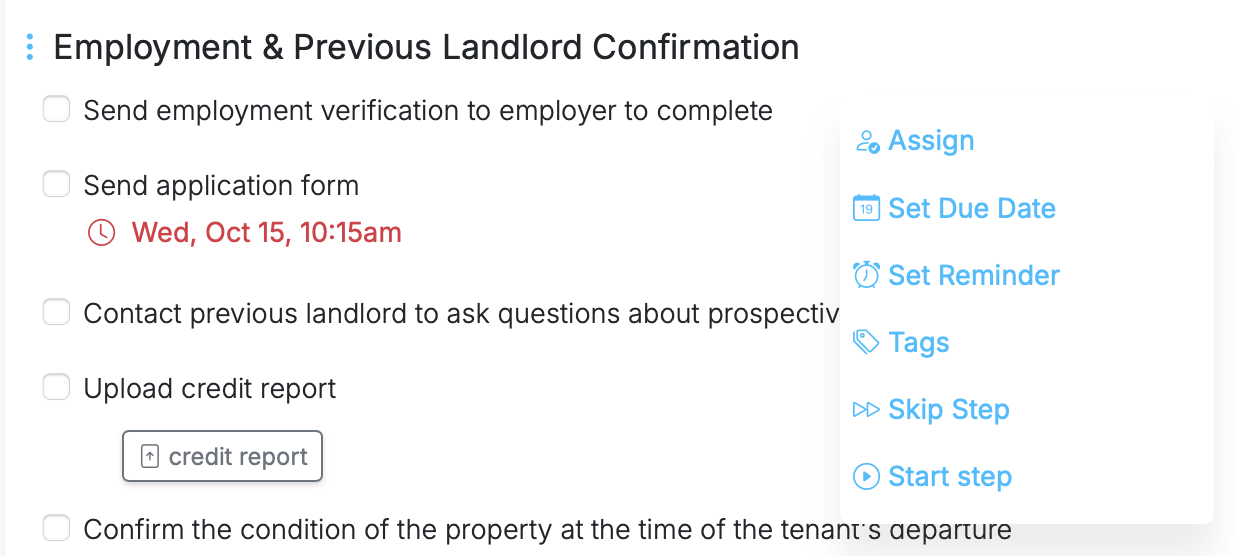
Working through a run just got faster.
You can now right-click on any step in a run to instantly open the step action menu. From there, you can assign the step, set a due date, add tags (including Urgent), skip it, and more — all without moving your cursor to the action panel.
The same right-click behavior works on section headers, giving you quick access to actions like completing the section, skipping all steps, or collapsing the section. Everything available in the header menu is now just a right-click away.
If your account has Quick Lists, this also works in task lists. Right-click on a task to add notes or comments, change the due date, tag the task, and more — using the same options you’d normally find in the task actions panel.
Right-click anywhere on a step or task to work faster, stay focused, and keep momentum while running your workflows.
Right Click Step Actions Menu is live in every account
Open Manifestly to try it, or book a walkthrough with our team.