
New Feature: Bulk Complete a Step Across Runs from the Run Summary
April 26, 2026
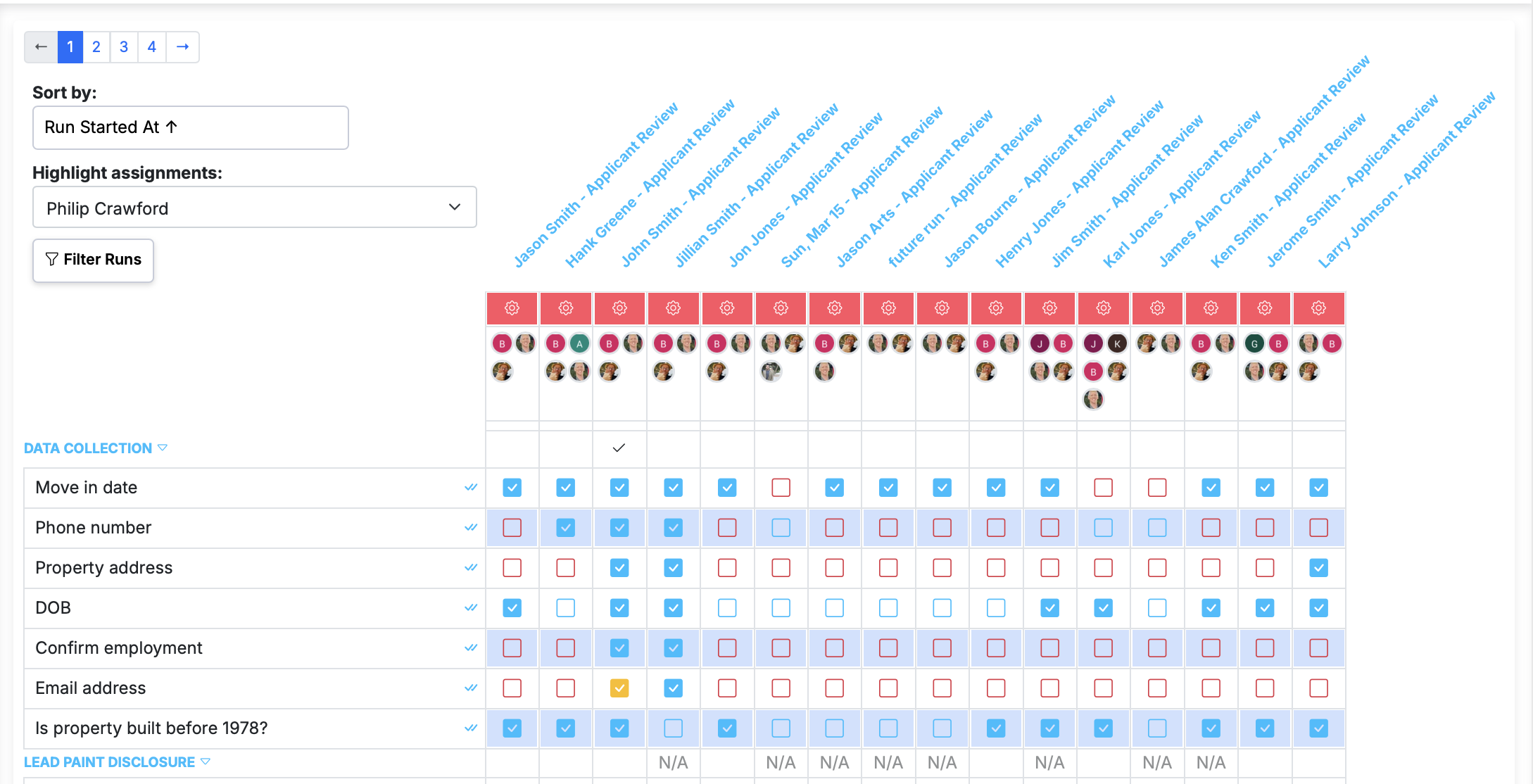
Some steps apply to every run at once. A morning safety check across all locations. A weekly sign-off that needs to happen on every active client run. A notification step that's the same for everyone. Previously, completing that step meant clicking into each run one by one.
Now you can complete the same step across every run visible on the run summary page in a single click.
How to use it
- Open the Run Summary page from the workflows page.
- Apply any filters you want — tag, date range, status — so the list shows exactly the runs you care about.
- Find the step you want to complete in the step column on the left. Look for the double checkmark icon next to the step title.
- Click it to mark that step done across every run currently visible.
Smart safeguards
Bulk complete respects the rules already in place on your runs:
- If a step requires data to complete, it's skipped on that run (you'll need to complete it individually).
- If you don't have permission to complete the step on a particular run, it's skipped.
- If the step isn't applicable on a run due to conditional logic, it's skipped.
- Steps that are already complete are skipped.
In other words, bulk complete does the right thing — it completes the step wherever it can and leaves everything else untouched.
Tip: Use filters first
The action applies to runs visible in the current view, so narrow the list with filters before clicking. This gives you precise control over scope — complete a step for all runs tagged "Location A," or only runs started this week.
See the full feature details for more.