
How to Migrate from Process Street to Manifestly
September 29, 2026
The short answer
To migrate from Process Street to Manifestly, export a workflow, upload it to Manifestly or recreate it with help from Claude or ChatGPT through MCP, review its settings, test a run, and go live. Then repeat for the next workflow.
You don’t have to move everything at once, and you don’t have to do it alone. Every Manifestly customer gets free white-glove migration help. Send us your exports and we’ll help you rebuild, map your team, and test before anything goes live.
Most teams hesitate to switch because the current process is working well enough, and switching sounds like a project. It doesn’t need to be one. The eight steps below start with a single workflow, so you can see the result on real work before moving the rest.
Before you start: what moves and what stays
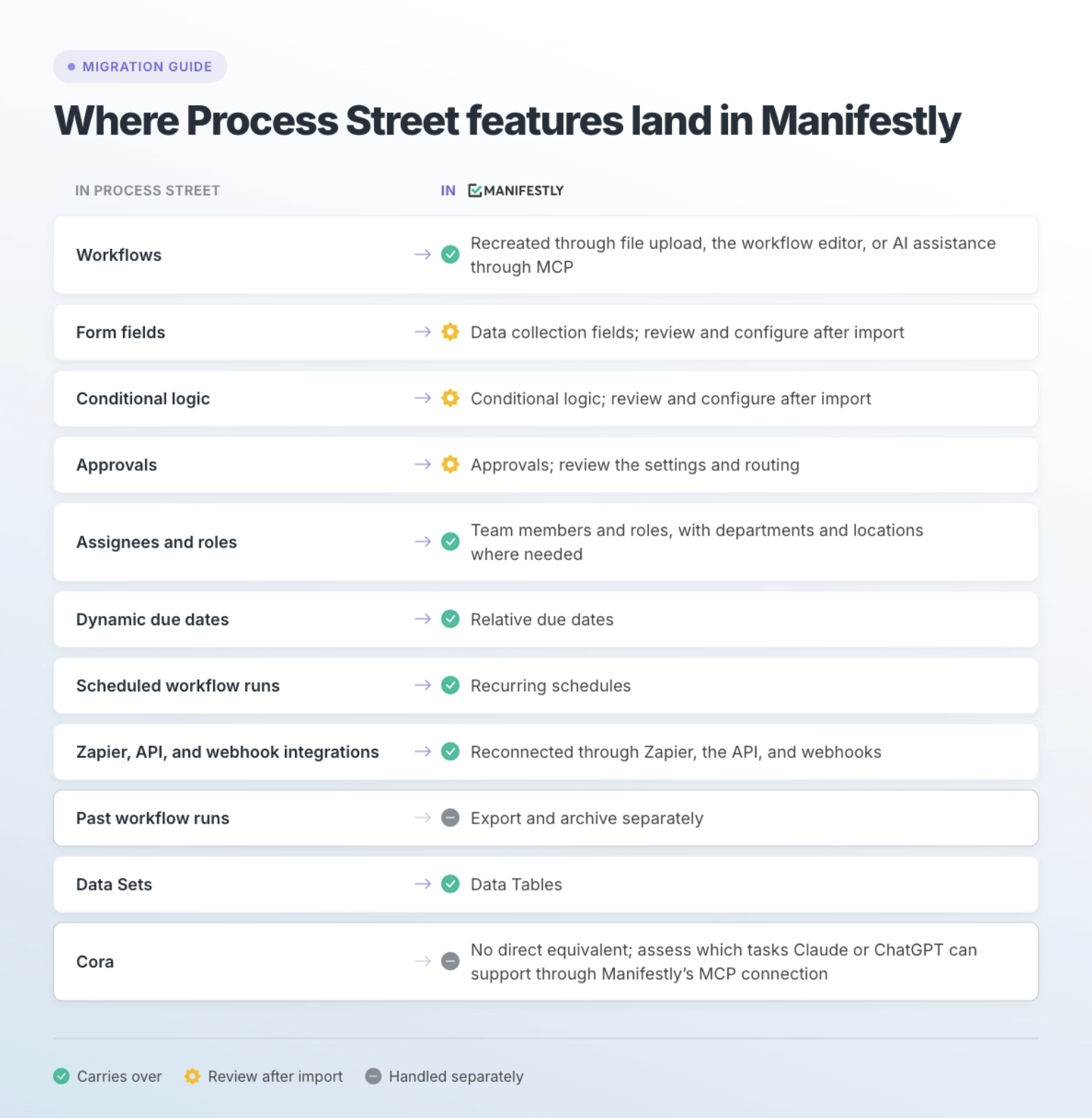
Your workflow designs can be recreated in Manifestly. Your past run history does not transfer, so export and archive the records you need before you cancel.
Is Manifestly the right fit? Manifestly is built for recurring operational execution: onboarding, close, inspections, reviews, and client delivery that need clear ownership, deadlines, approvals, and a record of each run.
If your team relies on Process Street’s document governance or Cora, list the specific functions you use and evaluate them separately. Much of the AI-assisted work may be possible through MCP, but check each task, the information it needs, and the actions it requires before switching.
Step 1: Inventory your Process Street workflows
List every workflow your team actually runs, then note what each one depends on. This tells you what to move, in what order, and what to leave behind.
For each active workflow, capture:
- How often it runs. Weekly, monthly, per new hire, per customer, or on demand.
- Who takes part. The people, roles, and teams that own steps.
- What makes it work. Conditional logic, approvals, form fields, and due dates.
- What it connects to. Zapier zaps, webhooks, or API calls it triggers or receives.
- What records you need to keep. Anything an auditor, client, or manager might ask for later.
Expect to find workflows nobody has run in months. Don’t migrate them. A switch is a good moment to retire process debt.
Step 2: Choose one or two workflows to move first
Start with a workflow that runs often and still needs chasing, not your most complex one. Frequent runs give you feedback fast, and a process people already chase shows the difference clearly.
Good first candidates:
- Employee onboarding
- Month-end close
- Customer onboarding
- A recurring inspection
- A weekly operations review
Save the workflow with the most branching logic and integrations for later, once your team knows how Manifestly runs work.
Step 3: Export from Process Street
Export each workflow you’re moving as a CSV, or save it as a PDF. Review the export to make sure it includes the instructions and configuration details you’ll need to recreate the process.
- CSV gives you a structured source for reviewing or rebuilding the workflow.
- PDF gives you a document to review with your team, upload to an AI assistant, or share with our migration team.
Compare the export with the original workflow, especially for form fields, conditions, approvals, assignments, and deadlines. Keep a record of anything the export leaves out.
While you’re in Process Street, export any past run records you need to keep. Do this before your subscription ends.
Step 4: Rebuild the workflow in Manifestly
Choose the route that fits how much help you want and how much you plan to change.
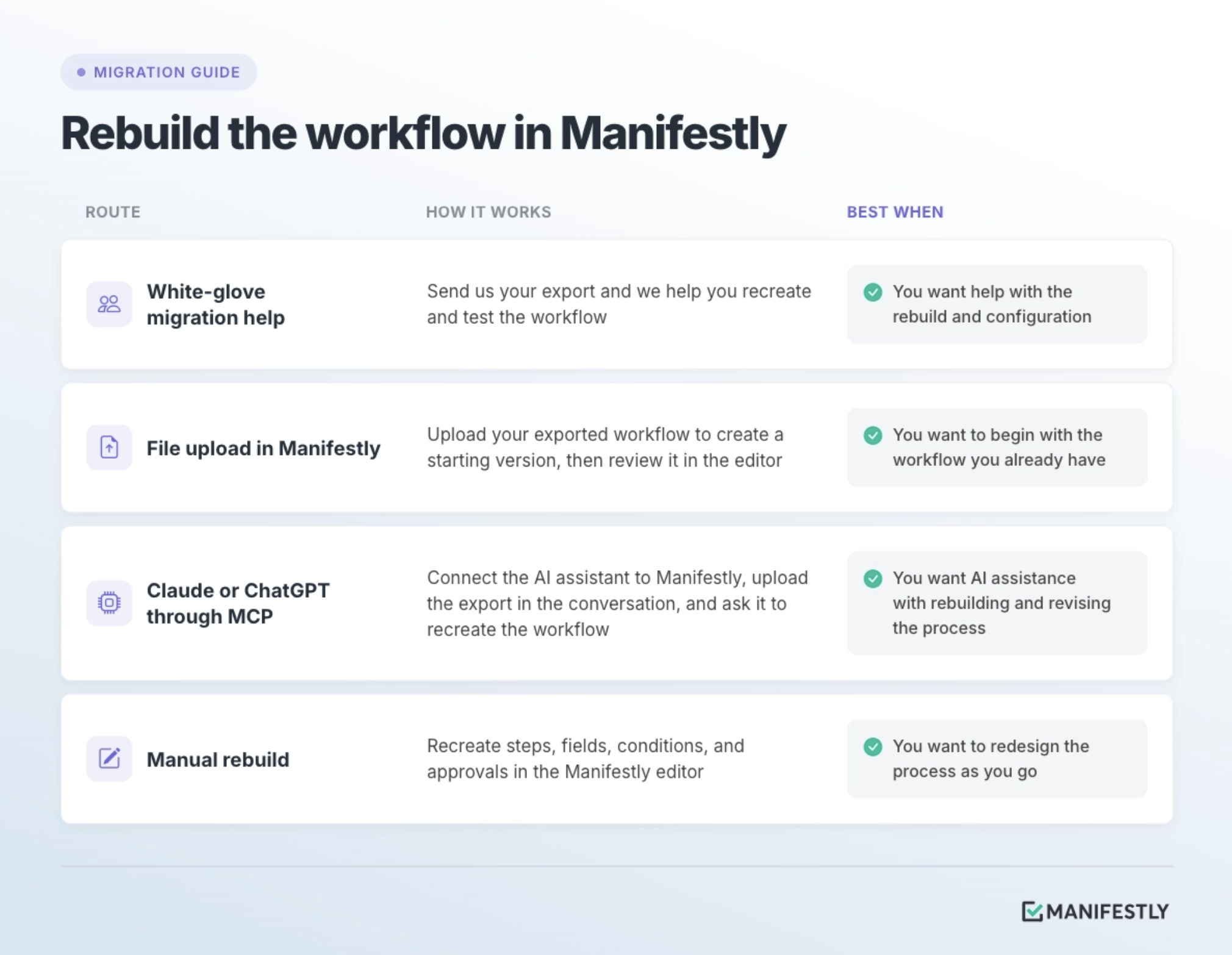
Upload the file in Manifestly
File upload brings through much of the workflow, but conditional logic needs to be reviewed and configured. Recreate those conditions in the editor.
Review the imported steps, instructions, data collection fields, approvals, assignments, and due dates against the original. Add or correct anything missing before testing a run.
Use Claude or ChatGPT through MCP
With Manifestly’s MCP connection set up, upload your exported workflow to Claude or ChatGPT and ask it to recreate the workflow in Manifestly.
Review the proposed structure before it creates or changes the workflow. Afterward, check the result in Manifestly, including fields, conditions, approvals, assignments, and deadlines. Complete any settings the assistant could not recreate.
Whichever route you choose, use the migration to improve the process. Remove steps that no longer happen, combine steps where it makes sense, and clarify instructions that people struggle to follow.
Step 5: Map your people to the work
Before the first live run, review who should handle each step and where deadlines will help the work move. Manifestly supports assignments to people and roles, so ownership can follow the responsibility rather than a particular employee.
- Set up roles such as HR, IT, Controller, or Account Manager, and map the appropriate people to them.
- Add departments and locations if the same workflow runs across teams or sites.
- Assign steps where responsibility should be explicit. Use a role for work that follows a job function and a person for work that belongs to a specific teammate.
- Set relative due dates where timing matters so deadlines calculate from each run’s start date.
These are workflow design recommendations. Manifestly does not require every step to have a named person and a due date before you use it. The goal is to make handoffs and time-sensitive work clear enough that people know when to act.
Step 6: Test the run
Start a test run with a small group before anyone depends on it. Walk it end to end and confirm each of these:
- Each conditional branch appears when you enter the answer that should trigger it
- Approvals route to the right reviewer and block the next step until signed off
- Relative due dates calculate correctly from the run’s start date
- Reminders reach the step owner
- The recurring schedule starts runs when it should
- Zapier, webhook, and API integrations fire
- Data collection fields capture everything you need to keep
Fix what breaks, then run the test once more. Conditions and approvals are the parts most likely to need a second look after a rebuild.
Step 7: Run it live alongside Process Street
Run the next real instance of the process in Manifestly, and keep Process Street available for reference for that one cycle. Don’t run the same instance in both tools; that doubles the work and splits the record.
When the run finishes, ask your team:
- Did everyone know what they owned?
- Did follow-up happen without someone chasing it?
- Could you see what was late while it was late?
- Did the process finish correctly?
- Do you have a useful record of what happened?
If the answers are yes, you have your proof. If not, adjust the workflow and run it again.
Step 8: Expand, then retire Process Street
Move the remaining workflows in small batches, repeating steps 3 through 7 for each. Once the last one is live, close out Process Street in this order:
- Confirm every active workflow is running in Manifestly.
- Export the past run records you need for audits, clients, or internal review.
- Store those exports where your team can find them later.
- Cancel your Process Street subscription.
Check your Process Street renewal date early and plan backward from it. Don’t leave exporting run history until after you cancel.
Free white-glove migration help
Every Manifestly customer gets white-glove migration help at no extra cost. You don’t need an Enterprise contract or a minimum team size.
Send us your Process Street exports as CSV or PDF, and we’ll help you:
- Rebuild your workflows in Manifestly, including steps, instructions, fields, conditions, and approvals
- Set up roles, assignments, departments, and locations
- Test your first runs before your team depends on them
Talk to us about switching from Process Street
Frequently asked questions
Can I import my Process Street run history into Manifestly?
No. Manifestly can’t import past Process Street runs. Export the run records you need to keep before you cancel, and store them where your team can find them. Every run in Manifestly from the switch onward keeps its own complete history.
How do I get my workflows out of Process Street?
Export each workflow as a CSV, or save it as a PDF. Check the export against the original workflow and note any missing configuration details. You can use the file to rebuild in Manifestly, work with Claude or ChatGPT through MCP, or get help from our migration team.
Can I upload my exported workflow directly to Manifestly?
Yes. You can use file upload in Manifestly to create a starting version of the workflow. Much of the workflow can come through, but conditional logic needs to be recreated separately. Review data collection fields and other settings before testing a run.
Is white-glove migration help really free?
Yes. It’s included for every Manifestly customer at no extra cost, not only Enterprise accounts.
How long does a migration take?
It depends on how many workflows you move and how complex they are. Starting with one or two workflows means you can have a real process running in Manifestly before deciding on the rest. Most of the time goes into deciding what the process should be, not into the rebuild itself.
Can I run Process Street and Manifestly at the same time?
Yes, and we recommend it for the first cycle. Run new instances of migrated workflows in Manifestly, and keep Process Street available for reference until everything has moved.
Can Claude or ChatGPT help with the migration?
Yes. Connect Claude or ChatGPT to Manifestly through MCP, upload your exported workflow in the conversation, and ask the assistant to recreate it in Manifestly.
Review the proposed workflow before approving changes, then check the result in Manifestly. Test conditions, approvals, assignments, deadlines, and data collection before using it for live work.
Do I need a sales call to start?
No. You can start a 14-day free trial with no credit card. Manifestly Business is $10 per user per month, or $100 per user per year, with published pricing.
Start with one workflow
Pick the recurring process your team chases most. Export it from Process Street, rebuild it in Manifestly, and run it once. You’ll know more from that one run than from any feature comparison.
No credit card. No sales call. Free white-glove migration help whenever you want it.