
Best Law Practice Management Software for Recurring Firm Workflows
October 13, 2026
Law practice management software helps a firm organize matters, documents, deadlines, time, and billing. Choosing the right platform means understanding how your firm works—and which capabilities it will actually use.
Then there is the work that keeps the firm running: reconciling trust accounts, reviewing deadlines across open matters, checking engagement letters, and closing files consistently. Some of these routines start on a schedule. Others start when a matter opens or closes.
The question is whether each routine has somewhere to run. Who starts it? Who owns each step? What needs review? What happens when something is overdue or unresolved? What record remains afterward?
This guide compares Clio, MyCase, PracticePanther, Smokeball, and Filevine, then explains how to assess the recurring workflows around them.
What is the best law practice management software?
The best law practice management software depends on your firm’s size, practice area, billing requirements, document work, and integration needs. Clio is worth considering for firms comparing a broad platform and integration options. MyCase and PracticePanther offer published pricing for firms that want to compare costs across plans. Smokeball is worth evaluating for document-heavy practices, while Filevine is worth evaluating for teams that need configurable case workflows.
Those are starting points for a shortlist. Before choosing, ask each vendor to demonstrate a routine your firm actually runs, including assignment, review, and exception handling.
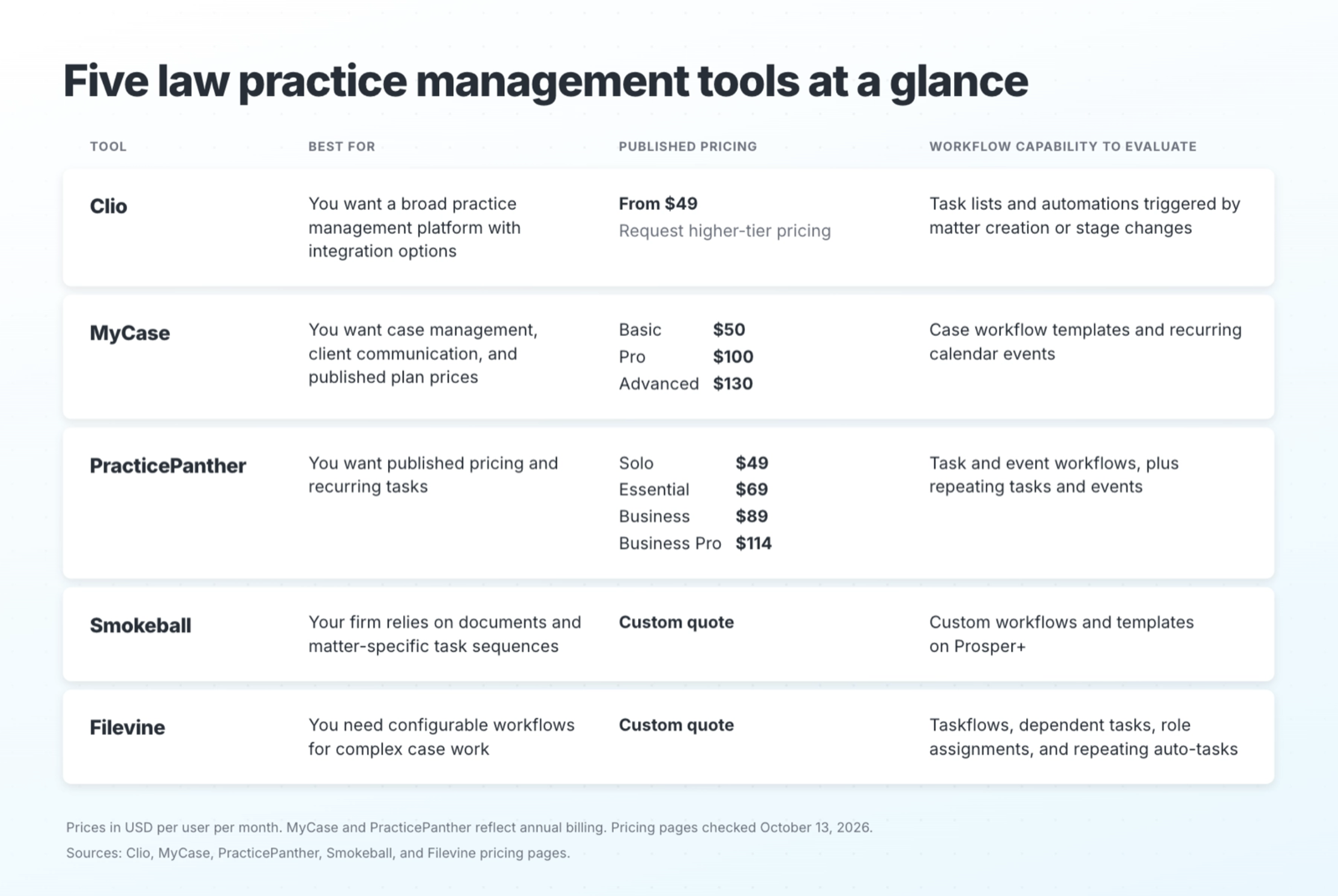
Five law practice management tools at a glance
Clio is the most widely reviewed law practice management software. MyCase, PracticePanther, Smokeball and Filevine round out the top five across G2, Capterra and Software Advice. All five manage matters, billing and trust accounting. Their automation is built around the matter, so firm-level recurring work, like monthly trust reconciliation, needs its own process.
Prices below are in USD per user per month. MyCase and PracticePanther figures reflect annual billing. Clio advertises a starting price of $49; confirm billing terms and higher-tier pricing with the vendor. Pricing pages were checked October 13, 2026.
How we chose these five
We only included tools that independent review platforms rank highly, not tools any one vendor recommends. Clio, MyCase, PracticePanther and Smokeball appear on all three major platforms: G2's Legal Practice Management grid, Capterra's Law Practice Management shortlist and Software Advice's FrontRunners. Filevine is on both G2's grid and Software Advice's FrontRunners, and it gives larger litigation firms an option.
Pricing comes from each vendor's own pricing page. Recurring task details come from each vendor's help center and, for Smokeball, its official community forum.
How to use this comparison
These five platforms provide different starting points for evaluating firm software. This is a shortlist, rather than a ranking based on review volume or a hands-on test of every configuration.
The pricing and workflow descriptions draw on vendor pricing pages and help documentation linked below. The fit recommendations are editorial judgments based on those capabilities. Confirm plan availability, add-ons, implementation costs, and the behavior of your specific workflow during a demo.
Two ways recurring law firm work starts
Practice management software automates work that belongs to a matter. Firm-level recurring work belongs to the firm's calendar instead. Knowing the difference tells you what your software will handle and what still needs an owner.
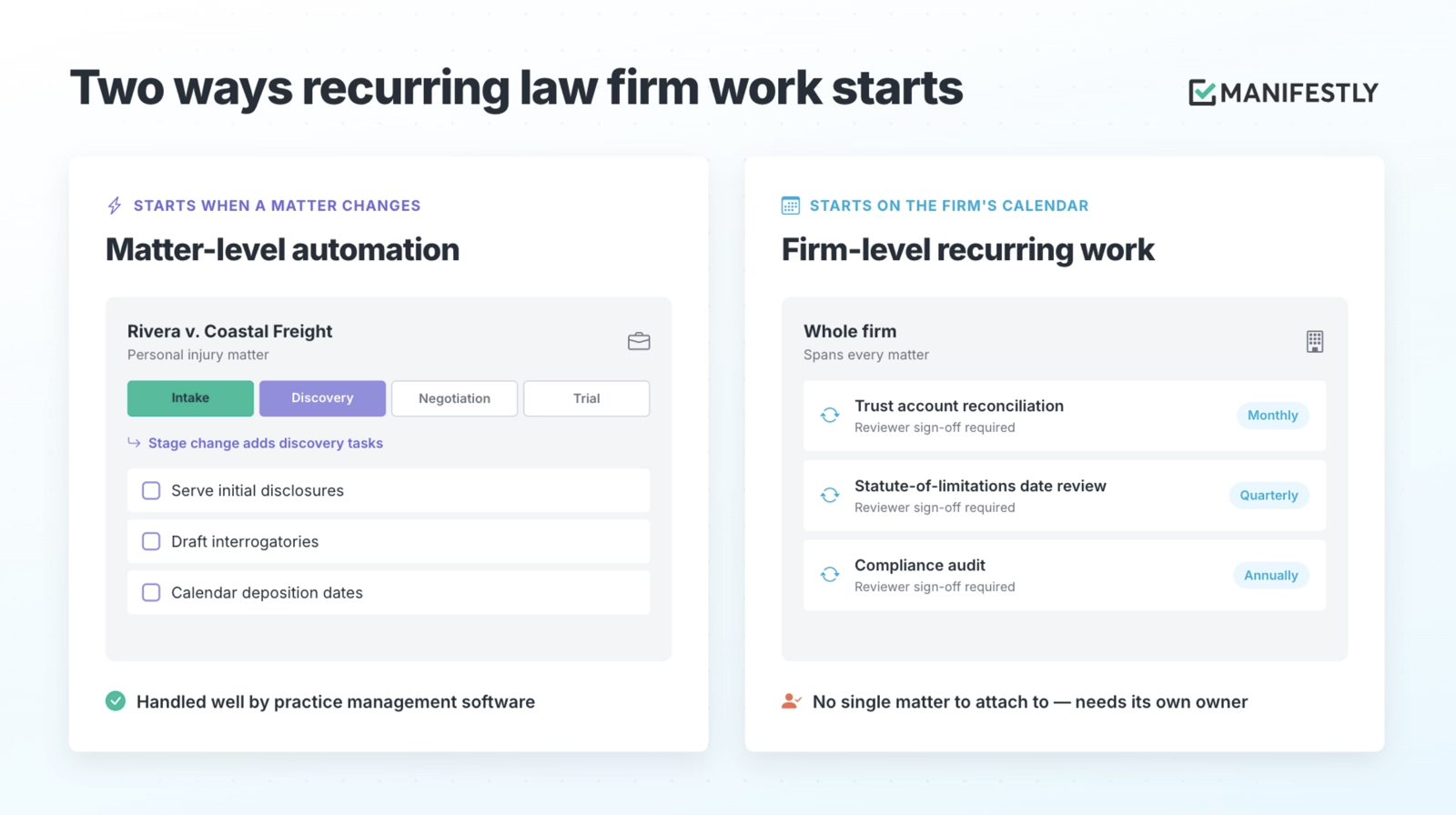
Matter-level automation
Matter-level automation is a set of tasks that fires when a matter opens or moves to a new stage. A new personal injury matter gets its intake tasks. A case that moves to discovery gets its discovery checklist. Every tool in this guide does this well, using task templates, workflows or matter stages.
Firm-level recurring work
Firm-level recurring work repeats on a fixed schedule, whether or not any one matter changes. Monthly trust account reconciliation, a quarterly review of statute-of-limitations dates and the annual compliance audit are common examples. This work spans every matter, so there is no single case for a template to attach to. It usually also needs a second person to review and sign off.
The five platforms, reviewed
1. Clio
Consider Clio if: your firm wants to evaluate practice management, accounting, client intake options, and integrations within a broader platform.
Clio advertises plans starting at $49 per user per month. Its current pricing page includes trust and operating-account reconciliation in Starter, with additional capabilities on higher tiers. Compare Clio plans.
Clio’s automated workflows can assign task lists when a matter is created or changes stage. Its task documentation also allows tasks without a selected matter, so firm work does not necessarily need to belong to a case. See automated workflows and task management.
What to test: ask for a demonstration of your monthly reconciliation process. Establish how the next cycle starts, who receives the preparation and review steps, and where unresolved discrepancies are tracked. Confirm the plan and configuration required.
2. MyCase
Consider MyCase if: your firm wants to compare case management and client communication capabilities across clearly priced plans.
Annual-billing prices are $50 for Basic, $100 for Pro, and $130 for Advanced per user per month. Pro adds workflows and intake capabilities. Compare MyCase plans.
MyCase workflow templates contain tasks and calendar events that can be applied to cases. Its calendar also supports recurring events, including monthly and annual schedules. See workflow templates and recurring events.
What to test: follow a recurring event through the actual work. Does it initiate the steps your team needs, or does someone separately apply a template? Establish how preparation, review, and completion evidence stay connected for each cycle.
3. PracticePanther
Consider PracticePanther if: your firm wants published plan pricing, task workflows, and repeating tasks and events.
Annual-billing prices are $49 for Solo, $69 for Essential, $89 for Business, and $114 for Business Pro per user per month. The pricing page lists task and event workflows on Solo and enhanced reconciliation features on Business Pro. Compare PracticePanther plans.
PracticePanther supports repeating tasks and events on daily, weekly, biweekly, monthly, and annual schedules. That gives firms a native way to schedule repeated assignments. See recurring tasks and events.
What to test: use a routine involving more than one person. Ask how the recurring assignment connects to dependent steps, reviewer approval, and evidence for that period. Evaluate the complete routine rather than just the repeat setting.
4. Smokeball
Consider Smokeball if: your firm wants to evaluate document tools alongside matter-specific workflows.
Smokeball offers Bill, Boost, Grow, and Prosper+, with pricing by quote. Its pricing page lists custom workflows and workflow templates on Prosper+. Compare Smokeball plans.
Smokeball’s workflow documentation describes task sequences applied to matters, with due dates based on previous task completion or a critical matter date. See workflow setup.
What to test: ask the vendor to show both a file-closing workflow and a scheduled firm-wide review. Establish what launches each process, how assignments are made, and what needs manual coordination. Confirm current recurrence options rather than relying on older feature discussions.
5. Filevine
Consider Filevine if: your team needs to configure detailed case workflows, task dependencies, and role assignments.
Filevine provides pricing by quote. Ask which products, implementation services, and integrations are included in the proposed package. See Filevine pricing.
Filevine taskflows can create tasks from phase changes or action buttons. Its documentation also describes repeating auto-tasks that can trigger dependent tasks again, effectively repeating a taskflow. Tasks can be assigned through project roles. See Filevine taskflows.
What to test: ask how the system would represent a firm-wide routine spanning multiple matters. Follow a full cycle through assignment, dependencies, review, and reporting. Assess whether the configuration is straightforward for the people who will maintain it.
What to compare beyond the feature list
Total cost for the workflow you need
A starting subscription price does not tell you what your firm’s operating process will cost. Include the tier required for automation, accounting capabilities, integrations, migration, and implementation.
Ask vendors to price the configuration they demonstrate, rather than an entry plan your firm would immediately outgrow.
How each new cycle begins
Distinguish a reusable template, a recurring task, and an automatically started workflow. Each can be useful, but each asks something different of the team.
For a scheduled routine, find out whether the system starts the next cycle or someone must remember to create it. For a matter-triggered routine, confirm which event starts the work.
Ownership and review
Check who receives each assignment and what happens when that person is unavailable. If the routine uses roles, establish who fills those roles in the active cycle.
Where review is needed, test how it works. A reviewer task, an approval gate, and an informal request in a comment have different effects on what can happen next.
Exceptions and completion records
Ask the vendor to demonstrate a problem: a missing statement, an unresolved conflict, or a reviewer who rejects the work.
Can the team see what is unresolved, who owns the response, and whether the process is still open? After completion, can you retrieve the assignments, dates, review decisions, and supporting evidence together?
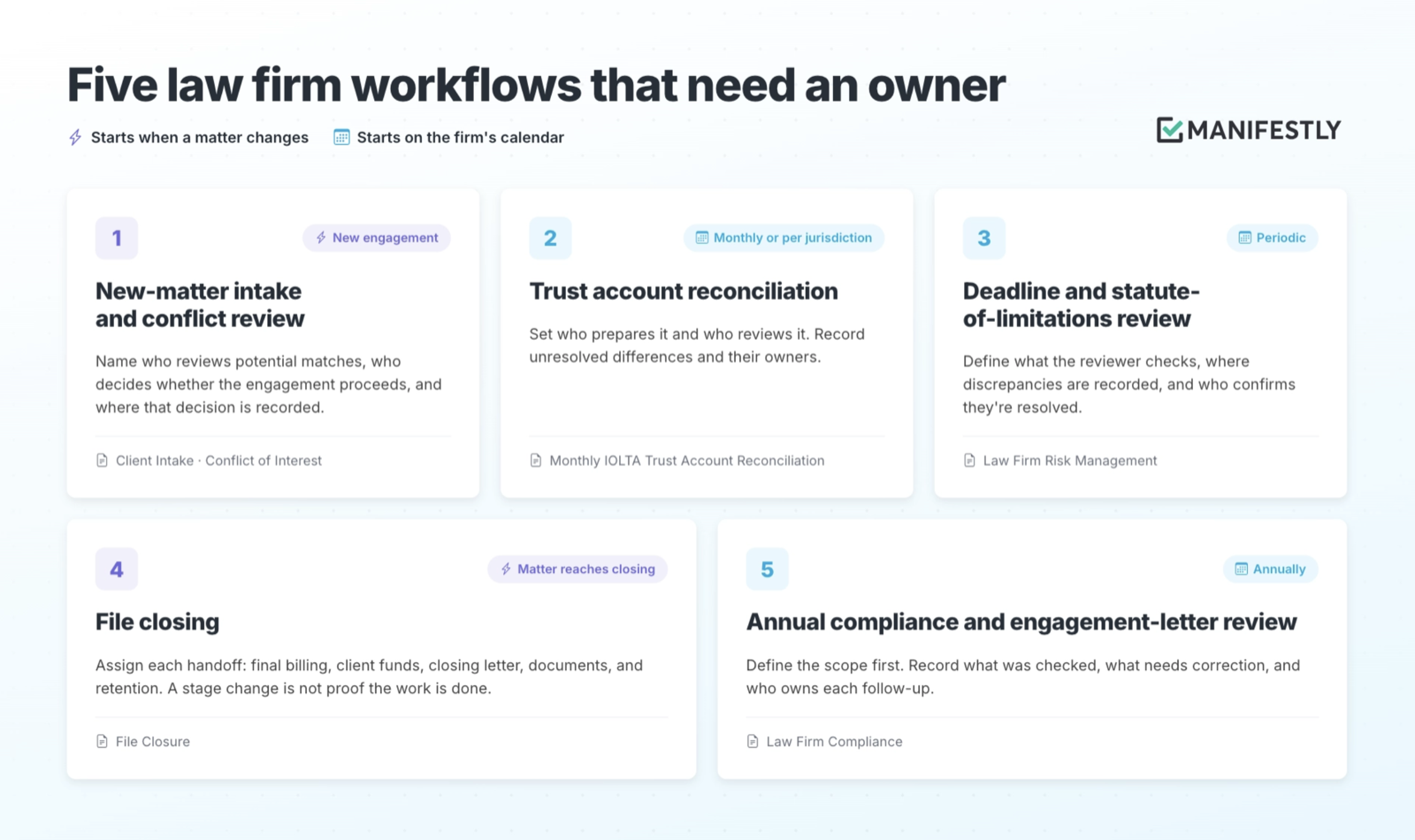
Five law firm workflows to assess
Start from a law firm template
Browse all law firm workflow templates, see the Law Firms use case, or schedule a demo to see a recurring trust reconciliation run end to end.
1. New-matter intake and conflict review
Templates: Client Intake Checklist and Conflict of Interest Checklist
Trigger: a prospective engagement or new matter, following the firm’s acceptance policy.
A conflict search produces information for a decision. The surrounding workflow should identify who reviews potential matches, who decides whether the engagement can proceed, and where that decision is recorded.
If a potential conflict remains unresolved, make the next action and responsible person explicit. Configure the intake process so unresolved review is visible before the firm proceeds.
2. Trust account reconciliation
Template: Monthly IOLTA Trust Account Reconciliation
Trigger: the schedule required by the applicable jurisdiction and the firm’s policy.
Reconciliation brings together bank records, the trust-account records, and individual client balances. Accounting software helps prepare that work. The firm’s process should establish who prepares it, what review is required, and how discrepancies are investigated.
The ABA’s model financial recordkeeping guidance describes quarterly reconciliation as a minimum and monthly reconciliation as preferred. Model guidance does not establish the governing rule for every firm; use your jurisdiction’s requirements to set the schedule and retention policy.
Where the firm requires a separate reviewer, assign that review explicitly. Record unresolved differences and their owners so a checked task does not obscure unfinished investigation.
3. Deadline and statute-of-limitations review
Template: Law Firm Risk Management Checklist
Trigger: a periodic schedule selected by the firm, with additional review when circumstances require it.
Matter calendaring records individual deadlines. A firm-wide review checks whether open matters have been assessed, dates are supported, and responsibility is clear.
Define what the reviewer checks, where discrepancies are recorded, and who confirms their resolution. The routine should produce a record of the review and follow-up work.
4. File closing
Template: File Closure Checklist
Trigger: a matter reaches the firm’s closing stage.
A closing workflow can cover final billing, the disposition of client funds, the closing letter, document handling, and retention instructions, according to the firm’s policy and applicable rules.
Assign each handoff and identify the checks that need review. If an outstanding balance or missing record prevents closure, keep that issue assigned rather than treating the matter-stage change as proof that closing work is complete.
5. Annual compliance and engagement-letter review
Template: Law Firm Compliance Checklist
Trigger: an annual schedule, with additional reviews when rules or firm policies change.
Define the scope before assigning the review: engagement-letter versions, conflict procedures, confidentiality practices, retention policies, or other relevant obligations.
The workflow should record what was checked, what needs correction, and who owns each follow-up. Finding an issue starts work; it does not complete it.
A practical process for accountable execution
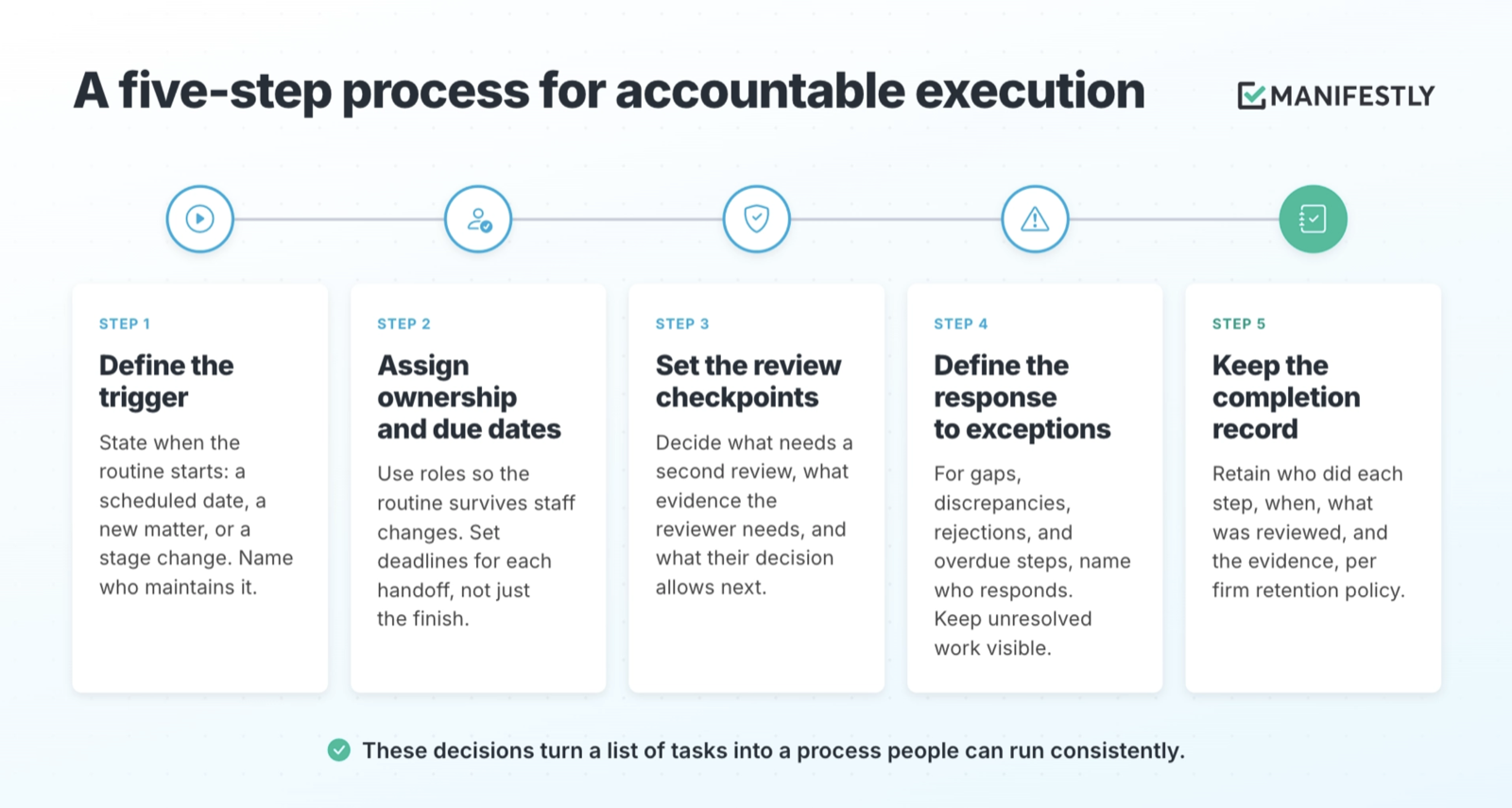
1. Define the trigger
State exactly when the routine starts: a scheduled date, a new matter, or a stage change. Identify who maintains the schedule or automation.
2. Assign ownership and due dates
Use roles where they help the routine survive staff changes, then identify the people responsible in each run. Set deadlines for the handoffs as well as the final completion date.
3. Set the review checkpoints
Decide which work needs a second review under applicable requirements and firm policy. Specify what the reviewer examines, what evidence they need, and what their decision allows to happen next.
4. Define the response to exceptions
For missing information, discrepancies, rejected work, and overdue steps, identify who responds and how the issue is tracked. Keep unresolved work visible until it is addressed.
5. Keep the completion record
Retain who completed the steps, when they did so, what was reviewed, and the supporting evidence. Follow the firm’s retention and access policies.
These decisions turn a list of tasks into a process people can run consistently.
How Manifestly works alongside practice management software
Keep your matters in Clio, MyCase, PracticePanther, Smokeball or Filevine. Run your recurring firm routines in Manifestly. Your practice management tool stays the system of record for each matter, and Manifestly makes sure the work around it gets done on schedule, by the right person, with a record.
For a scheduled reconciliation workflow, for example, configure a run to start each period, assign preparation and review, set due dates, and collect supporting evidence. Define steps for investigating discrepancies and use an approval checkpoint where the firm requires one.
Manifestly provides:
- Recurring scheduling: start workflow runs on a defined schedule.
- Role-based assignments: define responsibilities in the workflow and assign the people who fill them in each run.
- Relative due dates and reminders: set deadlines in relation to the run and notify assignees.
- Approval checkpoints: require recorded review decisions and control the steps that follow.
- Data collection: capture values, notes, and supporting uploads within the run.
- Activity logs: retain a searchable record of assignments, completion, data, and approval decisions.
See Manifestly’s workflow features, relative due dates, approval checkpoints, and data collection.
Connect the systems around a specific handoff
Manifestly supports Zapier automations. An integration can connect an event in another system to a workflow action when the required trigger and action are available.
For example, assess whether your practice management integration can start an intake workflow when a new matter is created. Confirm the fields, permissions, and error handling before relying on it. Decide which system owns the original record and pass only the information the workflow needs.
Start with one routine
Choose a workflow your team already repeats. Use the law firm template collection as a starting point, then adapt the steps, assignments, review requirements, and retention practices to your firm.
A file closure checklist is one place to begin. You can also explore Manifestly for law firms.
Choosing practice management software is also an opportunity to examine the work around it. Take one routine and follow it from its trigger to its final record. If someone still has to remember a handoff, chase a reviewer, or reconstruct what happened, you have found the next part of the process to design.
FAQs about law practice management software
What is law practice management software?
Law practice management software helps firms organize matters, contacts, documents, calendars, time tracking, and billing. Accounting, intake, automation, and other capabilities vary by platform and plan.
What is the difference between practice management and case management software?
Case management generally focuses on work within a matter, such as documents, tasks, deadlines, and notes. Practice management also addresses running the firm, including billing and reporting. Vendors use the terms differently, so compare the capabilities your firm needs.
Does Clio support work outside individual matters?
Yes. Clio’s task documentation allows tasks without a selected matter. Its documented automated workflows also assign task lists when matters are created or change stage. For a scheduled firm-wide routine, confirm how the full process would run in your chosen plan and configuration.
Which tools support recurring tasks?
PracticePanther documents repeating tasks and events. Filevine documents repeating auto-tasks that can trigger dependent tasks. MyCase documents recurring calendar events. Evaluate the complete routine—its trigger, assignments, review, exceptions, and record—when comparing recurrence features.
How often should a law firm reconcile its trust account?
Use the frequency required by your jurisdiction and the firm’s policy. ABA model financial recordkeeping guidance describes quarterly reconciliation as a minimum and monthly as preferred, but model guidance does not replace the applicable local rule.
Which law practice management software is best for small firms?
Start with your practice area, billing needs, document work, and budget. MyCase and PracticePanther publish tier prices; Clio publishes a starting price; Smokeball provides quotes. Ask shortlisted vendors to demonstrate your actual routines and price the configuration you would use.
Can Manifestly work with my practice management software?
Manifestly supports Zapier automations that can connect compatible systems. Confirm the available triggers, actions, and data fields for your specific platform. The useful integration is the one that handles a defined handoff reliably and makes failures visible.