
Configure SMS Notifications
Never miss a critical workflow moment. Manifestly can now send text messages for important activity like new runs, new assignments, mentions, reminders, and late/at-risk work.
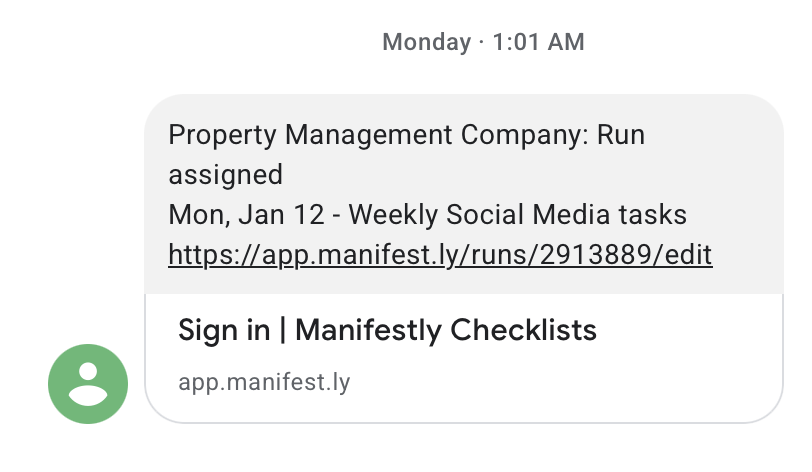
Get real-time Manifestly alerts by text message—so the right people know what’s happening the moment it happens, whether they’re on the floor, in the field, or away from their desk.
What you can be notified about
Choose which events you want to receive via SMS, including:
- Mentions — when someone @mentions you
- Reminders — scheduled nudges to keep work moving
- New assignments — when you’re assigned a step
- Late assignments — when assigned work becomes overdue
- Run status alerts — when a run is invited, completed, almost late, or late
- Team changes — when a new user is added (optional)
How it works
- Add your phone number in your notification settings.
- Verify your number via a one-time code sent by SMS.
- Select the notifications you want delivered by text, and set the scope where available.
Tip: Keep SMS for the alerts that truly require immediate attention, and use email/chat for everything else.
Built for control and consistency
- Per-user preferences — each person chooses what they receive
- Verified delivery — texts only go to verified phone numbers
- Consistent notification model — SMS follows the same notification patterns as other channels
Enterprise availability
SMS notifications are available for Enterprise customers. If you’re interested in enabling SMS for your account, head to the settings page in the app.
Configure SMS Notifications is live in every account
Open Manifestly to try it, or book a walkthrough with our team.