
Latest features
Auto-close runs
Auto-close runs
Released January 28, 2026
Automatically close runs after a set period so stale runs don't pile up.
Now live in Manifestly
Auto-close runs
It's live in every account — read the details or jump in and try it.
Runs that stay open too long can clutter your dashboard and make it hard to see what's actually in progress. Auto-close lets you set a time limit on any workflow and when a run exceeds it, Manifestly closes the run automatically.
How it works
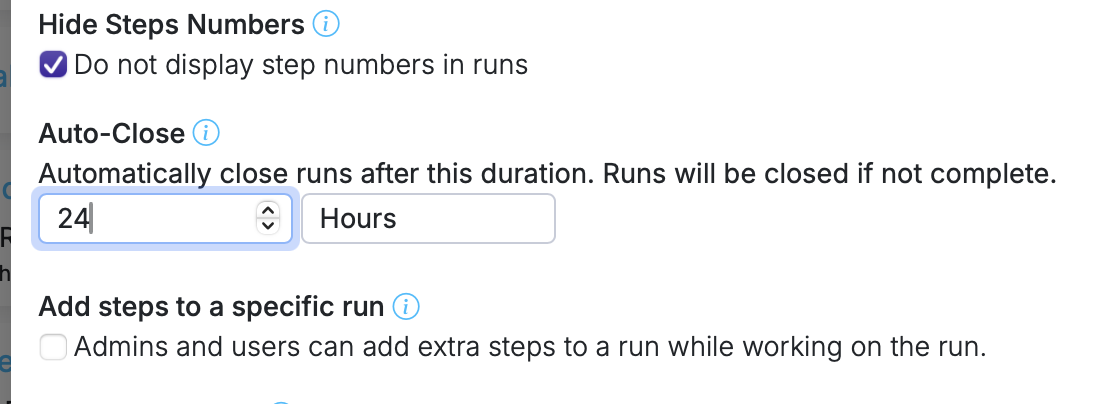
- Open Workflow Settings and set an Auto-Close duration (e.g., 7 days, 24 hours).
- Every run created from that workflow gets an auto-close date based on when it was started.
- When the time is up, the run is closed automatically in the background.
Details
- Auto-closed runs are marked in the activity log so you can see they weren't closed by a person.
- If a run is reopened, the auto-close date is recalculated.
- The run header displays a badge showing when the run will auto-close.
- Auto-close duration is visible in the workflow popover on the workflows list.
- Available via the API —
auto_close_atandauto_closed_atare included in run responses, andopen_durationin workflow responses.
Auto-close runs is live in every account
Open Manifestly to try it, or book a walkthrough with our team.