
Best Restaurant Operations Checklist Software (2026): Shift Tools vs. Recurring Workflows
November 05, 2026
Restaurant operations checklist software: the short answer
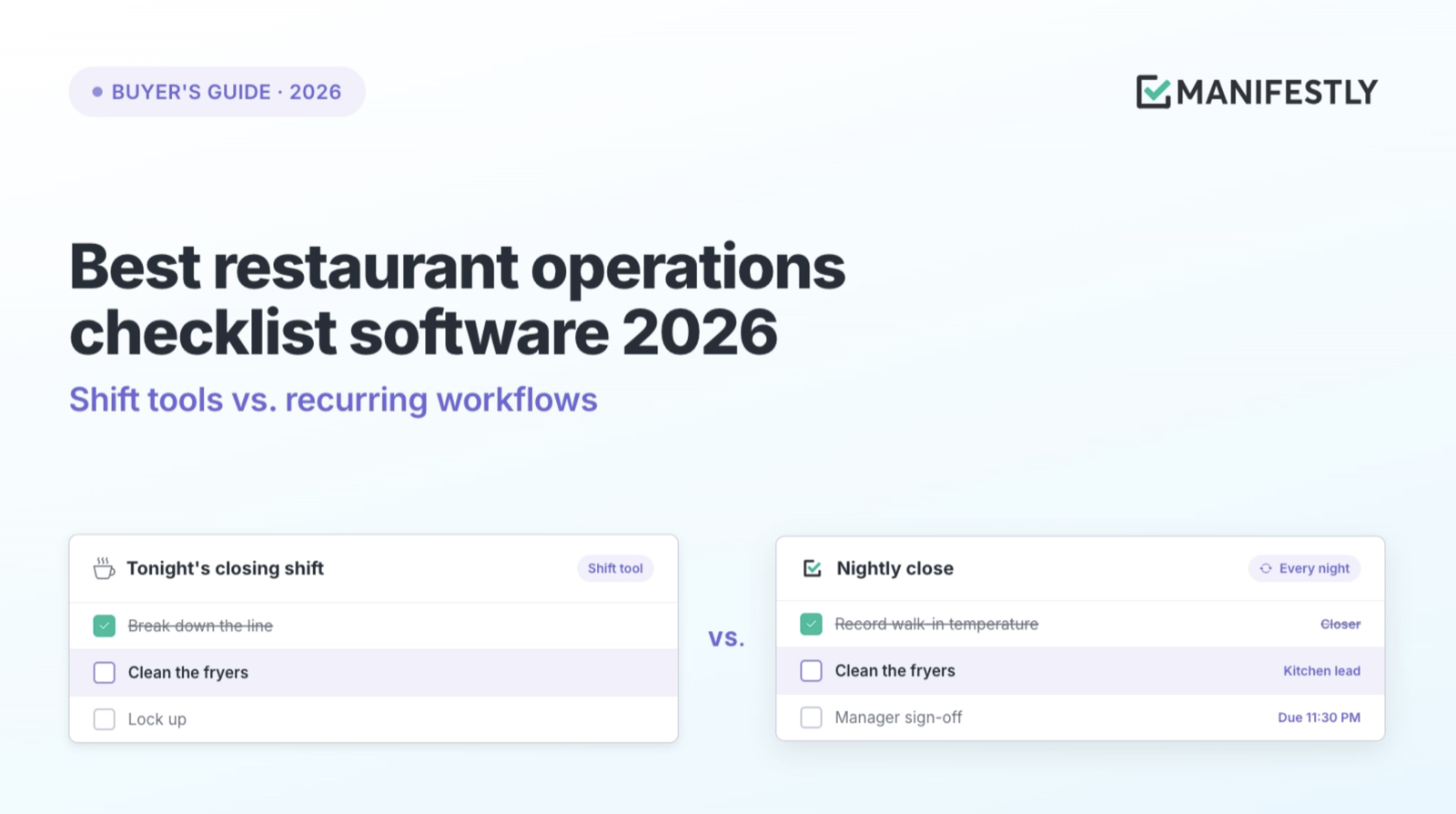
Restaurant operations checklist software turns the recurring tasks that keep a restaurant running into assigned, tracked, and recorded work. For most restaurants, the daily shift checklist is already covered: opening and closing lists come built into scheduling and POS tools many operators already pay for.
The harder problem sits one level up. New hire onboarding, menu rollouts, preventive maintenance, permit renewals, and inspection follow-up all repeat, but none of them fit inside a single shift. They run over days or weeks, pass between people, and need someone to sign off. In most restaurants, that work runs on the general manager’s memory, a spreadsheet, and a group text.
This guide separates the two kinds of restaurant checklists, maps the software that covers each one, and gives you templates for the recurring operations that usually fall between the tools.
Two kinds of restaurant checklists
We tend to talk about restaurant checklists as one thing. They are two, and they break in different ways.
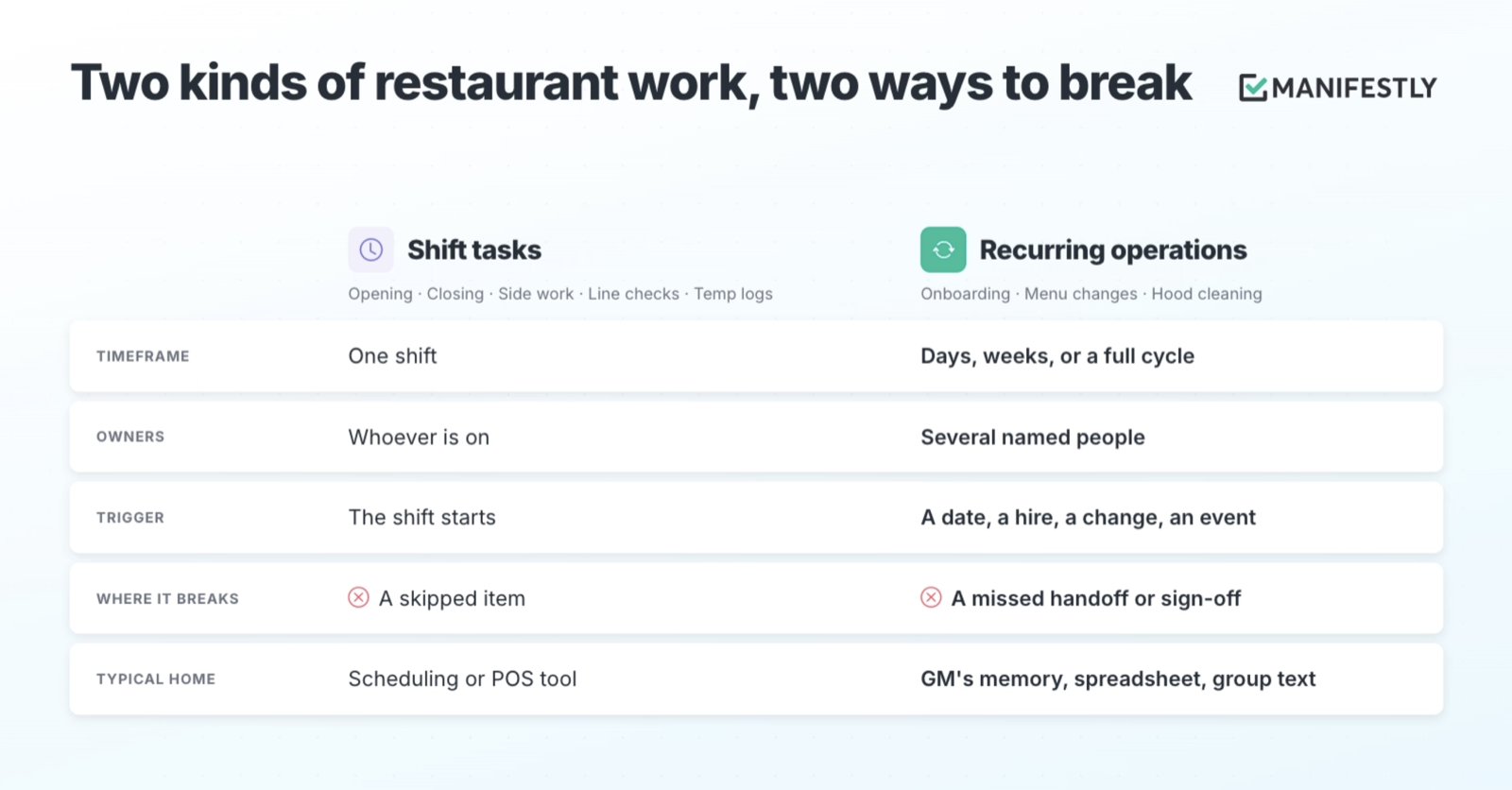
Shift checklists cover one shift at one location. Opening, closing, side work, line checks, and temperature logs all start and finish while the same crew is on. Whoever is working completes them, and the manager checks them before close. Because the shift itself is the trigger, these lists are easy to schedule and easy to see.
Recurring operations repeat on a cadence, but they do not fit inside a shift. Onboarding a new line cook takes two weeks and touches the GM, a trainer, and whoever handles payroll. A menu change moves from the chef to purchasing to the floor to the POS. A hood cleaning involves a vendor, a date, and a certificate that has to be filed. Each step has a different owner, and the work stalls at the handoffs.
The second kind is where restaurants lose time and money without noticing. Nobody skipped a task. The task simply had no owner once the person who usually remembers it was off, busy, or gone. A process that depends on someone remembering is a fragile process, and restaurants, with high turnover and long hours, ask a lot of memory.
Where checklists live in the restaurant software stack
Restaurants rarely buy “workflow software” as a category. They buy a POS, a scheduling tool, and something for inventory and the books. In one 2025 operator survey reported by FSR Magazine, the top planned investments were marketing, reservations, staff scheduling, kitchen display systems, and inventory software. Task and checklist software did not make the list.
That does not mean restaurants lack checklists. It means checklists arrive as features inside tools bought for something else. A typical stack has three layers:
- Systems of record. POS, inventory, payroll, and accounting, such as Toast, Square, and Restaurant365. They record what happened: sales, labor, costs.
- Shift checklists. Task features inside scheduling and POS tools, plus dedicated operations execution platforms for multi-unit brands. They make sure each shift runs its list.
- Recurring operations. The multi-step work around the restaurant: hiring, rollouts, maintenance, renewals, inspections, events. This layer usually has no system at all.
The first two layers are well served. The third is where a general manager keeps a mental list of what is coming up, and where an owner finds out a permit lapsed when the inspector mentions it.
The tools, one at a time
7shifts
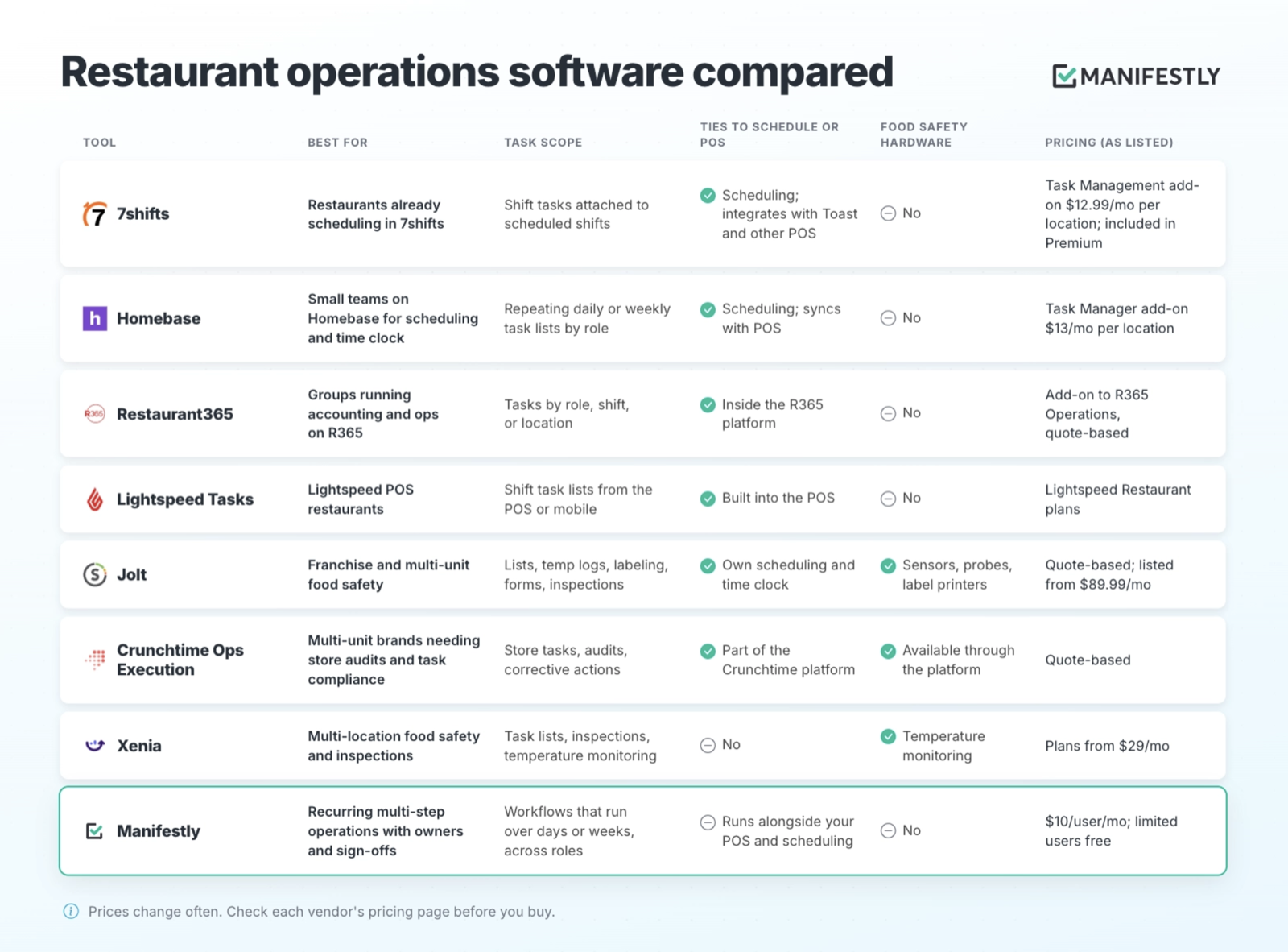
7shifts is a scheduling and team management platform built for restaurants, and its task feature works the way a restaurant already thinks: recurring tasks are attached to shifts in the weekly schedule, split by location, department, or role. If your crew already opens 7shifts to see when they work, putting the closing list there is the simplest move you can make. It is built for the shift. Work that runs past the end of one is outside what it was designed to track.
Homebase
Homebase covers scheduling, time clock, and payroll for small teams, with Task Manager as a per-location add-on. You build opening, closing, and prep lists, assign them by role or person, and set them to repeat daily or weekly. For a single location that wants paper lists off the wall, it is a low-cost fit. Like 7shifts, the unit of work is a task list, not a multi-step process with handoffs.
Restaurant365
Restaurant365 joins accounting, inventory, scheduling, and operations in one platform, and its Task Management add-on lets managers assign tasks by role, shift, or location. The strength is the connection to operating data. If your group already runs its books and inventory in R365, its task module keeps checklists close to the numbers.
Lightspeed Tasks
Lightspeed builds task management into its restaurant POS, so staff create checklists, get reminders, and track completion from the same system they ring orders on. For Lightspeed restaurants, that removes a separate app from the shift entirely.
Jolt
Jolt is built for food safety at scale: digital lists, remote temperature sensors, probes, label printing, inspections, and its own scheduling and time clock. Franchise systems use it to keep every store inspection-ready. If your priority is proving that every walk-in held temperature overnight across 40 locations, Jolt is designed for that problem. Digi International acquired Jolt in August 2025.
Crunchtime Ops Execution
Crunchtime Ops Execution, formerly Zenput, focuses on store-level task compliance, audits, and corrective actions for multi-unit brands. CrunchTime acquired Zenput in 2022, and the product now sits inside a broader platform for inventory, labor, and training. It suits brands that want one vendor across back-of-house operations.
Xenia
Xenia combines checklists, inspections, and temperature monitoring for multi-location food service, with conditional logic and photo requirements on checklist items. It competes directly with Jolt and Crunchtime for operators who need food safety compliance across many stores.
Manifestly
Manifestly is a recurring workflow tool, not a restaurant app. It does not schedule shifts, connect to a POS, read temperature sensors, or print labels, and restaurants should keep the tools that do. What Manifestly does is run the multi-step work that sits around the shift: a workflow starts on a schedule or a trigger, every step has an owner and a due date, approval steps hold the work until a manager signs off, and every run leaves a completion record. It is built for the onboarding, rollouts, maintenance, renewals, and inspection follow-up that the tools above were not designed to carry.
Recurring restaurant operations: 8 workflows and templates
Each of these repeats on a cadence, involves more than one person, and has a point where someone should confirm the work is right before it moves on. That point is where most of them break today.
New hire onboarding
Paperwork, food handler card, POS access, and station training over two weeks, ending in a manager sign-off.
Menu change rollout
Recipe testing to costing, purchasing, prep sheets, staff tasting, and POS, with an approval before launch.
Inventory count and period close
Count on time, give the variance review an owner, and confirm the handoff to the bookkeeper.
Preventive maintenance
Hood cleaning, grease trap, fire suppression, and pest control, each with a vendor, a date, and a record to file.
Permit, license, and certification renewals
Start well before each expiration date, assign an owner, and record the renewal once confirmed.
Health inspection prep and follow-up
Walk through before. After, give every finding an owner, a fix, and a manager verification.
Catering and private events
Booking, deposit, menu, prep, staffing, and a final check, in one workflow per event instead of an email thread.
New location opening
Permits, buildout, hiring, training, and go-live from the same workflow, so each opening learns from the last.
1. New hire onboarding
A new line cook needs paperwork, a food handler card, uniforms, POS access, station training, and a sign-off that they are ready to work the line alone. That spans two weeks and three or four people. When it lives on a printed sheet, steps get skipped the week the GM is short-staffed, which is usually the week you hired. Give each step an owner and due date relative to the start date, and hold the final step for a manager sign-off. See also the restaurant employee training checklist.
2. Menu change rollout
A new dish moves from recipe testing to costing, purchasing, prep sheets, staff tasting, POS buttons, and a post-launch review. Every handoff is a place for it to stall: the item is live in the POS but purchasing never adjusted the order, or servers were never tasted on it. A rollout workflow makes the next owner visible at every stage, with an approval before launch. New Menu Item Development template
3. Monthly inventory count and period close
The count happens on a set day, variances get reviewed, invoices get matched, and the numbers go to whoever does the books. Your inventory or accounting system holds the figures. The workflow makes sure the count happened on time, the variance review has an owner, and the handoff to the bookkeeper is confirmed.
4. Preventive maintenance
Hood cleaning, grease trap service, fire suppression inspection, ice machine cleaning, and pest control each run on their own cycle with a vendor, a date, and a certificate to file. Miss one and you find out from an inspector or a broken machine on a Friday night. Each service gets a recurring run with an owner, a due date, and a step to file the record. Monthly maintenance checklist
5. Permit, license, and certification renewals
Health permits, liquor licenses, business licenses, and manager food safety certifications all expire on different dates, usually once a year. This is the clearest example of work that depends on one person remembering. A renewal workflow starts well before each expiration date, assigns the owner, and records the renewal once it is confirmed.
6. Health inspection prep and corrective-action follow-up
Before an inspection, a walkthrough catches what the inspector will see. After one, every finding needs an owner, a fix, and verification that it was fixed. The follow-up is where it fails: the report gets filed and the fixes drift. Treat each finding as a step with an owner and a manager verification. Health inspection readiness checklist
7. Catering and private event execution
Each event has a booking, a deposit, a menu confirmation, a prep schedule, staffing, setup, and a final check before guests arrive. The front-of-house lead, the kitchen, and the GM all touch it across several days. One workflow per event keeps the details from living in an email thread. Restaurant event planning checklist
8. New location opening
Opening a new location is a one-time project for that store, but for a growing group it repeats every time you open. Permits, buildout, equipment, hiring, training, soft opening, and go-live all need owners and checkpoints. Running each opening from the same workflow means the second opening benefits from what the first one learned.
Where Manifestly fits in restaurant operations
Manifestly is the execution layer for the recurring work above. It does not replace your POS, your scheduling tool, or your food safety platform, and it is not trying to. Those systems tell you what happened on a shift. Manifestly makes sure the work around the shifts gets done, by someone, on time, with a record.
In practice, each recurring process becomes a workflow:
- A trigger. The run starts on a schedule (the first Monday of the month, 60 days before a permit expires) or when something happens (a new hire, a booked event).
- An owner per step. Every step is assigned to a person or role, with a due date, so the next step is never a question.
- A checkpoint. Approval steps hold the work until a manager confirms it, so “done” means someone checked.
- A record. Every completed run shows who did each step and when, which is what you want in front of you when an inspector, an owner, or a new GM asks.
For groups with more than one location, the same workflow runs at each store. An ops leader can filter runs by location or department and see overdue steps without calling every GM.
Manifestly is priced per user, and staff who only need to complete assigned steps can be added as limited users at no cost.
How to choose restaurant operations software
- List your recurring work. Write down everything that repeats, from the closing list to the liquor license renewal. Most operators are surprised by how long the second half of the list gets.
- Sort it into shift tasks and multi-day processes. If it starts and finishes in one shift, it is a shift task. If it spans days, people, or a sign-off, it is a recurring operation.
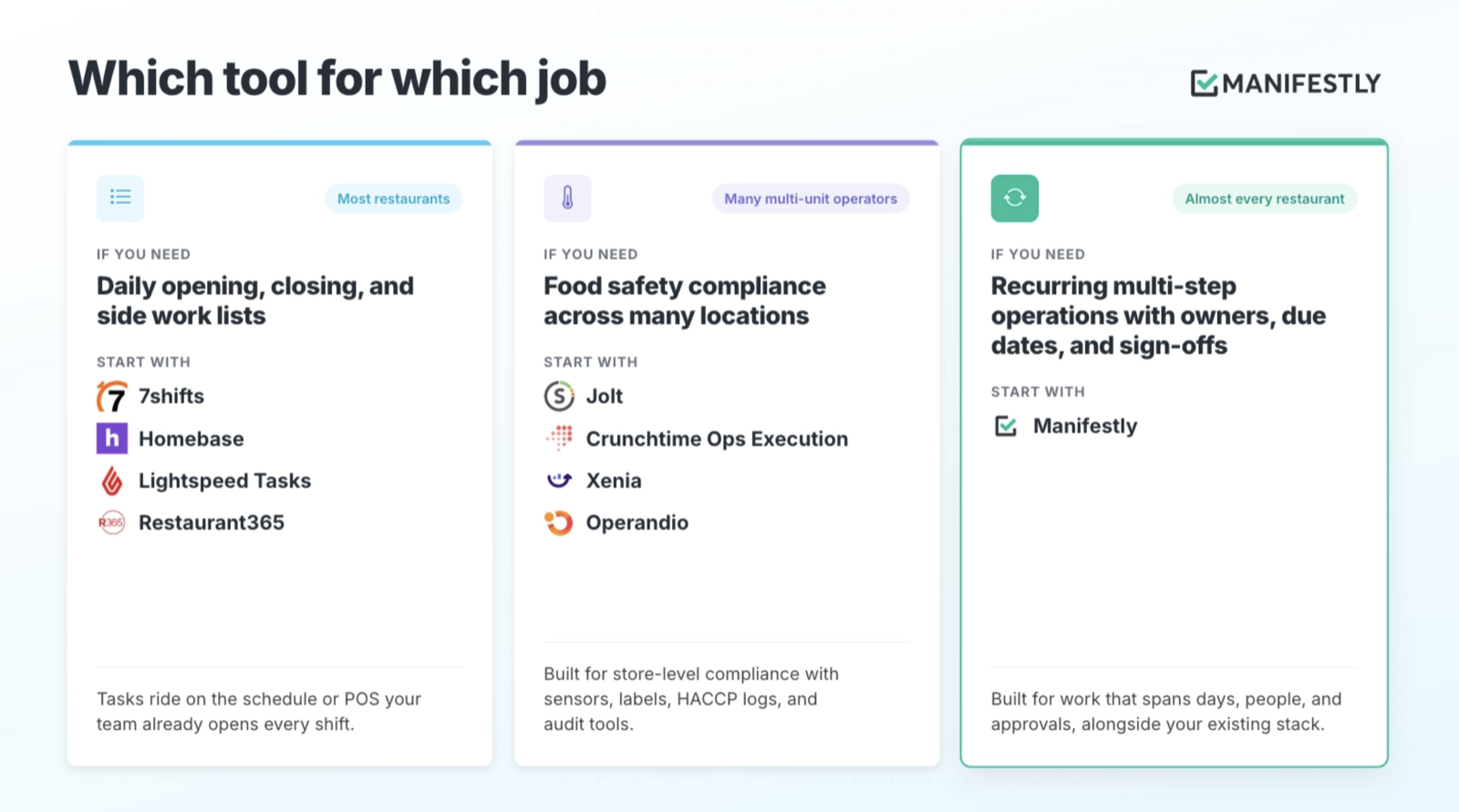
- Check what you already pay for. If you use 7shifts, Homebase, Restaurant365, or Lightspeed, a shift checklist feature may already be included or available as a small add-on. Use it before buying anything new.
- Decide whether food safety hardware is the priority. If you need temperature sensors, labels, and HACCP logs across many locations, start with an operations execution platform like Jolt or Crunchtime.
- Give recurring operations a place to run. For the multi-day processes on your list, add a recurring workflow tool alongside your stack.
- Pilot one workflow. New hire onboarding is a good first choice: it repeats often, involves several people, and the cost of a missed step is easy to see.
The work around the shift
Most restaurants have already solved the part of operations that happens during service. The closing list is on a tablet, the temperature log is digital, and someone checks it before lockup. The work that still runs on memory is the work around the shift: the hire who starts Monday, the permit that expires in March, the hood cleaning nobody scheduled.
None of that is a discipline problem. It is a design choice. Once you can see which recurring work has no owner and no checkpoint, leaving it to whoever remembers stops looking simple and starts looking like risk.
Browse restaurant workflow templates or start with new hire onboarding.
Frequently asked questions
What is restaurant operations checklist software?
Restaurant operations checklist software turns recurring restaurant tasks into assigned, tracked work with a record of completion. It ranges from shift checklists inside scheduling and POS tools, to food safety platforms with temperature sensors, to recurring workflow tools for multi-step processes like onboarding, maintenance, and permit renewals.
What is the difference between a restaurant checklist app and workflow software?
A checklist app lists the tasks for a shift and records that they were done. Workflow software runs a process that spans days and people: each step has an owner and a due date, the work moves from one person to the next, and approval steps hold it until a manager signs off. A checklist describes the work. A workflow runs it.
Do I need separate checklist software if I use 7shifts or Homebase?
For shift checklists, usually not. Both offer task management tied to the schedule, as a plan feature or a per-location add-on. You may still want a separate tool for recurring work that spans several days and people, such as onboarding, menu rollouts, maintenance, and permit renewals.
What recurring operations should a restaurant track?
Beyond opening and closing lists, most restaurants should track new hire onboarding, menu change rollouts, monthly inventory and period close, preventive maintenance, permit and license renewals, health inspection prep and follow-up, catering and events, and new location openings. Each repeats, involves several people, and benefits from a sign-off.
Can I manage checklists across multiple restaurant locations?
Yes. Food safety platforms like Jolt and Crunchtime focus on store-level compliance across many locations. A recurring workflow tool like Manifestly runs the same process at every location and lets an ops leader filter by location or department to see what is overdue.
Does Manifestly integrate with Toast or other POS systems?
No. Manifestly does not connect to POS or scheduling systems. It runs alongside them, handling the recurring multi-step work those systems are not built for, such as onboarding, rollouts, maintenance, and renewals.
Sources
- FSR Magazine: Restaurants reach a technology turning point
- 7shifts task management
- PricingSaaS: 7shifts pricing
- Homebase restaurant task management and pricing
- Restaurant365 Task Management
- Lightspeed Tasks
- Jolt and Software Advice: Jolt pricing
- CB Insights: Jolt vs Zenput
- Manifestly pricing overview